5
NAMES AND
FUNCTIONS
BASIC
CONNECTION
BASIC
OPERATION
ADVANCED
CONNECTIONS
TROUBLESHOOTING
OTHERS
NAMES AND
FUNCTIONS
ENGLISH
APPLICATION
OPERATION
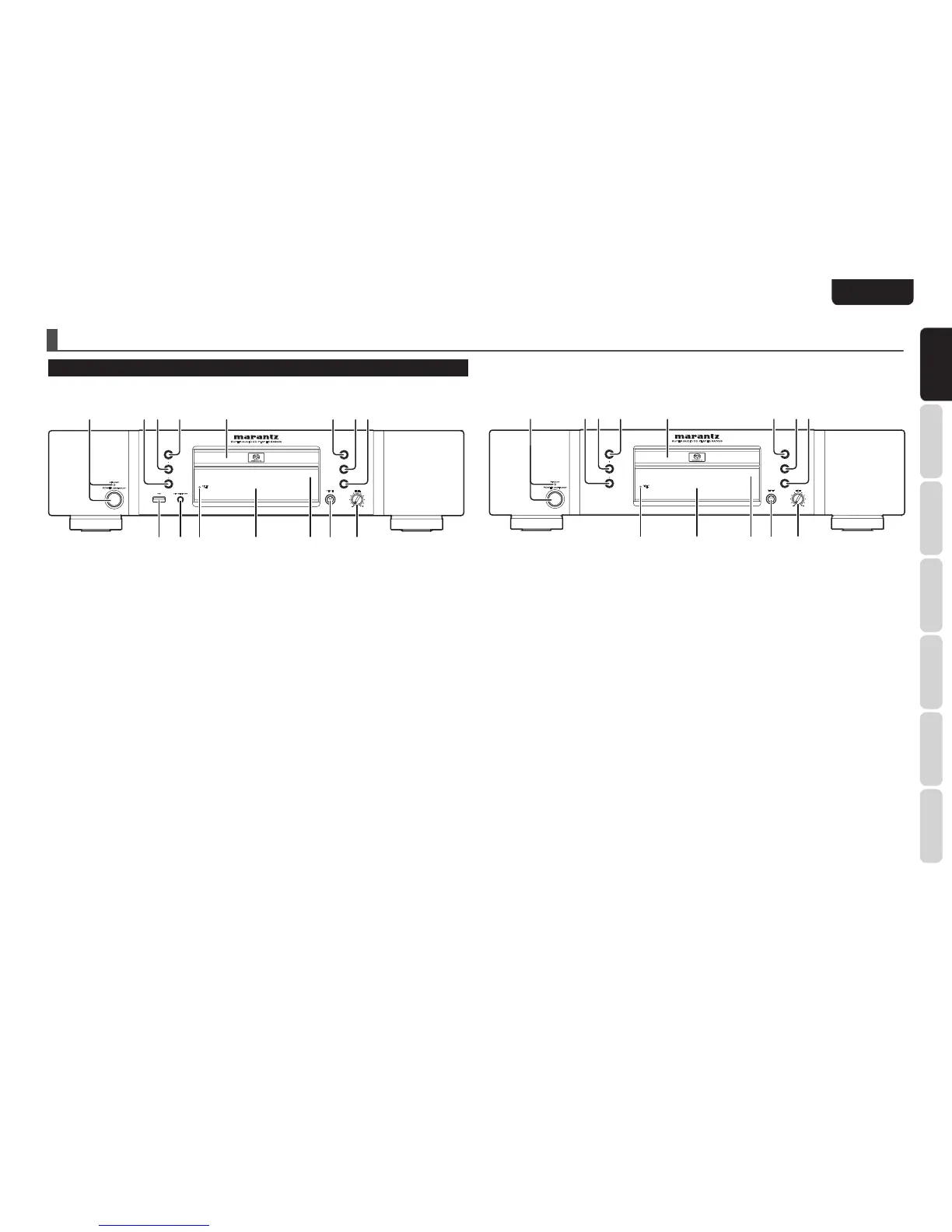
NAMES AND FUNCTIONS
q POWER ON/STANDBY switch
STANDBY indicator
This switch is used to turn the power ON and OFF
(see page 10).
w 4/1 (Track Skip/Search)
button
See page 10.
e ¡/¢ (Search/Track Skip)
button
See page 10.
r 0 (Open/Close) button
See page 10.
t Disc tray
The disk to be played is placed on the tray (see
page 10).
y 2 (Play) button
See page 10.
u 7 (Stop) button
See page 10.
i 8 (Pause) button
See page 10.
o LEVEL (headphones level) control
This is used to adjust the headphones volume level.
The level increases when turned clockwise.
!0 PHONES (headphones) jack
The headphones are connected to this jack. Use
headphones that come with a standard plug.
!1 Remote sensor
This sensor senses the infrared control signals sent
from the remote control unit.
!2 FL display
See page 6.
!3 DISPLAY OFF indicator
See page 7.
!4 DISC MEDIA / USB button (SA8003
only)
See page 17.
!5 USB connector (SA8003 only)
See page 17.
FRONT PANEL



 To Next Page