EasyManua.ls Logo

Marantz SD-63 - Recording and Playback Operations; Main Operating Buttons; Recording Level and Controls; Playback and Monitoring

Marantz SD-63
24 pages
Print Icon
To Next Page IconTo Next Page
To Previous Page IconTo Previous Page
Loading...
MAIN-OPERATING
BUTTONS
STOP
&
BUTTON:
Press
this
button
to
stop
all
opération
and
put
the
unit
into
the
stop
mode.
~
PLAY
>
BUTTON:
Press
this
button
to
start
tape
playback
The
">"
indicator
lights
up
on
the
display.
PAUSE
7
BUTTON:
If
this
button
is
pressed
during
recording
or
playback,
the
tape
travel
stops,
the
unit
enters
the
REC
PAUSE
mode
which
is
indicated
by
the
lighting
up
of
the
“Hl”
and
REC
indicators
on
the
display,
or
enters
the
play-pause
mode
which
is
indicated
by
the
lighting
up
of
the
HIP”
indicator
on
the
display.
To
cancel
the
pause
mode
and
resume
recording
or
playback,
press
the
Ill
PAUSE
button
again
or
press
the
PLAY
>
button.
<<.
BUTTON:
Press
this
button
to
rewind
the
tape
at
a
high
speed.
The
“<"
indicator
lights
up
on
the
display.
pr
BUTTON:
Press
this
button
to
fast-forward
the
tape.
The
»”
indicator
lights
up
on
the
display.
.
.
@
BUTTON:
Press
this
button,
then
press
the
PLAY
®
or
PAUSE
Hf
button
to
enter
the
REC
mode
or
REC
PAUSE
mode
respectively.
The
REC
indicator
lights
up
on
the
display.
O
BUTTON:
if
this
button
is
pressed
during
playback,
the
unit
enters
the
REC
PAUSE
mode
after
leaving
a
non-recorded
blank
of
4
seconds
on
tape.
The
I”
indicator
flashes
on
the
display
during
this
4-
second
period.
The
non-recorded
blank
period
can
be
extended
foras
longas
the
button
is
kept
pressed,
andin
this
case
the
unit
enters
the
REC
PAUSE
as
soon
as
the
button
is
released.
The
“IE”.
indicator
keeps
on
flashing
while
the
button
is
kept
pressed,
and
the
“#li”
and
“REC”
indicators
light
up
perma-
nently
as
soon
as
the
button
is
released.
45)
RECORD
LEVEL
CONTROL
To
raise
the
recording
level,
turn
the
knob
clockwise.
PHONES
JACK
Accepts
headphones
(optional)
utilizing
a
standard
stereo
phone
plug.
@
BIAS
CONTROL
.
Turn
this
knob
to
compensate
for
the
characteristic
difference
of
each
specific
tape.
DOLBY
NR
SWITCH
Set
this
switch
when
therecording
or
playback
is
using
the
Dolby
Noise
Reduction
system.
._
The
Dolby
B
or
C
NR
can
be
selected,
and
the
corresponding
indicators
light
up
on
the
display.
Set
this
switch
to
MPX
B
or
MPX
C
when
recording
the
FM
broadcast
source
using
Dolby
NR.
RECORD
BALANCE
CONTROL
Used
to
balance
the
right
and
left
channels
of
the
recording
sound.
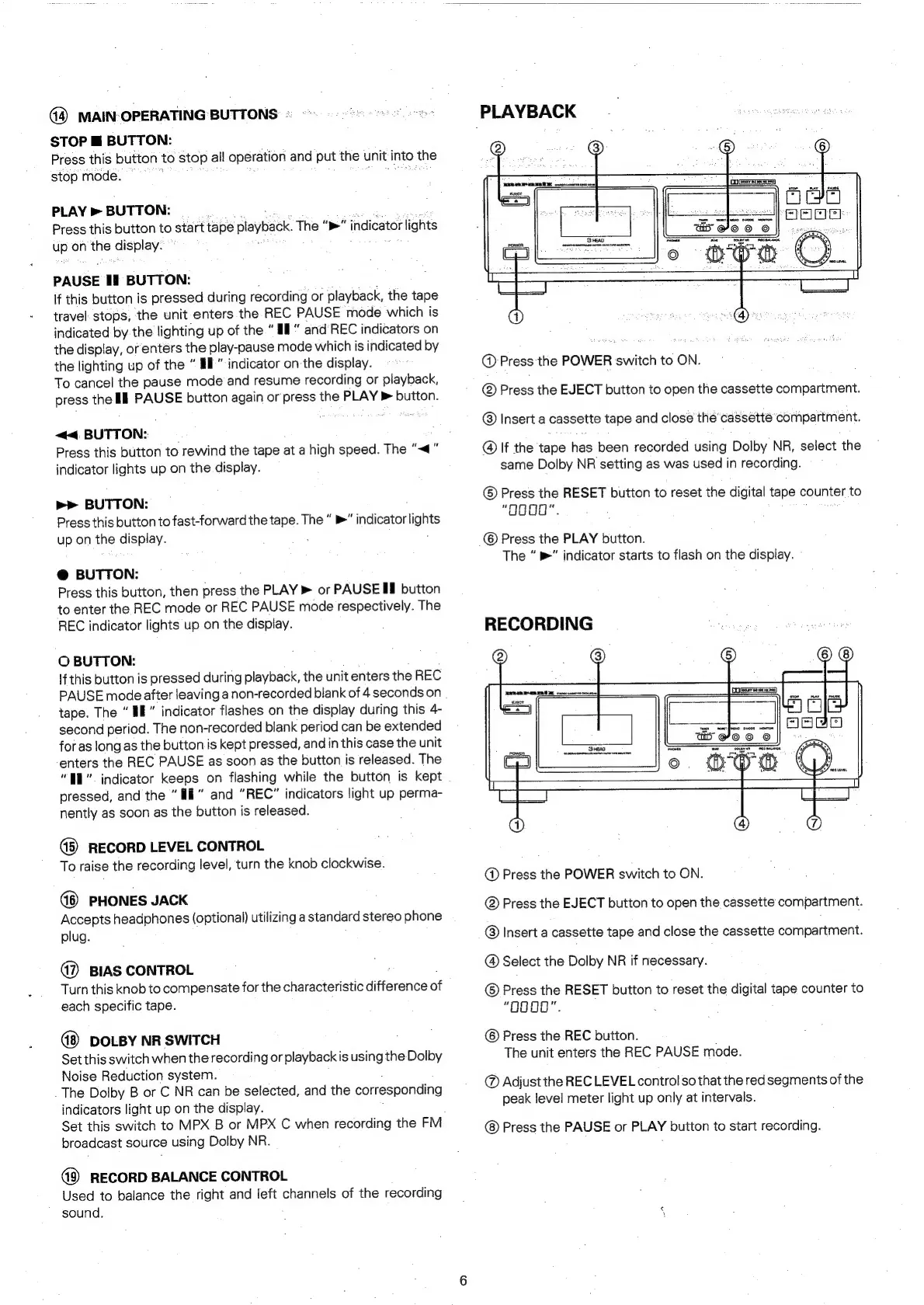
PLAYBACK
@
Press
the
POWER
switch
to
ON.
Press
the
EJECT
button
to
open
the
cassette
compartment.
Insert
a
cassette
tape
and
close
the’
cassette
compartment
@
If
the
tape
fies
been
recorded
using
Dolby
NR,
select
the
same
Dolby
NR
setting
as
was
used
in
recording.
©
Press
the
RESET
button
to
reset
the
digital
tape
counter
to
“Ogg0".
©
Press
the
PLAY
button.
The
&"
indicator
starts
to
flash
on
the
display.
RECORDING
@
Press
the
POWER
switch
to
ON.
@
Press
the
EJECT
button
to
open
the
cassette
compartment.
©
Insert
a
cassette
tape
and
close
the
cassette
compartment.
@
Select
the
Dolby
NR
if
necessary.
©
Press
the
RESET
button
to
reset
the
digital
tape
counter
to
“O000".
©
Press
the
REC
button.
The
unit
enters
the
REC
PAUSE
mode.
@
Adjust
the
REC
LEVEL
control
so
that
the
red
segments
of
the
peak
level
meter
light
up
only
at
intervals.
Press
the
PAUSE
or
PLAY
button
to
start
recording.

Related product manuals