EasyManua.ls Logo

Marantz SD-63 - Optimizing Cassette Recordings; Proper Recording Level Adjustment; Automatic Tape Selector; Tape Selection and Protection

Marantz SD-63
24 pages
Print Icon
To Next Page IconTo Next Page
To Previous Page IconTo Previous Page
Loading...
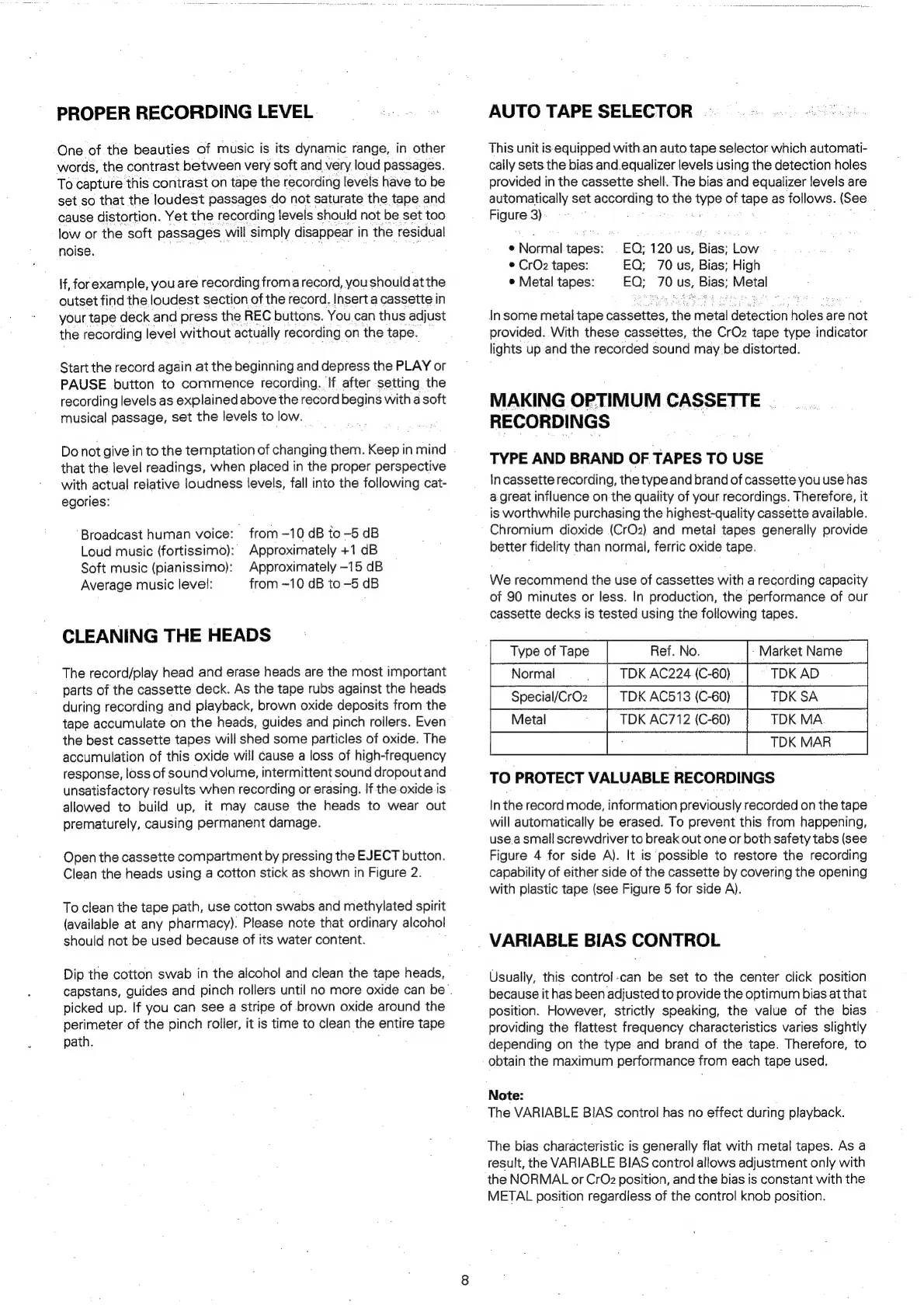
PROPER
RECORDING
LEVEL
One
of
the
beauties
of
music
is
its
dynamic
range,
in
other
words,
the
contrast
between
very
soft
and
very
loud
passages.
To
capture
this
contrast
on
tape
the
recording
levels
have
to
be
set
so
that
the
loudest
passages
do
not
saturate
the
tape
and
cause
distortion.
Yet the
recording
levels
should
not
be
set
too
low
or
the
soft
passages
will
simply
disappear
i
in
the
residual
noise.
{f,
forexample,
you
are
recording
from
a
record,
you
should
at
the
outset
find
the
loudest
section
of
the
record.
Insert
a
cassette
in
your
tape
deck
and
press
the
REC
buttons.
You
can
thus
adjust
the
recording
level
without
actually
recording
on
the
tape.
Start
the
record
again
at
the
beginning
and
depress
the
PLAY
or
PAUSE
button
to
commence
recording.
If
after
setting
the
recording
levels
as
explained
above
the
record
begins
with
a
soft
musical
passage,
set
the
levels
to
low.
Do
not
give
in
to
the
temptation
of
changing
them.
Keep
in
mind
that
the
level
readings,
when
placed
in
the
proper
perspective
with
actual
relative
loudness
levels,
fall
into
the
following
cat-
egories:
from
-10
dB
to
-5
dB
Approximately
+1
dB
Approximately
-15
dB
from
—10
dB
to
-5
dB
Broadcast
human
voice:
Loud
music
(fortissimo):
Soft
music
(pianissimo):
Average
music
level:
CLEANING
THE
HEADS
The
record/play
head
and
erase
heads
are
the
most
important
parts
of
the
cassette
deck.
As
the
tape
rubs
against
the
heads
during
recording
and
playback,
brown
oxide
deposits
from
the
tape
accumulate
on
the
heads,
guides
and
pinch
rollers.
Even
the
best
cassette
tapes
will
shed
some
particles
of
oxide.
The
accumulation
of
this
oxide
will
cause
a
loss
of
high-frequency
response,
loss
of
sound
volume,
intermittent
sound
dropout
and
unsatisfactory
results
when
recording
or
erasing.
Ifthe
oxide.is
allowed
to
build
up,
it
may
cause
the
heads
to
wear
out
prematurely,
causing
permanent
damage.
Open
the
cassette
compartment
by
pressing
the
EJECT
button.
Clean
the
heads
using
a
cotton
stick
as
shown
in
Figure
2.
To
clean
the
tape
path,
use
cotton
swabs
and
methylated
spirit
(available
at
any
pharmacy).
Please
note
that
ordinary
alcohol
should
not
be
used
because
of
its
water
content.
Dip
the
cotton
swab
in
the
alcohol
and
clean
the
tape
heads,
capstans,
guides
and
pinch
rollers
until
no
more
oxide
can
be
.
picked
up.
If
you
can
see
a
stripe
of
brown
oxide
around
the
perimeter
of
the
pinch
roller,
it
is
time
to
clean
the
entire
tape
path.
,
AUTO
TAPE
SELECTOR
This
unit
is
equipped
with.an
auto
tape
selector
which
automati-
cally
sets
the
bias
and.equalizer
levels
using
the
detection
holes
provided
in
the
cassette
shell.
The
bias
and
equalizer
levels
are
automatically
set
according
to
the
pe
of
tape
as
follows.
(See
Figure
3)
:
EQ;
120
us,
Bias;
Low
EQ;
70
us,
Bias;
High
EQ;
ate.
us,
pales
Metal
e
Normal
tapes:
©
CrOz
tapes:
e
Metal
tapes:
In
some
metal
tape
cassettes,
the
metal
detection
holes
are
not
provided.
With
these
cassettes,
the
CrO2
tape
type
indicator
lights
up
and
the
recorded
sound
may
be
distorted.
MAKING
OPTIMUM
CASSETTE
|
RECORDINGS
TYPE
AND
BRAND
OF
TAPES
TO
USE
In
cassette
recording,
the
type
and
brand
of
cassette
you
use
has
a
great
influence
on
the
quality
of
your
recordings.
Therefore,
it
is
worthwhile
purchasing
the
highest-quality
cassette
available.
Chromium
dioxide
(CrOz)
and
metal
tapes
generally
provide
better
fidelity
than
normal,
ferric
oxide
tape.
We
recommend
the
use
of
cassettes
with
a
recording
capacity
of
90
minutes
or
less.
In
production,
the
performance
of
our
cassette
decks
is
tested
using
the
following
tapes.
TDK
AC224
(C-60)
TDK
AD
Special/CrO2
|
TDK
AC513
(C-60)
TDK
SA
TDK
MA
TDK
AC712
(C-60)
TO
PROTECT
VALUABLE
RECORDINGS
In
the
record
mode,
information
previously
recorded
on
the
tape
will
automatically
be
erased.
To
prevent
this
from
happening,
use.a
small
screwdriver
to
break
out
one
or
both
safety
tabs
(see
Figure
4
for
side
A).
It
is
possible
to
restore
the
recording
capability
of
either
side
of
the
cassette
by
covering
the
opening
with
plastic
tape
(see
Figure
5
for
side
A).
VARIABLE
BIAS
CONTROL
Usually,
this
control
-can
be
set
to
the
center
click
position
because
it
has
been
adjusted
to
provide
the
optimum
bias
at
that
position.
However,
strictly
speaking,
the
value
of
the
bias
providing
the
flattest
frequency
characteristics
varies
slightly
depending
on
the
type
and
brand
of
the
tape.
Therefore,
to
obtain
the
maximum
performance
from
each
tape
used,
Note:
The
VARIABLE
BIAS
control
has
no
effect
during
playback.
The
bias
characteristic
is
generally
flat
with
metal
tapes.
As
a
result,
the
VARIABLE
BIAS
control
allows
adjustment
only
with
the
NORMAL
or
CrOz
position,
and
the
bias
is
constant
with
the
METAL
position
regardless
of
the
control
knob
position.

Related product manuals