EasyManua.ls Logo

Marantz SR1041 - PROGRAM TIMER SETTING; Timer Operation Modes; Timer Setting Procedures

Marantz SR1041
15 pages
Print Icon
To Next Page IconTo Next Page
To Previous Page IconTo Previous Page
Loading...
1.
Press
the
MEMO/ST.N
button
@
twice.
Flashing
2.
While
listening
to
a
time
announcement,
press
the
MEMO/ST.N
button
@
the
moment
14:00
is
announced.
Note:
The
displayed
hour
does
not
change
if
the
minute
figures
displayed
are
between
00
and
29.
If
they
are
between
30
and
59,
the
displayed
hour
increases
by
one.
For
example,
the
time
being
displayed
is
13:58,
the
above
operation
changes
it
to
14:00.
Program
Timer
Setting
The
timer
built
in
to
this
unit
allows
you
to
perform
the
following
operations:
e
Two
kinds
of
timer
settings:
Program
1,
Program
2;
e
Setting
of
ON
time
and
OFF
time;
e
Setting
of
operation
mode;
The
operation
mode
is
selected
from
tuner
preset
numbers
1
to
30,
CD,
TAPE1,
TAPE2/MD,
AUX
and
AUTO.
e
Specification
of
CD
track
number
to
be
played;
e
Setting
of
single
(ONCE)
operation
or
everyday
(DAILY)
operation.
In
the
following
procedure,
each
button
should
be
pressed
within
8
seconds
of
pressing
the
previous
one.
1.
Press
the
POWER
switch
(6/[1]
to
turn
the
power
of
the
unit
ON.
2.
Press
the
TIMER
button
@.
The
TIMER
indicator
flashes
on
the
display.
3.
Press
the
MEMO/ST.N
button
@
within
5
seconds
of
the
above.
The
MEMO
indicator
and
“PRG-1”
flash,
indicating
that
the
unit
is
in
the
timer
setting
mode.
4.
Select
Program
1
or
Program
2
with
the
A
UP
or
¥
DOWN
button
@).
a
example,
select
PROG-1
and
press
the
MEMO/ST.N
button
[
Operation
using
the
buttons
on
the
main
unit
]
5,
“~—:--
ON"
is
displayed.
Enter
the
timer
ON
time
in
hours
and
minutes
using
the
UP
&
and
DOWN
Y
buttons
@),
and
press
the
MEMO/ST.N
button
@
after
each
entry.
(The
entry
order
is
hour
figures
>
MEMO
minute
figures
>
MEMO.)
6.
When
the
display
changes
to
“~
-
:
- -
OFF”,
enter
the
timer
OFF
time
in
hours
and
minutes
using
the
UP
&
and
DOWN
®
buttons
@),
and
press
the
MEMO/ST.N
button
@
after
each
entry.
7.
“AUTO”
starts
to
flash
on the
display.
With
AUTO
timer
operation,
when
the
ON
time
comes,
the
unit
searches
the
components
automatically
in
the
order
TAPE1
>
TAPE2/MD
—>
CD
TUNER
to
detect
the
presence
of
a
source
(if
a
disc
or
tape
is
set),
and
plays
the
first
detected
source.
[
To
set
the
timer
with
AUTO
timer
operation
]
A.
Press
the
MEMO/ST.N
button
@
while
“AUTO”
is
flashing.
(If
AUTO
timer
operation
is
required,
the
AUTO
operation
is
set
automatically
in
8
seconds,
even
when
the
MEMO/ST.N
button
is
not
pressed.)
B.
“ONCE?”
starts
to
flash
on
the
display.
Select
ONCE
or
DAILY
by
pressing
the
UP
or
DOWN
button
@).
The
ONCE
operation
executes
the
set
timer
operation
only
once,
after
which
the
memory
is
cleared.
The
DAILY
operation
executes
the
set
timer
operation
every
day.
a
selecting
“ONCE”
or
“DAILY”,
press
the
MEMO/ST.N
button
(The
ONCE
or
DAILY
operation
is
set
automatically
in
8
seconds
even
if
the
MEMO/ST.N
button
is
not
pressed.)
Notes:
e
Timer
operations
such
as
timer
playback
are
not
possible
if
a
Marantz
CD
player
or
tape
deck
is
not
connected
through
the
remote
control
bus.
Caution
in
Timer
Play.
A.
Be
sure
to
set
the
present
time
before
setting
the
timer
operation.
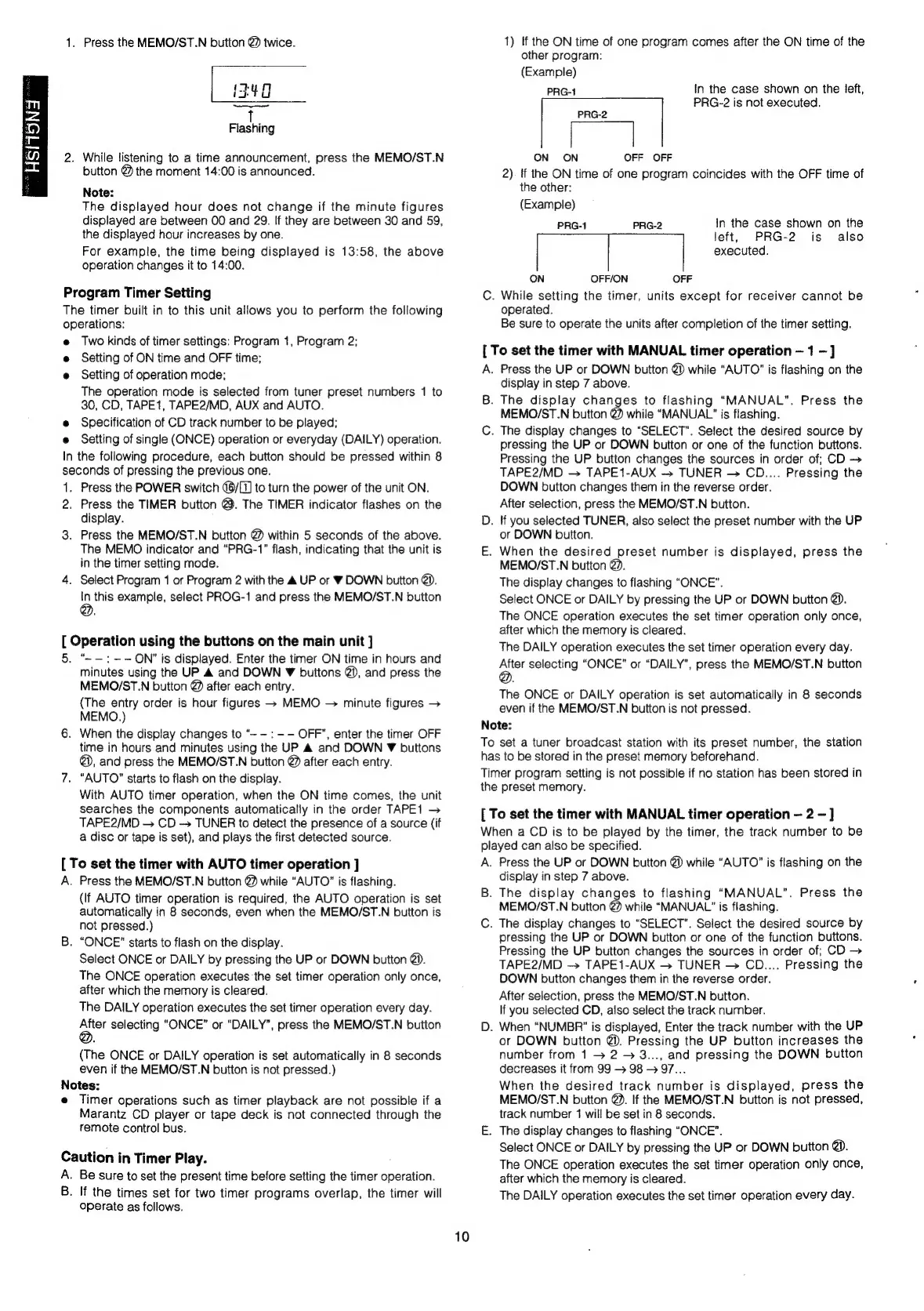
B.
If
the
times
set
for
two
timer
programs
overlap,
the
timer
will
operate
as
follows.
10
1)
If
the
ON
time
of
one
program
comes
after
the
ON
time
of
the
other
program:
(Example)
PRG-1
In
the
case
shown
on
the
left,
PRG-2
is
not
executed.
PRG-2
ON
ON
OFF
OFF
2).
If
the
ON
time
of
one
program
coincides
with
the
OFF
time
of
the
other:
(Example)
PRG-1
PRG-2
In
the
case
shown
on
the
left,
PRG-2
is
also
executed.
ON
OFF/ON
OFF
C.
While
setting
the
timer,
units
except
for
receiver
cannot
be
operated.
Be
sure
to
operate
the
units
after
completion
of
the
timer
setting.
[
To
set
the
timer
with
MANUAL
timer
operation
1
]
A.
Press
the
UP
or
DOWN
button
@)
while
“AUTO”
is
flashing
on
the
display
in
step
7
above.
B.
The
display
changes
to
flashing
“MANUAL”.
Press
the
MEMO/ST.N
button
@
while
“MANUAL!”
is
flashing.
C.
The
display
changes
to
“SELECT”.
Select
the
desired
source
by
pressing
the
UP
or
DOWN
button
or
one
of
the
function
buttons.
Pressing
the
UP
button
changes
the
sources
in
order
of;
CD
>
TAPE2/MD
TAPE1-AUX
TUNER
CD....
Pressing
the
DOWN
button
changes
them
in
the
reverse
order.
After
selection,
press
the
MEMO/ST.N
button.
D.
If
you
selected
TUNER,
also
select
the
preset
number
with
the
UP
or
DOWN
button.
E.
When
the
desired
preset
number
is
displayed,
press
the
MEMO/ST.N
button
@.
The
display
changes
to
flashing
“ONCE”.
Select
ONCE
or
DAILY
by
pressing
the
UP
or
DOWN
button
@.
The
ONCE
operation
executes
the
set
timer
operation
only
once,
after
which
the
memory
is
cleared.
The
DAILY
operation
executes
the
set
timer
operation
every
day.
a
selecting
“ONCE”
or
“DAILY”,
press
the
MEMO/ST.N
button
The
ONCE
or
DAILY
operation
is
set
automatically
in
8
seconds
even
if
the
MEMO/ST.N
button
is
not
pressed.
Note:
To
set
a
tuner
broadcast
station
with
its
preset
number,
the
station
has
to
be
stored
in
the
preset
memory
beforehand.
Timer
program
setting
is
not
possible
if
no
station
has
been
stored
in
the
preset
memory.
[
To
set
the
timer
with
MANUAL
timer
operation
2
—]
When
a
CD
is
to
be
played
by
the
timer,
the
track
number
to
be
played
can
also
be
specified.
A.
Press
the
UP
or
DOWN
button
@)
while
“AUTO”
is
flashing
on
the
display
in
step
7
above.
B.
The
display
changes
to
flashing
“MANUAL”.
Press
the
MEMO/ST.N
button
@2
while
“MANUAL?
is
flashing.
C.
The
display
changes
to
“SELECT”.
Select
the
desired
source
by
pressing
the
UP
or
DOWN
button
or
one
of
the
function
buttons.
Pressing
the
UP
button
changes
the
sources
in
order
of;
CD
>
TAPE2/MD
TAPE1-AUX
—>
TUNER
CD....
Pressing
the
DOWN
button
changes
them
in
the
reverse
order.
After
selection,
press
the
MEMO/ST.N
button.
If
you
selected
CD,
also
select
the
track
number.
D.
When
“NUMBR"”
is
displayed,
Enter
the
track
number
with
the
UP
or
DOWN
button
@).
Pressing
the
UP
button
increases
the
number
from
1
>
2
>
3...,
and
pressing
the
DOWN
button
decreases
it
from
99
>
98
-
97...
When
the
desired
track
number
is
displayed,
press
the
MEMO/ST.N
button
@.
If
the
MEMO/ST.N
button
is
not
pressed,
track
number
1
will
be
set
in
8
seconds.
E.
The
display
changes
to
flashing
“ONCE”.
Select
ONCE
or
DAILY
by
pressing
the
UP
or
DOWN
button
@.
The
ONCE
operation
executes
the
set
timer
operation
only
once,
after
which
the
memory
is
cleared.
The
DAILY
operation
executes
the
set
timer
operation
every
day.

Related product manuals