EasyManua.ls Logo

Marantz SR1041 - RDS RECEPTION AND TIME SETTING; RDS Broadcasting Features; PRESENT TIME SETTING

Marantz SR1041
15 pages
Print Icon
To Next Page IconTo Next Page
To Previous Page IconTo Previous Page
Loading...
e
Reception
of
RDS
broadcasting
This
unit
provides
the
following
three
functions
for
use
with
the
RDS
(Radio
Data
System).
e
PTY
(Programme
Type)
Auto
Search
Automatic
searching
of
stations
broadcasting
only
the
specified
type
(genre)
of
programmes.
e
AF
(Alternative
Frequencies)
Search
In
case
the
receiving
condition
of
the
station
being
received
is
poor,
a
Station
broadcasting
the
same
programme
can
be
searched
and
received
with
a
one-touch
operation.
e
PS
(Programme
Service
Name)
Display
The
station
name
of
the
station
being
tuned
is
displayed
automatically.
e
PTY
Auto
Search
operation
procedure
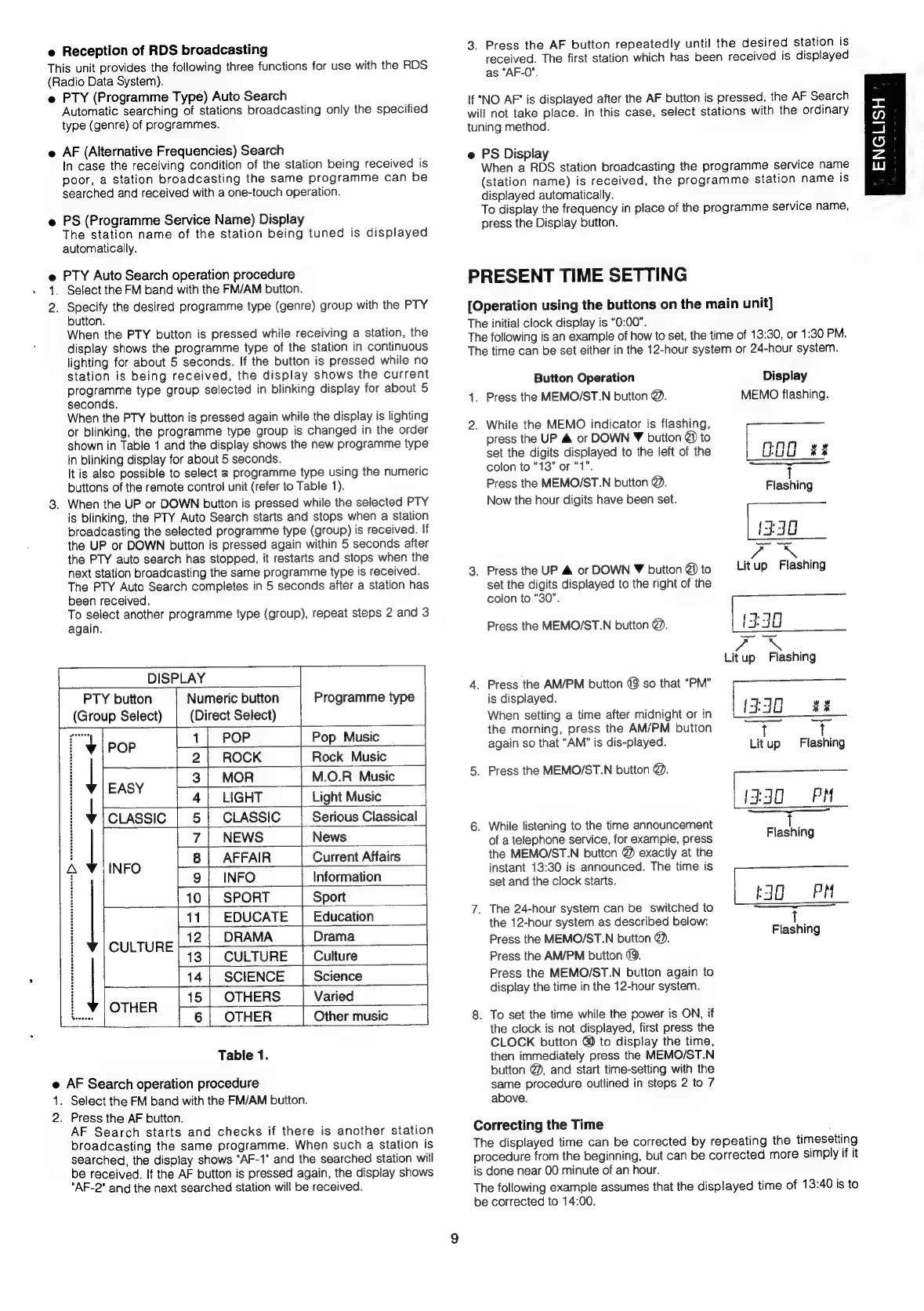
1.
Select
the
FM
band
with
the
FM/AM
button.
2.
Specify
the
desired
programme
type
(genre)
group
with
the
PTY
button.
When
the
PTY
button
is
pressed
while
receiving
a
station,
the
display
shows
the
programme
type
of
the
station
in
continuous
lighting
for
about
5
seconds.
If
the
button
is
pressed
while
no
station
is
being
received,
the
display
shows
the
current
programme
type
group
selected
in
blinking
display
for
about
5
seconds.
When
the
PTY
button
is
pressed
again
while
the
display
is
lighting
or
blinking,
the
programme
type
group
is
changed
in
the
order
shown
in
Table
1
and
the
display
shows
the
new
programme
type
in
blinking
display
for
about
5
seconds.
It
is
also
possible
to
select
a
programme
type
using
the
numeric
buttons
of
the
remote
control
unit
(refer
to
Table
1).
3.
When
the
UP
or
DOWN
button
is
pressed
while
the
selected
PTY
is
blinking,
the
PTY
Auto
Search
starts
and
stops
when
a
station
broadcasting
the
selected
programme
type
(group)
is
received.
If
the
UP
or
DOWN
button
is
pressed
again
within
5
seconds
after
the
PTY
auto
search
has
stopped,
it
restarts
and
stops
when
the
next
station
broadcasting
the
same
programme
type
is
received.
The
PTY
Auto
Search
completes
in
5
seconds
after
a
station
has
been
received.
To
select
another
programme
type
(group),
repeat
steps
2
and
3
again.
DISPLAY
PTY
button
Numeric
button
Programme
type
(Group
Select)
(Direct
Select)
my
1}
POP
Pop
Music
i
POP
2|
ROCK
Rock
Music
i
3|
MOR
M.O.R
Music
:
E
i
said
4|
LIGHT
|
Light
Music
+
[cassie
5
|
CLASSIC
Serious
Classical
:
|
4
NEWS
News
i
8|
AFFAIR
Current
Affairs
A
j
i
ire
9]
INFO
Information
|10|
SPORT
|
Sport
__
11
EDUCATE
Education
12
|
DRAMA
Drama
T
eS
13
|
CULTURE
Culture
|
14
|
SCIENCE
|_
Science
i
15
|
OTHERS
Varied
:
OTHER
eras
6
|
OTHER
Other
music
Table
1.
e
AF
Search
operation
procedure
1.
Select
the
FM
band
with
the
FM/AM
button.
2.
Press
the
AF
button.
AF
Search
starts
and
checks
if
there
is
another
station
broadcasting
the
same
programme.
When
such
a
station
is
searched,
the
display
shows
“AF-1"
and
the
searched
station
will
be
received.
If
the
AF
button
is
pressed
again,
the
display
shows
"AF-2"
and
the
next
searched
station
will
be
received.
3.
Press
the
AF
button
repeatedly
until
the
desired
station
is
received.
The
first
station
which
has
been
received
is
displayed
as
“AF-0".
If
"NO
AF"
is
displayed
after
the
AF
button
is
pressed,
the
AF
Search
will
not
take
place.
In
this
case,
select
stations
with
the
ordinary
tuning
method.
e
PS
Display
When
a
RDS
station
broadcasting
the
programme
service
name
(station
name)
is
received,
the
programme
station
name
is
displayed
automatically.
To
display
the
frequency
in
place
of
the
programme
service
name,
press
the
Display
button.
PRESENT
TIME
SETTING
[Operation
using
the
buttons
on
the
main
unit]
The
initial
clock
display
is
“0:00”.
The
following
is
an
example
of
how
to
set,
the
time
of
13:30,
or
1:30
PM.
The
time
can
be
set
either
in
the
12-hour
system
or
24-hour
system.
Button
Operation
Display
1.
Press
the
MEMO/ST.N
button
@.
MEMO
flashing.
2.
While
the
MEMO
indicator
is
flashing,
press
the
UP
&
or
DOWN
¥
button
@)
to
set
the
digits
displayed
to
the
left
of
the
G80
Ri
colon
to
“13”
or
“1”.
a
sal
Press
the
MEMO/ST.N
button
@.
Flashing
Now
the
hour
digits
have
been
set.
{330
a
3.
Press
the
UP
&
or
DOWN
¥
button
@
to
—Lit
up
Flashing
set
the
digits
displayed
to
the
right
of
the
colon
to
“30”.
ta
ty
3
Press
the
MEMO/ST.N
button
@.
+
FO
Secu
Litup
Flashing
4.
Press
the
AM/PM
button
@9
so
that
“PM”
is
displayed.
(ee
vy
When
setting
a
time
after
midnight
or
in
($40
tk
——
the
morning,
press
the
AM/PM
button
T
t
again
so
that
“AM"
is
dis-played.
Litup
Flashing
5.
Press
the
MEMO/ST.N
button
@.
—=
(3530
PM
————
6.
While
listening
to
the
time
announcement
i
of
a
telephone
service,
for
example,
press
Flashing
the
MEMO/ST.N
button
@
exactly
at
the
instant
13:30
is
announced.
The
time
is
set
and
the
clock
starts.
:
t3G
PM
7.
The
24-hour
system
can
be
switched
to
ane
the
12-hour
system
as
described
below:
das
Press
the
MEMO/ST.N
button
@.
Press
the
AM/PM
button
@.
Press
the
MEMO/ST.N
button
again
to
display
the
time
in
the
12-hour
system.
8.
To
set
the
time
while
the
power
is
ON,
if
the
clock
is
not
displayed,
first
press
the
CLOCK
button
@
to
display
the
time,
then
immediately
press
the
MEMO/ST.N
button
@,
and
start
time-setting
with
the
same
procedure
outlined
in
steps
2
to
7
above.
Correcting
the
Time
;
The
displayed
time
can
be
corrected
by
repeating
the
timesetting
procedure
from
the
beginning,
but
can
be
corrected
more
simply
if
it
is
done
near
00
minute
of
an
hour.
The
following
example
assumes
that
the
displayed
time
of
13:40
is
to
be
corrected
to
14:00.
ENGLISH

Related product manuals