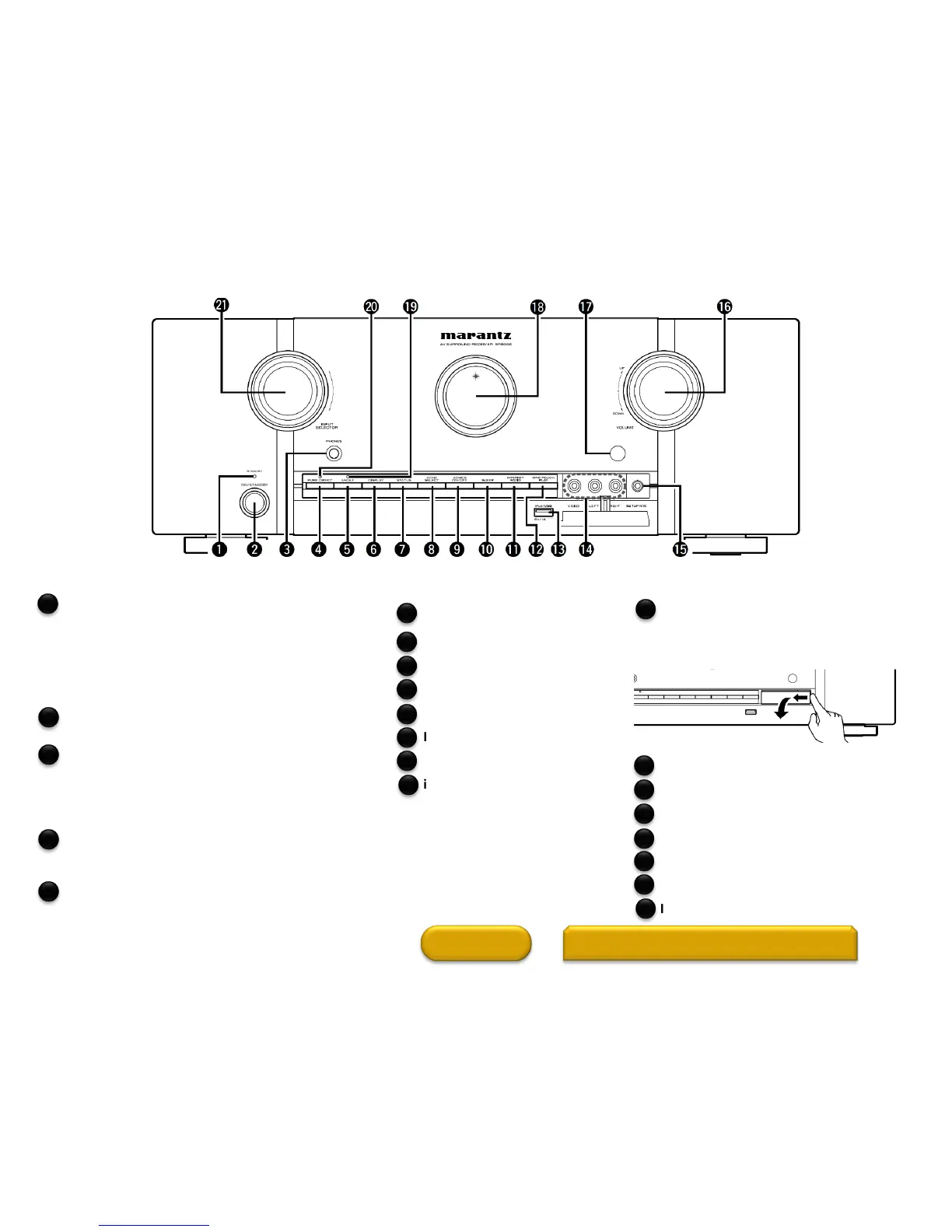
Power indicator
Power indicator status in standby mode
• Red: Normal standby
• Orange:
•
When “HDMI Control” is set to “On”
•
When “Network Standby” is set to “On”.
Power operation button
Turns power to this unit on and off (standby).
Headphones jack (PHONES)
This is used to connect headphones.
When the headphones are plugged into this jack,
audio will no longer be output from the connected
speakers or from the PRE OUT connectors.
PURE DIRECT button
This switches the sound mode between DIRECT,
PURE DIRECT and AUTO.
M-DAX button
This enables the M-DAX mode.
HOME
MAIN DISPLAY (1 of 2)
2
DISPLAY button
STATUS button
ZONE SELECT button
ZONE2 ON/OFF button
SLEEP button
INTERNET RADIO button
ONE TOUCH PLAY button
iPod/USB port
8
12
6
7
Front Panel
1
2
3
9
10
11
4
5
13
AUX INPUT connectors
Remove the cap covering the connectors
when you want to use them
SETUP MIC jack
VOLUME control knob
Remote control sensor
Display
M-DAX indicator
PURE DIRECT indicator
INPUT SELECTOR knob
16
20
14
15
17
18
19
21



 To Next Page