1-4
4. TAKING THE DISC OUT OF EMERGENCY
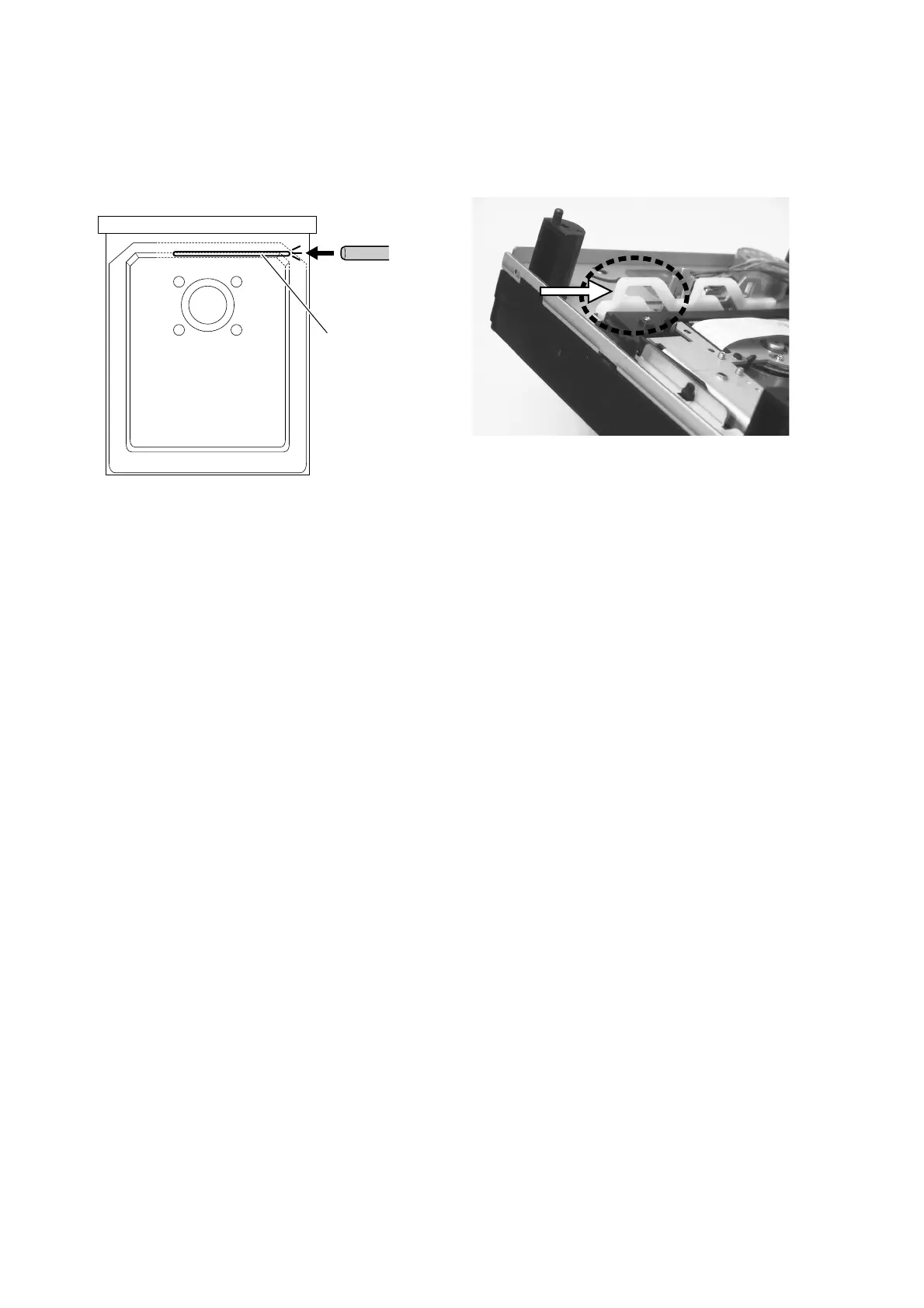
To open the stucked tray, push the eject lever.
How to upgrade (IC731) by upgrade DISC.
(90M-SA15S1DVD )
1. Press the POWER button while pressing the PLAY and
STOP buttons.
2. Press the OPEN/CLOSE button to open the tray, Insert
the update DVD-ROM (part No.:90M-SA15S1DVD).
3. Press the SOUND MODE and STOP buttons.
The Display indicates "VERSION UP"
4. Press the OPEN/CLOSE button to close the tray.
The Display indicates " TOC Reading" >>>
" FILE CHECK">>> " ERASE" >>> " WRITING".
5. Software updating will be done automatically.
When the updating is finished, The disc tray opens au-
to mat i cal ly.
(Updating takes about 1 minute.)
6. Remove the DVD-ROM from the disc tray.
Upgrade is completed,
Press the POWER button to turn off the unit.
ǽȕȈǦǨǢ
(IC731)
ƷǢȃȗȇȸȈ૾ඥ
(90M-SA15S1DVD )
1. PLAY
Ʊ
STOP
ȜǿȳǛƠƳƕǒ
POWER
ȜǿȳǛ
ƠLJƢŵ
2. OPEN/CLOSE
ȜǿȳǛƠŴȈȬǤǛǪȸȗȳƠLJƢŵ
ǢȃȗȇȸȈ
DVD-ROM (
ᢿԼဪӭ
90M-SA15S1DVD)
ǛλƠLJƢŵ
.
3. SOUND MODE
Ʊ
STOP
ȜǿȳǛӷƴƠLJƢŵ
ᘙᅆᢿƴƸ
"VERSION UP"
ƱᘙᅆƞǕLJƢŵ
4. OPEN/CLOSE
ȜǿȳǛƠLJƢŵ
ᘙᅆᢿƴƸ
"TOC Reading">>>"FILE CHECK">>>
"ERASE">>>"WRITING"
ƷƴᘙᅆƞǕLJƢŵ
5.
ǽȕȈƷƖƑƸᐯѣႎƴᘍǘǕLJƢŵƖƑƕ
ኳʕƢǔƱȇǣǹǯȈȬȸƸᐯѣႎƴǪȸȗȳƠLJƢŵ
(
ǢȃȗȇȸȈƴƸኖ
1
ЎƔƔǓLJƢŵ
)
6.
ȇǣǹǯȈȬȸƔǒ
DVD-ROM
ǛӕǓЈƠLJƢŵ
ˌɥưŴǽȕȈǦǨǢƷǢȃȗȇȸȈƸܦʕưƢŵ
POWER
ȜǿȳǛƠᩓเǛЏǓLJƢŵ
5. SERVICE MODE
The eject lever is pointed by the arrow.
This picture shows the unit upside down.
Eject lever
Push
Top View


 To Next Page