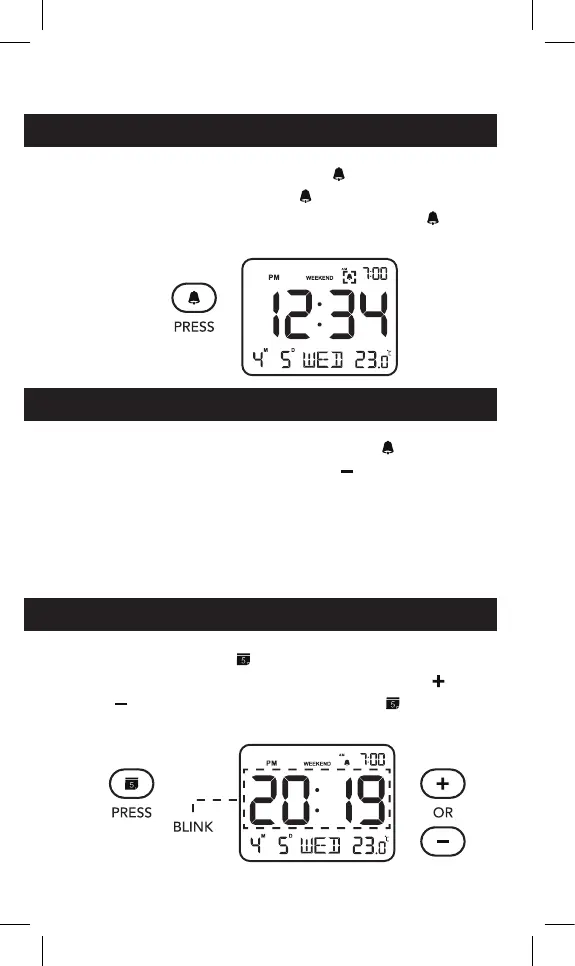
TURN ON/OFF THE ALARM CLOCK
1. To turn on the alarm, press “ ” button. When
the alarm is turned on, “
” icon will display on
the screen. To turn off the alarm, press “
”
button again.
TURN ON/OFF THE WEEKEND MODE
1. When the alarm is turned on, the “ ” icon will
display on the screen. press “
” to turn on/off
the weekend mode. “Weekend” will display on
the screen when the weekend mode is turned on.
NOTE: Once the weekend mode is turned on, the
alarm will not sound on Saturday and Sunday.
DATE SETTING
1. Press and hold “ ” button to enter date setting
mode. “2019” will begin ashing. Press “
” or
“
” to adjust the year, then press “ ” button to
save and move to next setting.







 To Next Page