5Section
37
Powering the DVR
After you mount the DVR and connect all devices, you can connect the DVR to a UPS and apply power.
The UPS, which provides backup power in the event of a power failure, must be specified for a 60 watt
load.
Before powering the DVR, ensure the following safety precautions are met:
The DVR is connected to an available electrical outlet on a recommended UPS.
The power cord is firmly connected to the DVR’s AC power receptacle.
The power cord is routed appropriately, and is secured out of the way.
Connecting the AC Power Cord
Connect the AC power cord to the power connector at the bottom of the DVR.
To connect the AC power cord
1
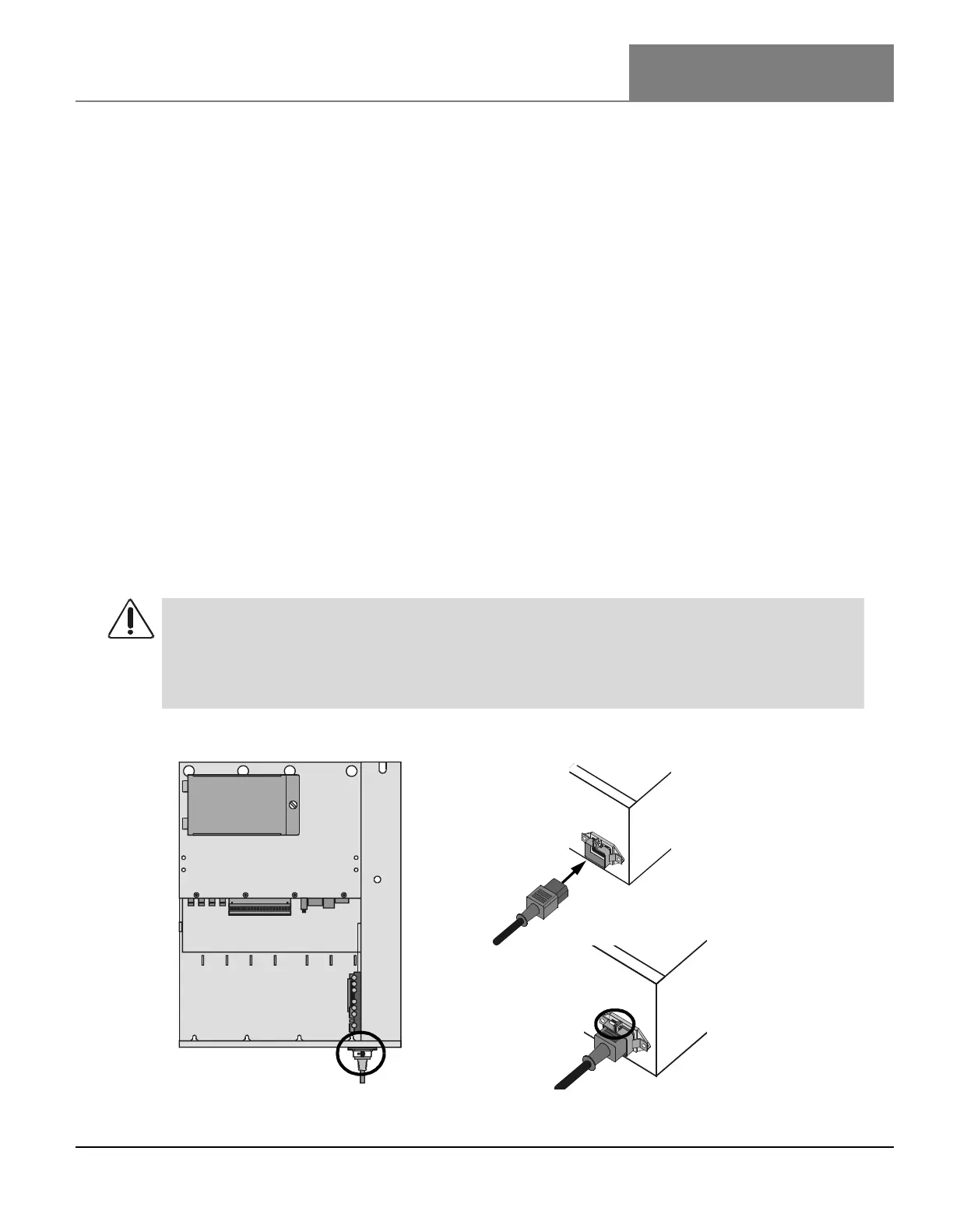
Plug the AC power cord firmly into the power connector at the bottom of the DVR.
2
Tighten the clamp onto the AC power cord by tightening the clamp screw, as shown in Figure 27
on page 37.
Figure 27: Connecting the AC Power Cord
WARNING!
When live AC power is connected to the DVR, +24 volts AC power is also live. Before you access
any components located inside the DVR, move the power switch on the auxiliary I/O panel to
the OFF position. After the health and status LEDs turn off, remove the power cord from the
DVR to prevent injury.
Insert
AC Power Cord
Tighten Clamp



 To Next Page