13
NOTE
The dive planner is enabled only if either
AIR or NITROX mode is set.
2.6. MAPS AND PHOTOS
These menus allow you to view all the maps
and pictures that have been uploaded via Dive
Organizer to your Icon HD. Any file in JPEG
format can be uploaded to Icon. Note that only
the files listed as maps can be selected for the
LINKED MAP function described in section
2.2.1.8.
Icon HD’s memory can hold approximately 50
between maps and pictures.
2.7. BUTTON LOCK
This function allows you to lock the buttons
so that the computer is not turned on
inadvertently. This is very useful for instance
while travelling to a dive site, since otherwise
Icon HD might unintentionally drain the battery
before the dive.
To lock the buttons, press and hold SELECT
for one second from the main menu, or press
it normally when the BUTTON LOCK icon is
highlighted. This will blacken the display.
NOTE
Even when turned off, Icon HD uses up the
battery at a rate of approx 4-6% per day,
so you must recharge it before diving if you
have not used it for a few days.
NOTE
Leaving Icon HD unattended for long
periods of time such that the battery
will be completely empty does not harm
neither the battery nor Icon HD. Logbook
data and all settings will be saved. After
charging you must however set the time
and date again.
NOTE
When the battery in Icon HD is completely
empty, it may take up to 20 minutes from
the moment it is connected to a power
source before Icon HD reacts.
To unlock the buttons, press the left button
followed by pressing the right button. The main
display now reappears.
• 3. DIVING WITH ICON HD
3.1. A FEW WORDS ABOUT NITROX
Nitrox is the term used to describe breathing
gases made of oxygen-nitrogen mixes with
an oxygen percentage higher than 21% (air).
Because Nitrox contains less nitrogen than
air, there is less nitrogen loading on the
diver’s body at the same depth as compared to
breathing air.
However, the increase in oxygen concentration
in Nitrox implies an increase in oxygen partial
pressure in the breathing mix at the same depth.
At higher than atmospheric partial pressures,
oxygen can have toxic effects on the human body.
These can be lumped into two categories:
- Sudden effects due to oxygen partial
pressure over 1.4bar. These are not related
to the length of the exposure to high partial
pressure oxygen, and can vary in terms of the
exact level of partial pressure they happen
at. It is commonly accepted that partial
pressures up to 1.4bar are tolerable, and
several training agencies advocate maximum
oxygen partial pressures up to 1.6bar.
- Long exposure effects to oxygen partial
pressures over 0.5bar due to repeated and/
or long dives. These can affect the central
nervous system, cause damage to lungs or
to other vital organs.
Icon HD keeps you safe with respect to these
two effects in the following ways (as long as it
is set to either AIR or NITROX):
• Against sudden effects: Icon HD has an MOD
alarm set for a user-defined ppO
2
max. As
you enter the oxygen concentration for the
dive, Icon HD shows you the corresponding
MOD for the defined ppO
2
max. The default
value of ppO
2
max from the factory is 1.4bar.
This can be adjusted to your preference
between 1.2 and 1.6bar. Please refer to
section 2.2.1.1 for more information on how
to change this setting. If Icon HD is set to
AIR, the ppO
2
max is set to 1.4bar by default.
• Against long exposure effects: Icon HD
“tracks” the exposure by means of the
CNS% (Central Nervous System). At levels
of 100% and higher there is risk of long
exposure effects, and consequently IconHD
will activate an alarm when this level of
CNS% is reached. Icon HD also warns you
when the CNS level reaches 75%. Note that
the CNS% is independent of the value of
ppO
2
max set by the user.
3.2. ALARMS
Icon HD can alert you of potentially dangerous
situations. There are six different alarms:
- Ascent rate alarm;
- Exceeding a safe ppO
2
/MOD;
- CNS =75%;
- Missed decompression stop;
- Low tank pressure;
- Low battery during the dive.
WARNING
When in gauge mode, all warnings and all
alarms are OFF aside for the low battery
alarm.
NOTE
- Alarms are both visual and audible, as
described in detail below.
- If you are in any graphic display mode
(compass, dive profile, map viewing
or tissue graph) when an alarm is
triggered, you will be kicked out of that
mode and back to the standard numeric
display.
- Ascent rate alarm has priority over
other alarms if they are triggered
simultaneously.
3.2.1. ASCENT RATE
As soon as depth decreases Icon HD activates
the ascent rate control algorithm and displays
the calculated value both numerically and
graphically.
WARNING
A rapid ascent increases the risk of
decompression sickness.
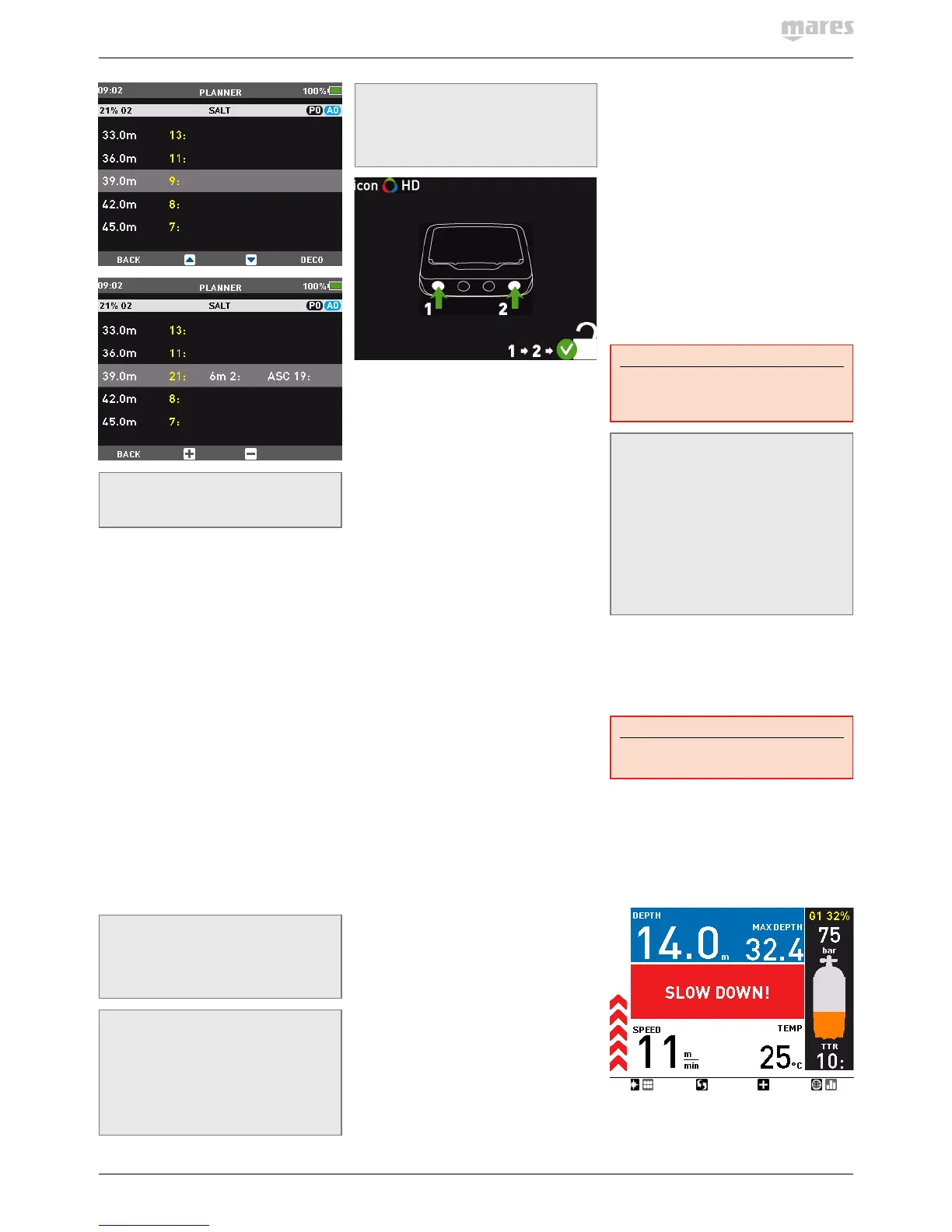
If Icon HD determines an ascent rate of 10m/
min / 30ft/min or higher, the fast ascent
alarm is triggered: an audible alarm goes
off, the arrows on the left side bar turn red
and the message SLOW DOWN is displayed in
the middle of the screen of the screen. This
persists until the ascent rate is reduced to
10m/min / 30ft/min or less.
If the ascent rate exceeds 12m/min / 40ft/min
at a depth below 12m / 40ft, the message on
the screen changes to UNCONTR. ASCENT .
If a speed in excess of 12m/min / 40ft/min is



 To Next Page
 Loading...