12
First you must enter the security code, 1234.
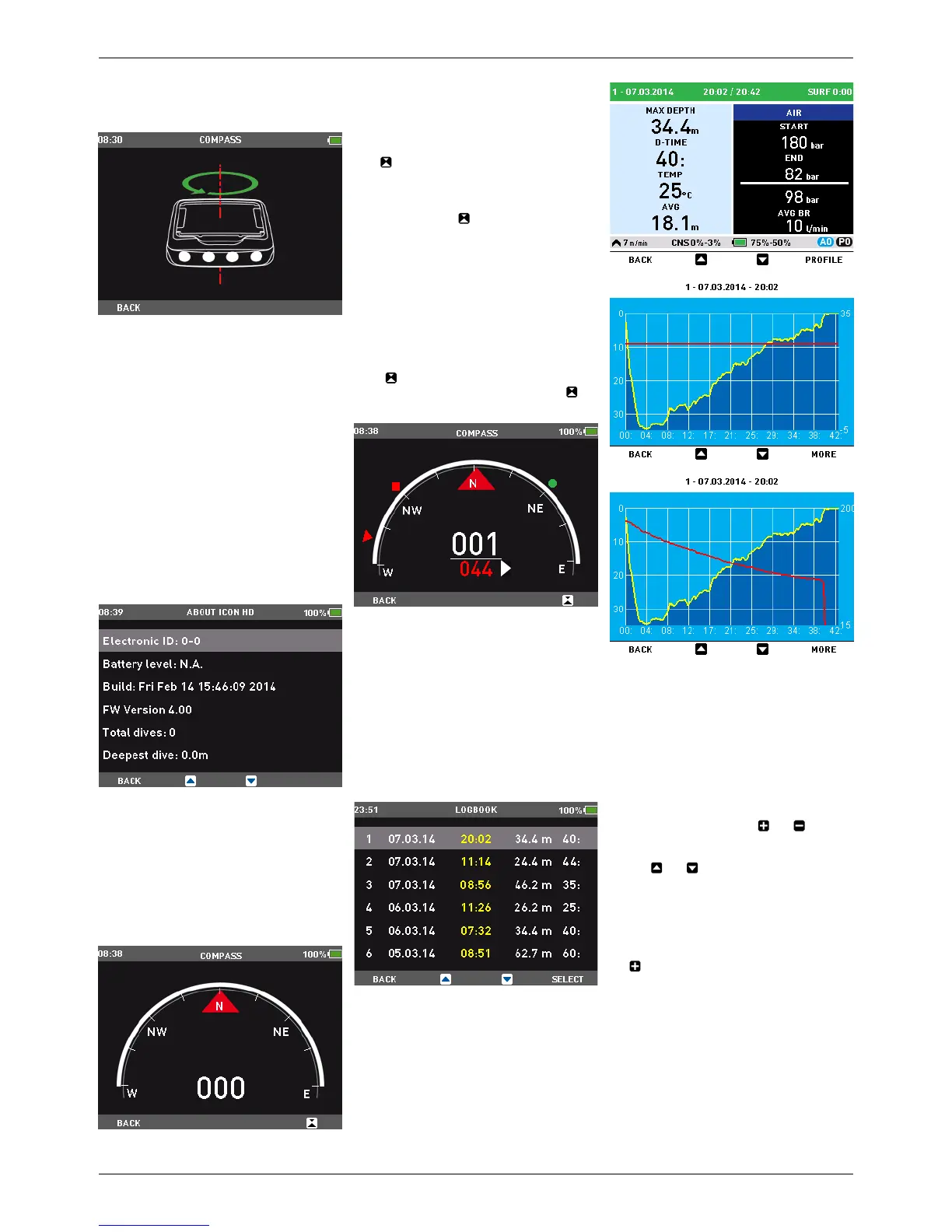
Then the following image will appear on the
display.
Now hold Icon HD horizontal to the surface
and perform one slow counter clockwise
circle. Once you have finished the circle, the
calibration is completed.
2.2.3. ABOUT ICON HD
This submenu provides various information
about the hardware and software of your Icon
HD . It also lists information about the use
of the dive computer, such as longest dive,
deepest dive, total number of dives and total
dive time. These can be individually reset to
0 by pressing the right button (RESET). In
addition, you can revert to the original settings
configuration via the FACTORY RESET option
(this option is not available while there is
remaining desaturation in the computer). The
option FACTORY MAINTENANCE is for use by
authorized personnel only.
2.3. DIGITAL COMPASS
Icon HD has a tilt-compensated digital
compass which can be used at almost any
inclination. The compass can be called up at
any moment during the dive and it can also be
used on the surface. This menu allows you to
use the compass on the surface and also to set
a bearing for reference during your next dive.
The number shown in the middle of the
compass rose represents the bearing, between
0 (North) and 359.
2.3.1. SETTING A BEARING
With
you can set a reference bearing. This
is useful for instance if you are on a boat and
there is a landmark on the shore that you can
use for alignment to reach a specific spot on
that dive site. Press
and a dot will appear
to indicate the set bearing. Additional symbols
will appear as well: squares at 90 degrees,
triangles at 120 degrees and two parallel
lines at 180 degrees, as an aid in navigation
for square, triangular and reciprocal courses.
The number at the bottom represents the
deviation of the direction you are pointing at
with reference to the set bearing.
Once underwater, align the dot with the arrow
and start swimming in that direction. If you
press
again, the new bearing will override
the one in memory. If you press and hold
you erase the bearing.
2.4. LOGBOOK
Icon HD can record the profiles of
approximately 100 hours of diving, at a
sampling rate of 5 seconds. The information
can be transferred to PC via the Dive Organizer
software or to a Mac via the Divers’ Diary
software. In addition, Icon HD can show most
of the information directly on the display. On
the main page of the logbook you will see a
listing of all dives, including date, time the dive
started, depth and dive time.
By pressing SELECT you will access the details
of the dive, and from here you can view the
depth profile with either the temperature or
tank pressure data by pressing PROFILE.
2.5. DIVE PLANNER
This function allows you to plan your next
dive. At the top of the display you will see
the settings used for the calculations: O
2
%,
water type, P Factor and Altitude selections.
In case you dived recently, you can enter an
additional surface interval between now and
when you intend to dive: the residual nitrogen
load will be adapted accordingly. Hit the
SELECT button then use the and buttons
to define the additional surface interval in
15-minute increments. Next hit BACK and
use the and buttons to scroll through
the no decompression limits for all depths,
in 3m / 10ft increments, up to the MOD for
the gas in use. If you wish to see what would
happen if for a given depth you extended your
dive time beyond the no decompression limit,
press the right button, labelled DECO. Use
the to increase your dive time and see what
your corresponding decompression obligation
would be. Press BACK to return to the no
decompression limits.


 To Next Page
 Loading...