11
locks the computer for 24 hours in order to
prevent you from diving again. In this menu,
you have the option to disable the locking up of
the computer in the event of an uncontrolled
ascent.
WARNING
- An uncontrolled ascent increases your
risk of decompression sickness (DCS)
- This feature is intended for very
experienced divers only, such as dive
instructors, who take full responsibility
for the consequences of turning off this
function.
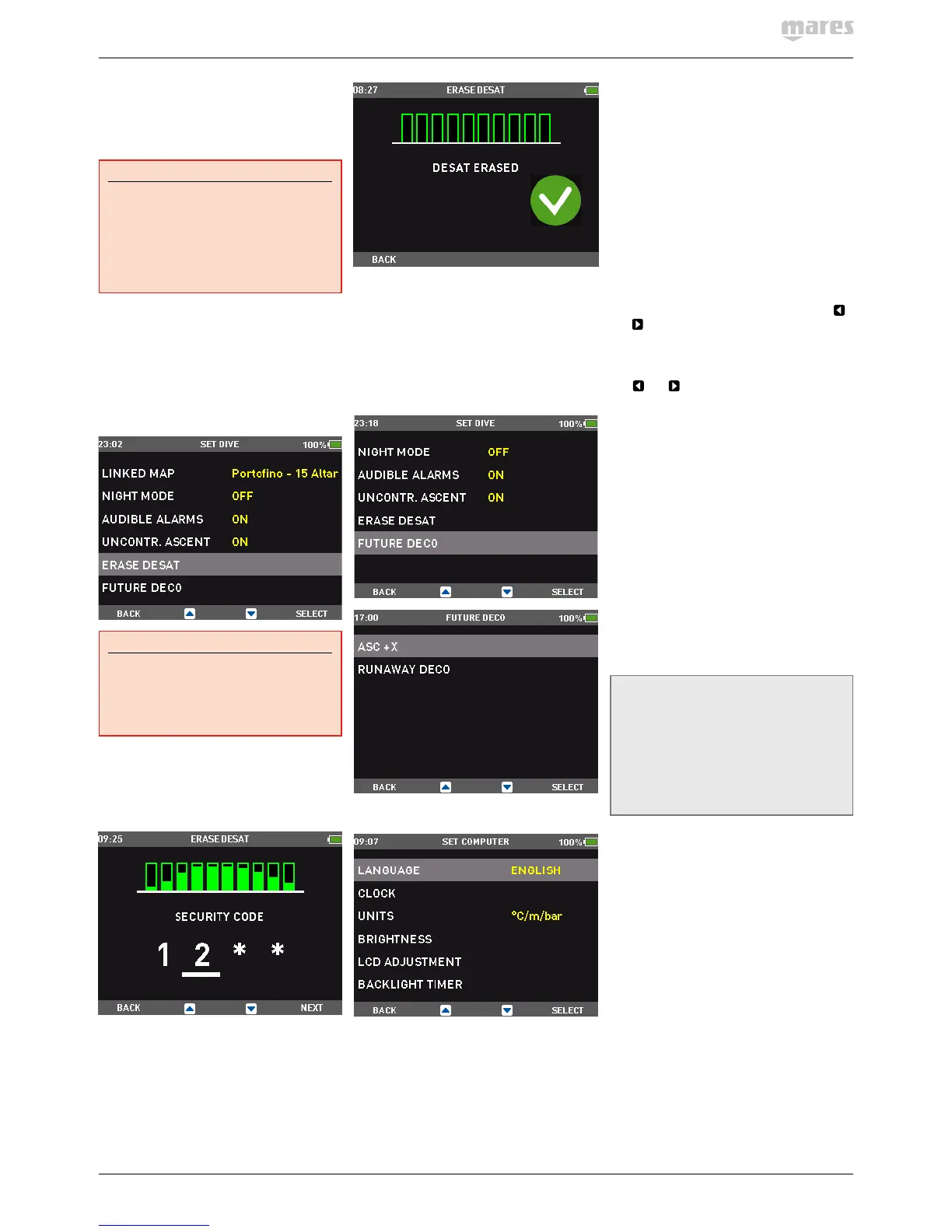
2.2.1.12. ERASE DESATURATION
Icon HD allows you to reset the desaturation
in the computer. Any tissue saturation
information from a recent dive will be reset to
zero and the computer treats the next dive as
a non-repetitive dive. This is useful when the
computer is loaned to another diver who has
not dived in the last 24 hours.
WARNING
Diving after having reset the desaturation
is extremely dangerous and is very likely to
cause serious injury or death. Do not reset
the desaturation unless you have a valid
reason to do so.
Once inside the menu, you will see a graphic
representation of the loading in all tissues
of the decompression calculation. To prevent
accidental desaturation reset, you must enter
the security code once you decide to proceed
with the reset. The security code is 1234.
After entering the security code you will get a
confirmation of the successful completion of
the operation.
2.2.1.13. FUTURE DECO
In this menu you can define the parameters of
the future deco prediction and of the runaway
deco alarm. Refer to section 3.3.1.3 for more
information.
2.2.2. SET COMPUTER
2.2.2.1. LANGUAGE
In this menu you can set the language for the
user interface and for alarm messages during
the dive.
2.2.2.2. TIME
This menu allows you to set the time format,
time, date, time zone shift and wake-up alarm.
2.2.2.3. UNITS
You can choose between metric (depth in
meters, temperature in°C, tank pressure in
bar) and imperial (depth in feet, temperature
in°F, tank pressure in psi).
2.2.2.4. BRIGHTNESS
This menu allows you to change the brightness
of the display in the high power mode (see
section 2.2.2.6) to adapt to various levels of
light conditions. Upon entering this menu, a
sliding bar appears across the display. Use
and
to set the brightness level.
2.2.2.5. LCD ADJUSTMENT
This menu allows you to optimize the display.
Use
and and observe how the test display
is affected.
2.2.2.6. BACKLIGHT TIMER
Icon HD has a permanently backlit color
display. In order to optimize the life of the
battery, there are two levels of light intensity
in dive mode: a low power mode, in which
the display is still readable but the intensity
is dimmed, and a high power, the intensity
of which is defined with the BRIGHTNESS
setting at 2.2.2.4. Whenever you push a
button, IconHD switches from low power to
high power intensity. In this menu, you can
choose the duration of the high intensity
interval between 10 seconds and 1minute
in 10-second intervals. You can also set it to
ON in which case the backlight in Icon HD is
permanently set to high intensity. This is the
default setting.
NOTE
- The backlight consumes battery energy:
the longer the backlight stays on high
intensity, the less your battery charge
will last.
- If the LOW BATTERY warning is
activated, high intensity backlight will be
disabled and the display will remain on
low power.
2.2.2.7. DECLINATION
Depending on the exact location on the planet,
there can be a deviation between true North
and magnetic North. Any compass will always
show magnetic North, so via this menu you can
set a value for the so-called declination that will
make the compass show true North instead.
2.2.2.8. COMPASS CALIBRATION
The digital compass in Icon HD is calibrated
from the factory and does not require,
under normal circumstances, any further
maintenance. In certain instances, however,
such as after exposure to extremely intense
magnetic fields, it may be necessary to
recalibrate the compass to ensure its accuracy.
If you notice an obvious deviation in the
indication of the compass, access this menu
and perform the calibration as described below.



 To Next Page
 Loading...