10
The second menu, TANK VOLUME, allows
you to set the size of the volume of the tank,
individually for G1, G2 and G3. This parameter
is important for a correct evaluation of your
gas consumption in l/min or cu ft /min. Default
setting is 12l for metric system and 80 cubic
feet in imperial. For the imperial setting it
is paramount that you also set the correct
operating tank pressure, since the size of the
tank is referenced to this pressure.
The third menu, OPERATING TANK
PRESSURE, is where you define the nominal
fill pressure of your tanks. This can be set
individually for each tank (G1, G2 or G3).
This value is used to scale the graphic tank
representation but also to define the pressure
ranges for color coding (described in section
2.2.1.6.1). When the units are set to ft/°F/psi,
this value is important because together with
the tank volume it allows Icon HD to correctly
evaluate your gas consumption in cu ft/min.
Default values are 200bar and 3000psi.
The fourth menu, MID TANK WARNING, is the
value at which Icon HD triggers a half tank
warning. This can be set individually for each
tank (G1, G2 or G3). This value is also used in
the definition of the pressure ranges for color
coding as described below. Default values are
100bar and 1500 psi.
The fifth menu, TANK RESERVE, is the value
at which an alarm is triggered because
you should always be at the surface before
reaching this level. Furthermore, this value is
used to calculate the TTR value (see section
3.2.5 and 3.3.1). This can be set individually for
each tank (G1, G2 or G3). Default values are
50bar and 750psi.
The sixth and last menu is called AUTOZERO
RESET and it allows you to set the ambient
pressure reading on the tank module in the
unlikely event of a drift of the zero value. You
would perform this operation if you noticed a
significant difference between the read-out of
Icon HD and a calibrated pressure gauge also
connected to the same first stage.
Due to the potential of introducing an error in
the tank module measurement, please contact
your Mares Authorized Service Center before
performing this operation.
2.2.1.6.1. COLOR CODING FOR PRESSURE
RANGES
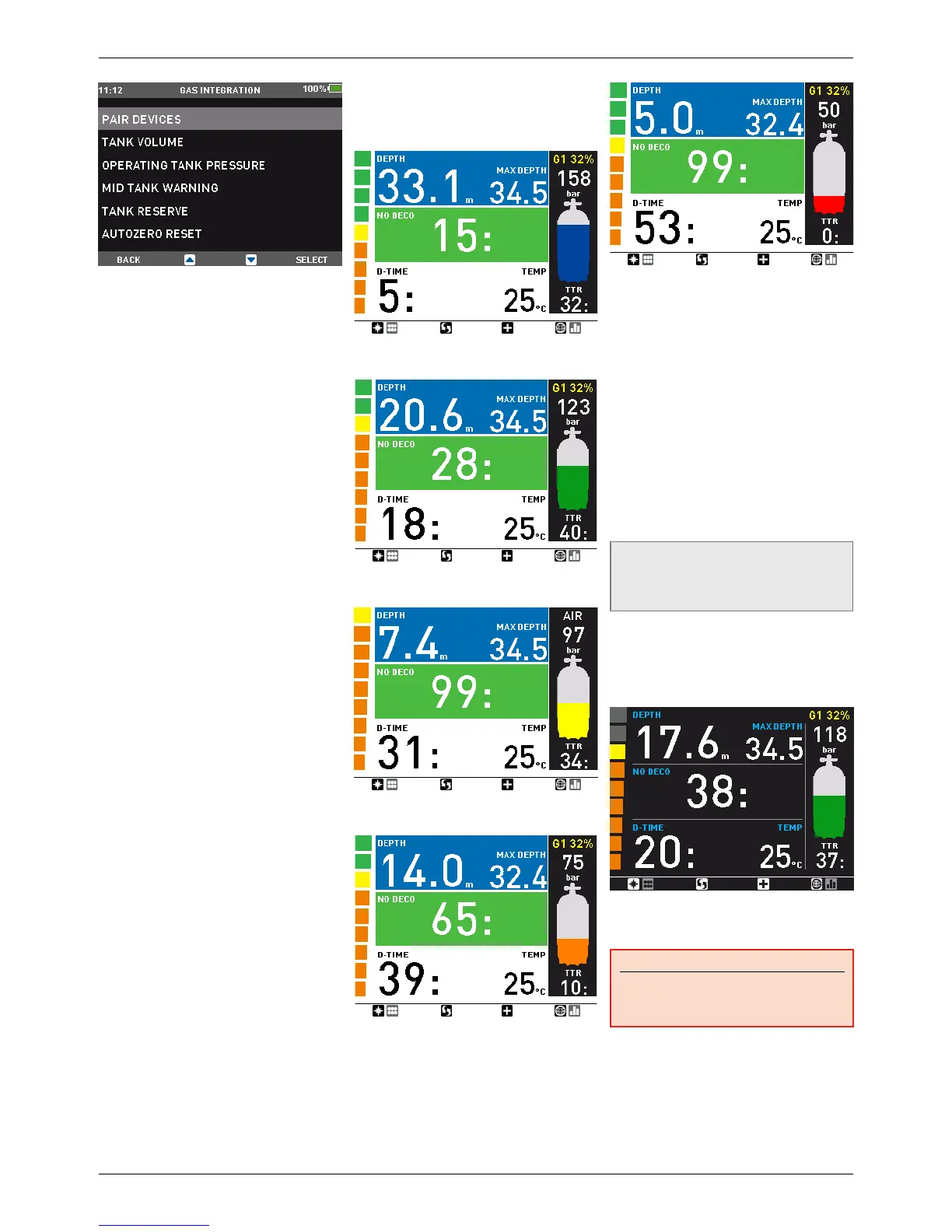
In addition to a numeric value for the tank
pressure, Icon HD uses color coding for
an immediate at-a-glance tank pressure
visualization. The color is applied to the inside
of the tank pictogram. The pressure range
from operating tank pressure to empty tank
is split into 5 ranges, from BLUE to GREEN to
YELLOW to ORANGE to RED. The ranges are
so defined:
BLUE: the upper half between OPERATING
TANK PRESSURE and MID TANK WARNING
GREEN: lower half between OPERATING TANK
PRESSURE and MID TANK WARNING
YELLOW: upper half between MID TANK
WARNING and 50bar/750psi.
ORANGE: lower half between MID TANK
WARNING and 50bar/750psi.
RED: below 50bar / 750psi
2.2.1.7. WATER
You can set the computer for fresh water or
salt water calibration, depending on where
you intend to dive. Setting the wrong water
type entails an error in depth measurement
of approx 3% (i.e. at a depth of 30m/100ft, a
computer set to salt water will show 29m/97ft
in fresh water whereas a computer set to fresh
water will show 31m/103ft in salt water). Note
that this does not affect the proper functioning
of the computer, since the computer performs
all of the calculations based purely on
pressure measurements.
2.2.1.8. LINKED MAP
In this menu, you can select a map which you
can later on call up during the dive.
NOTE
If you do not select any map, the
corresponding button will be disabled
during the dive.
2.2.1.9. NIGHT MODE
In this menu you can select the NIGHT MODE
as the default display. You can always switch
between the two display modes using the
Underwater Menu described in section 3.3.6.
2.2.1.10. AUDIBLE ALARMS
In this menu you can disable audible alarms.
WARNING
Disabling audible alarms can lead you into
potentially dangerous situation and could
result in serious injury or death.
2.2.1.11. UNCONTROLLED ASCENT
An uncontrolled ascent is defined as one in
which a speed of 12 m/min / 40ft/min or higher
was maintained over more than two thirds of
the way up. This applies to dives deeper than
12m/40ft only. In such an event, due to the
potential of harmful bubble formation, IconHD


 To Next Page
 Loading...