9
Use
and to highlight your choice,
then press SELECT to activate it. AIR is the
equivalent of setting NITROX to 21% and a
ppO
2
max of 1.4bar.
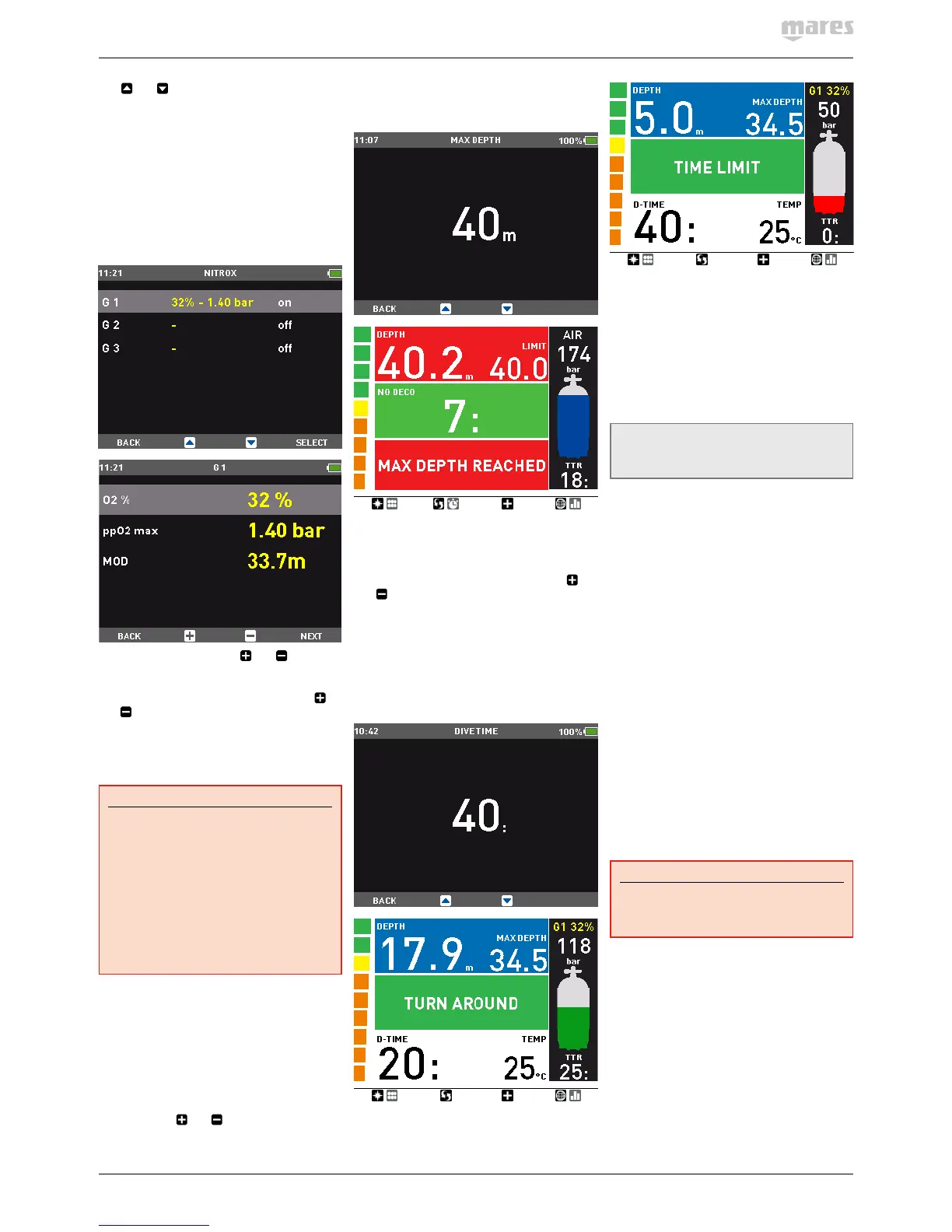
When selecting NITROX, you are taken to
a submenu in which you can define the
percentage of oxygen in the mixture (O
2
%) and
the maximum value of oxygen partial pressure
(ppO
2
max) for up to three breathing mixes. The
maximum possible value for the ppO
2
max is
1.6bar. Most training agencies recommend not
to exceed a value of 1.4bar.
Once inside this menu, use
and to change
the O
2
%, and watch how this affects the
maximum operating depth (MOD). Then press
NEXT to move on to the ppO
2
max and use
and
to change the value, again noticing
how this affects the MOD. Press SET to save
and exit the menu. Note that you can press
BACK after having set the O
2
% to save and exit
skipping the ppO
2
max setting.
WARNING
- Diving with Nitrox may only be
attempted by experienced divers after
proper training from an internationally
recognized agency.
- Before every dive and after changing
the tank, you must make sure that the
set oxygen concentration in IconHD
corresponds to the oxygen concentration
in the tank. Setting the wrong oxygen
concentration can lead to serious injury
or death.
This is also the menu where you would be
setting your decompression gases if you dived
with more than one gas. See chapter 3.5 for
more information about diving with more than
one gas.
2.2.1.2. MAX DEPTH
Icon HD allows you to set an alarm at a depth
independent of the MOD. The default value is
OFF. Using the
and buttons you can set
it between 10m / 30ft and up to just shy of the
MOD, in 1m / 5ft increments. Upon reaching the
depth defined in this alarm, the message MAX
DEPTH REACHED appears on the screen and
stays there until you ascend above the set limit.
2.2.1.3. DIVE TIME
Icon HD allows you to set a time alarm,
triggering also a warning at half of the set time
limit. The default value is OFF. Using the
and buttons, you can set the value between
20 and 90 minutes in 2-minute increments.
Upon reaching half of the set limit, the
message TURN AROUND appears and stays
on the display until you hit any button to
acknowledge it. Upon reaching the set time
limit, the message TIME LIMIT appears and
stays on the display until you hit any button to
acknowledge it.
2.2.1.4. P FACTOR
Icon HD allows you to set an additional
personal safety factor for those circumstances
in which you want to be especially cautious,
such as after a long period of inactivity or when
planning a strenuous dive. In this menu you
can choose between the standard algorithm
(P0), a more conservative version (P2) or an
intermediate one (P1).
NOTE
The choice of P FACTOR will be reflected in
the dive planner.
2.2.1.5. ALTITUDE
Atmospheric pressure is a function of altitude
and of weather conditions. This is an important
aspect to consider for diving, because the
atmospheric pressure surrounding you has an
influence on uptake and subsequent release
of nitrogen. Above a certain altitude, the
decompression algorithm has to change in
order to account for the effect of the change
in atmospheric pressure. When diving in a
mountain lake, find out what the altitude is and
choose the altitude range in Icon HD within the
four available options:
- A0: from sea level to approximately
700m/3300ft;
- A1: from approximately 700m/2300ft to
approximately 1500m/4900ft ;
- A2: from approximately 1500m/4900ft to
approximately 2400m/7900ft;
- A3: from approximately 2400m/7900ft to
approximately 3700m/12100ft;
- We do not recommend diving at altitudes
above 3700m / 12100ft. If you do, set IconHD
to BOTTOM TIMER and find appropriate
altitude dive tables.
WARNING
Diving in mountain lakes without first
setting IconHD to the proper altitude
setting can cause severe injury or death.
2.2.1.6. GAS INTEGRATION
This menu contains six submenus. The first
one allows you to pair the tank modules to the
Icon HD. Please refer to section 1.7 for the
description of the pairing process.


 To Next Page
 Loading...