15
3.2.5. LOW TANK PRESSURE IF OPTIONAL
TANK MODULE IS USED
When Icon HD is used in conjunction with the
bidirectional tank module, you will not only
have tank pressure information clearly visible
on the display, but also an estimate of the time
you can still spend at the depth you are at,
based on the current gas consumption, before
reaching the tank reserve. This is called TTR –
Time To Reserve.
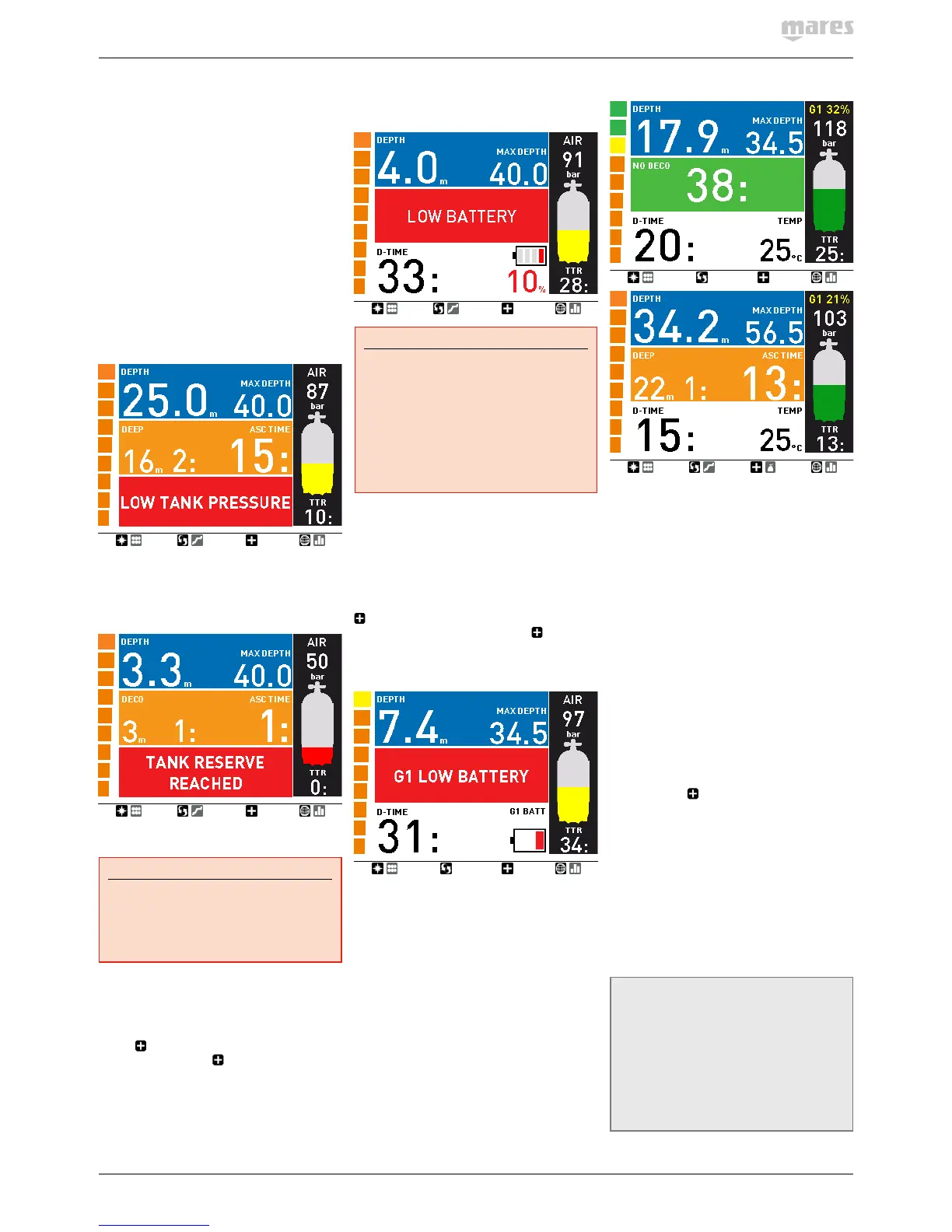
When during a decompression dive IconHD
calculates a TTR which is inferior to the
total ascent time, the message LOW TANK
PRESSURE appears on the bottom of the
display and remains there until you hit any
button to acknowledge having seen it. We
strongly suggest initiating an ascent when this
situation arises, in order to avoid running out of
breathing gas during the decompression stop.
Additionally, when the tank pressure reaches
the value specified under TANK RESERVE,
the message TANK RESERVE REACHED
is displayed until you hit any button to
acknowledge having seen it.
3.2.6. LOW BATTERY
WARNING
Do not start a dive if the LOW BATTERY
message is displayed on the screen on the
surface. The computer may fail to function
during the dive and this could lead to
serious injury or death.
If Icon HD detects that the battery power
level is getting low, it will show the message
LOW BATTERY on the display until you hit
any button to acknowledge having seen it.
Furthermore, the field which can be selected
via the button shows the battery information
in red. If you push the button to view any
other value, it will remain for 4s only, and
then return to the battery value. In a LOW
BATTERY situation, the map function is
disabled, as well as audible signals, and the
backlight is reduced to a low - power safety
level (readability of the display is ensured). You
can still access the compass, but after 30s the
screen will revert to the standard display and
the battery displayed in red.
WARNING
When this warning appears, you should
stop the dive, safely, without delay.
If the battery is completely drained during
or right after a dive, IconHD will lose the
nitrogen loading information in the tissues,
and hence it will calculate the next dive
wrongly. Do not dive for 24 hours following
a dive during or after which the battery was
completely drained.
In addition to monitoring the status of its own
battery, Icon HD also monitors the status of
the battery in all tank modules paired to it, and
alerts you when a battery is low and should be
replaced. The message G1 (or G2 or G3) LOW
BATTERY is displayed until you hit any button
to acknoweldge having seen it. Furthermore,
the field which can be selected via the
button shows the tank module battery
information in red. If you push the button to
view any other value, it will remain for 4s only,
and then return to the tank module battery
information.
3.3. DISPLAY INFORMATION
Upon immersion, if Icon HD was set to pre-
dive, it will immediately start monitoring the
dive. Otherwise, it will turn on automatically
within 20 seconds of having reached a depth of
1.2m/4ft.
With Icon HD you have a choice of how the
information is presented on the display. This is
described in the next sections.
3.3.1. STANDARD DEFAULT DISPLAY
The standard display presents dive information
in a prevalently numerical format. More
specifically, the following information is
displayed:
- current depth and max depth in top row
- no deco time in middle row (depth of
deepest stop, time at deepest stop and total
ascent time in case of decompression dives)
- dive time and temperature in bottom row
- description of gas in use, tank pressure in
bar / psi, graphic representation of tank
pressure using the 5 color ranges described
in section 2.2.1.6.1, time to reserve (TTR)
along the right edge of the display
- nitrogen bar graph along the left edge of the
display
- ascent speed: in case of an ascent, the value
in m/min or ft/min is displayed in lieu of the
dive time, while graphically it is shown in
lieu of the nitrogen bar graph (each arrow
representing 2m/min / 6ft/min).
Upon pressing
, the field to the right of
the dive time is modified in the following
sequence:
- water temperature
- stopwatch
- O
2
/MOD (Nitrox only)
- CNS (Nitrox only)
- ppO
2
(Nitrox only)
- time of day
- battery status of Icon HD
- battery status of tank module in use
- average depth
- gas consumption in l/min or cuft/min.
NOTE
if you set Icon HD to AIR, the information on
O
2
/MOD, CNS and ppO
2
are not displayed in
order to simplify the display. The CNS value
is however calculated in the background
and both the CNS alarm and MOD alarm are
triggered if the circumstances require it. If
you are diving air but would anyway like to
see the O
2
/MOD, CNS and ppO
2
, set Icon HD
to Nitrox 21%.


 To Next Page
 Loading...