16
The battery in the tank module is shown as
a battery outline with either 3 (battery ok), 2
(battery ok for now but you should consider
replacing it) or 1 (battery could fail any time)
segments inside of it. The 3-segment situation
is green, the 2-segment situation is yellow,
and the 1-segment situation is red.
3.3.1.1. DETAILED DESCRIPTION OF
DISPLAYED DATA
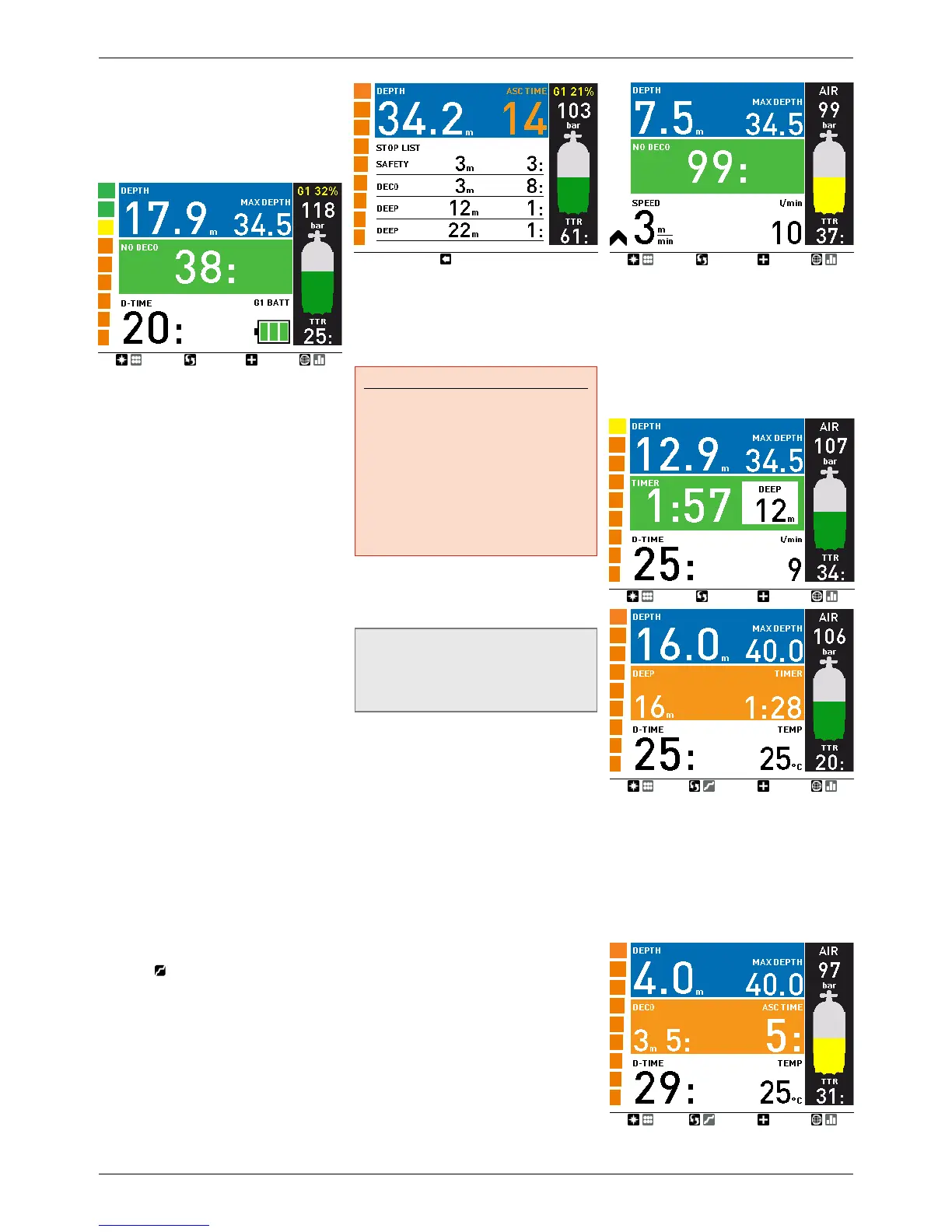
The depth is given in 10cm resolution until
99.9meters, after which it is given in 1m
resolution. When the depth is displayed in
feet, the resolution is always 1 foot. At a depth
shallower than 1.2m/4ft, the display shows ---.
Maximum possible depth is 150m/492ft.
The dive time is displayed inminutes. If during
the dive you ascend to the surface, the time
spent on the surface will only be counted
if you descend again below 1.2m/4ft within
3minutes. This allows for brief periods of
orientation. While on the surface, the time will
not show as progressing but it is running in
the background. As soon as you submerge, the
time will resume, including the time spent on
the surface.
The no deco time is calculated in real time and
updated continuously. Maximum displayed no
deco time is 99minutes. If you remain at depth
beyond a no deco time of zerominutes, you will
enter into decompression: you can no longer
make a direct ascent to the surface and Icon
HD displays a MANDATORY decompression
stop. Instead of a no deco time, it shows you
the depth of the deepest stop, the time at the
deepest stop, and the total ascent time (ASC),
which includes each decompression stop and
the time required to travel the vertical distance
to the surface at a rate of 10m/min / 33ft/
min. ASC includes the duration of deep stops
as well. Note that in presence of a deep stop
during a decompression dive, the deep stop
itself is shown as the first (deepest) stop in the
middle row. Deep stops are NOT mandatory
so you can skip them without incurring any
penalty in the decompression calculation.
Once there is a mandatory decompression
stop, the second button from the left features a
new label:
. Pressing and holding it will
display the details of all stops computed by
Icon HD, up to a maximum of 4, starting from
the deepest.
The tank pressure is based on the signal from
the tank module. The tank module has a range
of 1.5m/5ft. In addition to showing the numeric
value, Icon HD employs color coding to identify
a range in tank pressure, as described in
section 2.2.1.6.1.
WARNING
- If IconHD receives no signal from
the tank module for 45 seconds, the
pressure value is replaced by ---. Check
the position of IconHD with respect to
the tank module. Start ascending if you
don’t get a tank pressure reading unless
you have a spare pressure gauge.
- If the tank pressure reaches
15bar/220psi, the tank module will
turn off and IconHD will not show tank
pressure any longer.
The TTR (time to reserve) is the time you can
spend at the current depth breathing at the
current rate before reaching the user defined
tank reserve.
NOTE
IconHD needs approximately 2minutes to
analyze your breathing pattern, thus the
TTR is not displayed at the very beginning
of the dive.
The nitrogen bar graph is on the left
side of the display. It represents nitrogen
supersaturation (any amount in excess of the
equilibrium state at the surface) in the leading
tissue compartment. The bar graph is made
of ten segments, which gradually switch from
green to red during the dive. The more red
segments you see, the closer to the no deco
limits you are. As you enter a situation of
mandatory decompression stop, all segments
will be red.
During a surface interval, the segments will
gradually turn from red to green as Icon HD
tracks the offgassing of your tissues.
Ascent rate: in presence of a depth change in
excess of 80cm / 3ft, IconHD calculates the
corresponding ascent speed and displays both
numerically (in lieu of the dive time) and via an
arrow bar which, for the duration of the ascent,
replaces the nitrogen bar graph. Each arrow in
the arrow bar represents approximately 2m/
min / 6ft/min speed. These arrows turn red for
speeds in excess of 10m/min / 33ft/min.
3.3.1.2. DEEP, DECO AND SAFETY STOPS
DEEP stops are generated as you approach
the no deco limit. You can either have one
2-minute stop or two 1-minute stops.
DEEP stops are NOT mandatory but rather
suggestions which attempt to minimize bubble
production by offgassing some nitrogen at high
ambient pressure. Deep stops are shown as a
1 or 2 minute countdown.
DECO stops are generated progressively as
you stay at depth beyond the no deco time.
DECO stops are MANDATORY As you approach
the depth of a stop, the duration of the stop
is gradually reduced. The duration itself is
always shown in minutes, and is calculated as
a function of the pressure gradient achieved at
the stop depth itself. Hence the farther you are
from the exact depth of the stop, the longer it
will take for each minute to tick off.


 To Next Page
 Loading...