18
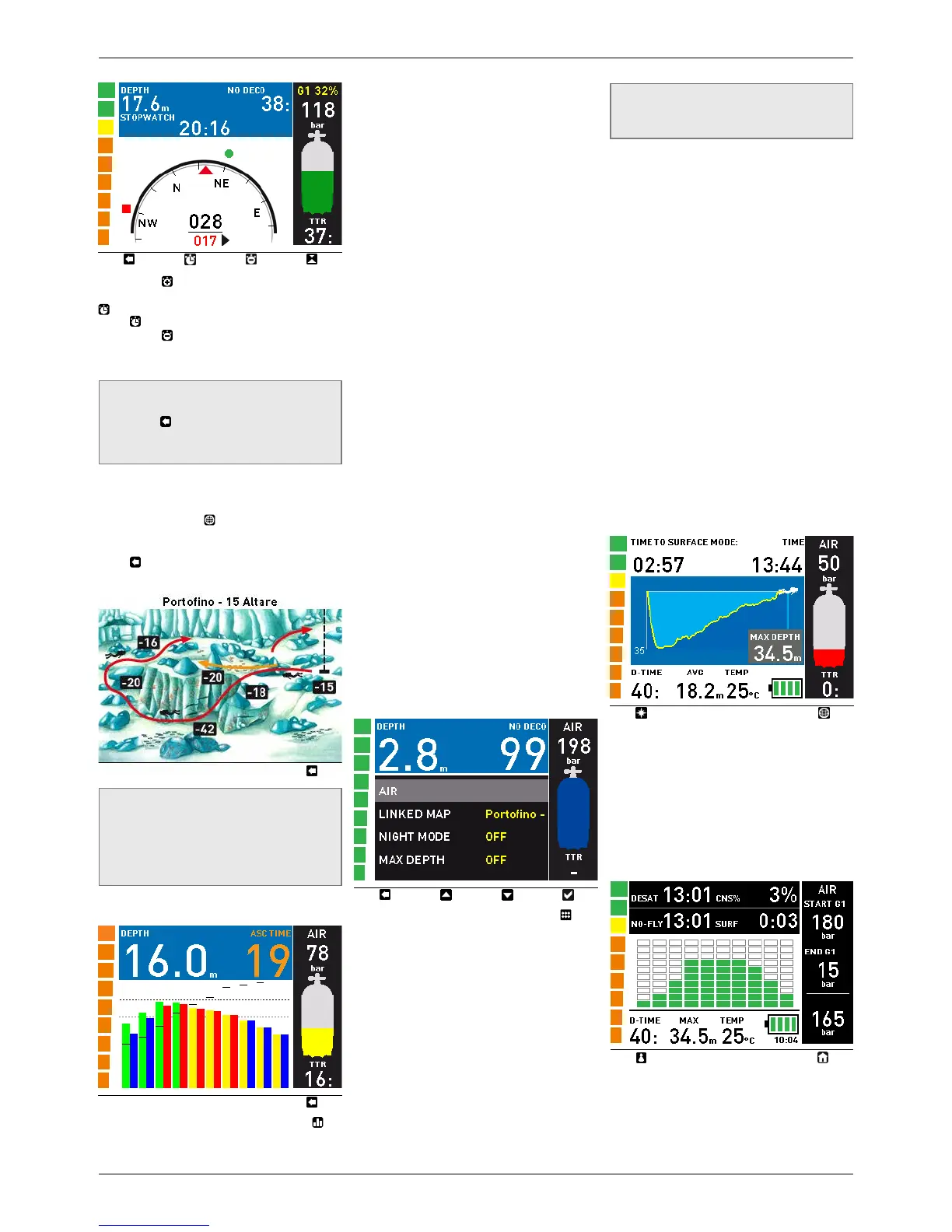
By pressing , the top row is split in two and
a stop watch appears in the lower row. Use
to activate the stop watch. Every time you
press , the stop watch restarts from 00:00.
By pressing , the top row goes back to full
size but the stop watch keeps running in the
background.
NOTE
The display remains in compass mode until
you press or until an alarm is triggered,
in which case the display reverts to the
standard display.
3.3.4. VIEWING MAPS DURING A DIVE
To call up the map selected under SET DIVE/
LINKED MAP, press
. The map will remain
on the display for 10 seconds, after which the
screen reverts to dive information. You can
press to return to the main screen before
the 10 seconds have elapsed.
NOTE
- In the event of an alarm, IconHD
automatically switches back to the
standard display.
- The map is static, and does not change
as you swim during the dive.
3.3.5. TISSUE SATURATION GRAPH
By pressing and holding the right button ( ) a
complete description of the current tissue
saturation fills the space underneath the top
row. The top row itself shows current depth
and no deco time (or total ascent time in case
of decompression dives) so that you can keep
the tissue saturation graph on the display and
still have all the major information about the
dive. The graph itself is updated continuously.
The graph shows the tissue tension in each
of the ten compartments simulated by the
algorithm, both the instantaneous value
(left bar, green or yellow) and the projected
value at the surface after an ascent at 10m/
min (right bar, blue or red). The vertical axis
represents pressure, normalized so that the
safe ascent criterion for each tissue is at the
same height, and this is represented by the
lower dotted line. As long as the right bar
(projected value at the surface) remains below
the dotted bar, that particular tissue does not
require decompression. When one of the right
tissues pushes past the lower dotted line, a
decompression stop will be required (failure
to meet the safe ascent criterion) and the bar
itself changes from blue to red. If a right bar
were to push past the second dotted line, there
would be a 6m / 20ft stop required in addition
to a 3m / 10ft stop.
On the graph one also sees small horizontal
black segments: these are representative,
on the same pressure scale, of the partial
pressure of nitrogen in the inhaled gas. The
distance between the small segment and the
left bar represents the pressure difference
driving gas in or out of a tissue and is thus
indicative of the speed of on or offgassing. As
long as the segment is above the left bar, the
tissue in question is taking on gas and the bar
is depicted in yellow. Once the small segment
descends into the left bar, the tissue in question
is offgassing and the bar becomes green. More
information about this can be found in the
download section of www.mares.com.
3.3.6. UNDERWATER MENU
By pressing and holding the left button ( ) you
can call up a menu which allows you to change
certain settings during the dive. These are
described in detail in section 2.2 although
some names have changed a bit due to the
limited length available in the UW menu.
AIR (or G1) - corresponds to MODE in 2.2.1.1.
This is meant for those occasions when you
forgot to update the oxygen percentage setting
in the computer after a change of nitrox, a
switch from air to nitrox or viceversa, which
would force you to abort the dive or at least go
to the surface, wait three minutes to exit the
dive and then perform the change. This menu
is active only during the first minute of the dive
and only if the depth has not exceeded 6m / 20ft.
NOTE
This menu is not meant for switching to a
high oxygen content decompression gas.
LINKED MAP - as described in 2.2.1.8
NIGHT MODE - as described in 2.2.1.9
MAX DEPTH - as described in 2.2.1.2
DIVE TIME - as described in 2.2.1.3
BRIGHTNESS - as described in 2.2.2.4
TANK VOLUME - as described in 2.2.1.6
MAX PRESSURE - corresponds to OPERATING
TANK PRESSURE in 2.2.1.6
HALF TANK - corresponds to MID TANK
WARNING in 2.2.1.6
TANK RESERVE - as described in 2.2.1.6
WATER - as described in 2.2.1.7.
3.4. AFTER THE DIVE
Upon returning to the surface, Icon HD first
goes into the so-called surfacing mode. This
mode allows you to resume your dive after a
brief period of orientation. The screen shows a
3-minute countdown, a profile of the dive, your
maximum depth, dive time, average depth and,
for nitrox dives, the CNS% at the end of the
dive. When used with the optional tank module,
the screen shows the tank pressure as well.
If you submerge again before the 3-minute
countdown is over, the dive time will resume
from where it left off, including the time spent
on the surface. If you do not submerge before
the end of the countdown, Icon HD considers
the dive finished, records the data to the
logbook and reverts to the so-called post-dive
mode.
The post-dive screen shows the following
information:
- The remaining desaturation time
(DESAT TIME): this is calculated by the
decompression model in the computer.
Any dive started while there is remaining
desaturation on your computer is considered
a repetitive dive, meaning that Icon HD


 To Next Page
 Loading...