19
accounts for the pre-existing nitrogen load
in your body.
- The no-fly time (NO-FLY TIME): this is
the time during which an exposure to
the reduced pressure inside the cabin of
an airplane could cause decompression
sickness. Icon HD employs, as
recommended by NOAA, DAN and other
agencies, a standard 12-hour (no-deco
non-repetitive dives) or 24-hour (deco and
repetitive dives) countdown. There are two
special cases:
- if the DESAT TIME is longer than the NO-
FLY TIME, Icon HD automatically sets the
NO-FLY TIME to be equal to the DESAT
TIME;
- the DESAT TIME could be shorter than the
NO-FLY TIME, which would imply that you
cannot fly although you are desaturated.
This is simply the consequence of the
desaturation time being calculated by the
algorithm based on the actual dive profile,
while the no-fly time is an accepted
standard in the diving industry. Since the
real effect of flying after diving has never
been fully investigated, this approach fits
with our philosophy.
WARNING
Flying while IconHD displays NO-FLY can
result in serious injury or death.
- The surface interval (SURF. INT.): this is
displayed from the moment the dive is
closed (3minutes after surfacing) for as
long as there is remaining desaturation or
no-fly time on the computer.
The screen also shows the main data of the last
dive: max depth, temperature, dive time, CNS%,
initial, final and differential tank pressure.
In addition, the supersaturation with respect
to ambient pressure at the surface in all ten
compartments of the algorithm is shown
discretized in ten segments. The tallest bar is
also reproduced along the left edge in the same
fashion as it is also during the dive. You can
use this to gauge your progress in getting rid of
nitrogen as the surface interval grows. Icon HD
continues to perform decompression-related
calculations (nitrogen release), for as long as
there is desaturation or no-fly time left.
3.5. DIVING WITH MORE THAN ONE
GAS MIXTURE
WARNING
- Diving with more than one gas mixture
represents a much higher risk than
diving with a single gas mixture, and
mistakes by the diver may lead to
serious injury or death.
- During dives with more than one gas
mixture, always make sure you are
breathing from the tank that you intend
to breathe from. Breathing from a high
oxygen concentration mix at the wrong
depth can kill you instantly.
- Mark all your regulators and tanks so
that you cannot confuse them under any
circumstance.
- Before each dive and after changing
a tank, ensure that each gas mixture
is set to the correct value for the
corresponding tank.
Icon HD enables you to use up to three gas
mixtures during the dive (air and Nitrox
only). The three mixtures are labeled G1, G2
and G3 and must be in ascending order of
oxygen content, i.e. G1 has the lowest oxygen
concentration, G2 an intermediate value, and
G3 has the highest oxygen concentration of the
three. Two or more tanks can also be set to the
same oxygen concentration. If you are diving
with only two mixtures, you will be utilizing
tanks G1 and G2.
Icon HD can show the tank pressure of each
tank if the corresponding first stage regulator
is equipped with a Mares tank module, paired
as described in section 1.7. Note that Icon HD
can be programmed and used for diving with
more than one gas mixture whether you use
tank modules for each or not.
NOTE
You can set all the gases to the same
oxygen percentage.
WARNING
It is not possible to switch to a gas at a
depth at which the oxygen partial pressure
for that gas is greater than the set
maximum value.
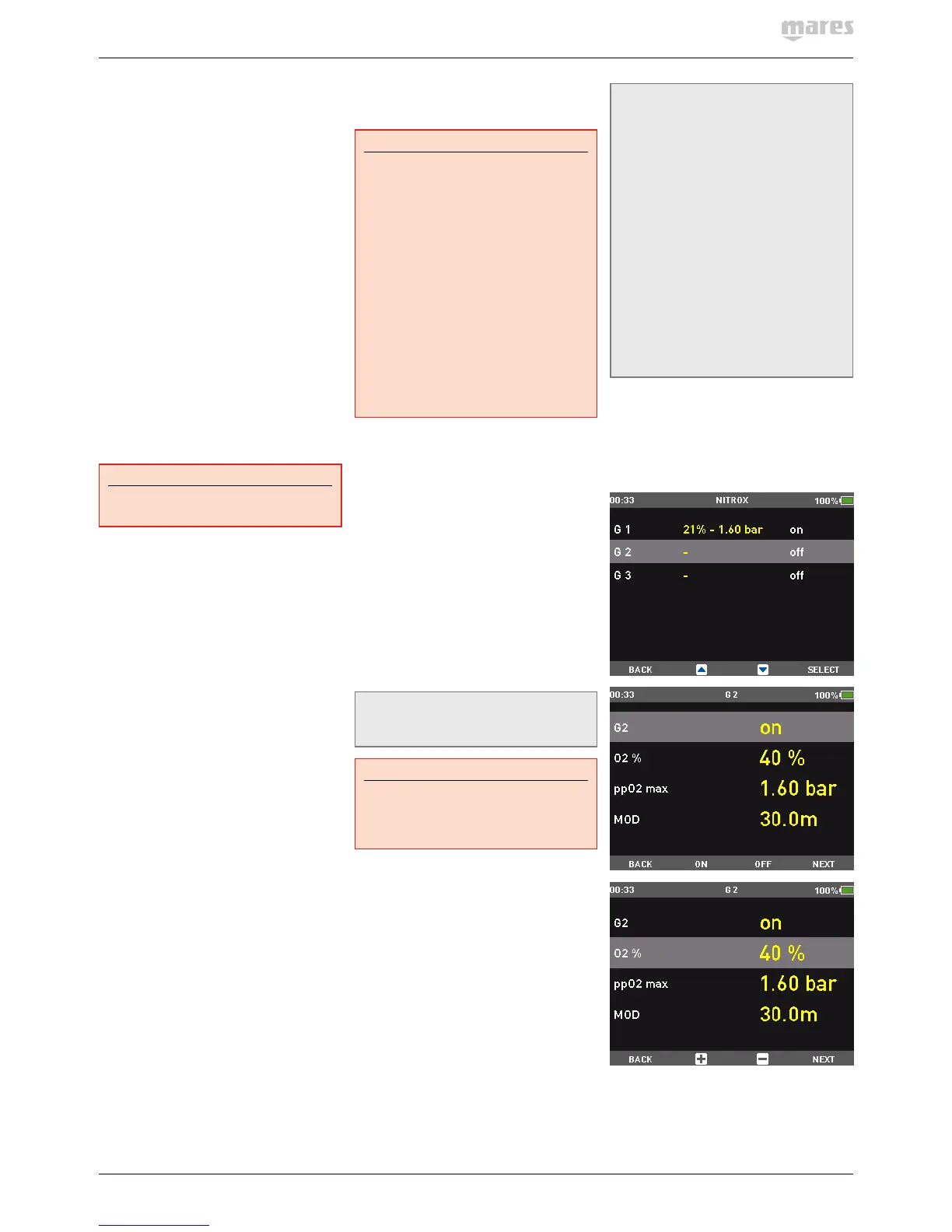
3.5.1. SETTING MORE THAN ONE GAS
The characteristics of the gases must be
entered in the computer before the dive. Itwill
then be your responsibility to tell Icon HD
which gas is currently being used during the
various phases of the dive.
NOTE
- If you dive using just one gas, select G1
and deselect the other two.
- For dives with two gases, select G1 and
G2 and deselect the third.
- When enabling G2 and G3, you must first
define G2 and then G3.
- You cannot activate G3 without first
having activated G2.
- G2 cannot have an oxygen percentage
higher than G3.
- If you set G2 to OFF, G3 will
automatically be set to OFF also.
- The MOD for G2 and G3 is the switch
depth for the corresponding gas. This
is what IconHD uses for its calculation,
alarms and suggested switch points.
- Setting a tank to OFF does not affect
the pairing of the corresponding tank
module.
To use multiple gases, you will need to enable
the gases and set the oxygen percentage and
the ppO
2
max for each one, as described in the
picture sequence below. Keep in mind that
the MOD for G2 and G3 is the depth at which
IconHD will prompt you to perform the gas
switch (see section 3.5.2 below).


 To Next Page
 Loading...