20
3.5.2. SWITCHING GAS
During Nitrox dives with the gas switching
function enabled, the third button from the left
has two functions, indicated by a double icon:
• Brief pressure: scrolls through the sequence
of information to the right of the dive time
.
• Prolonged pressure (1 second): displays the
gas switch screen .
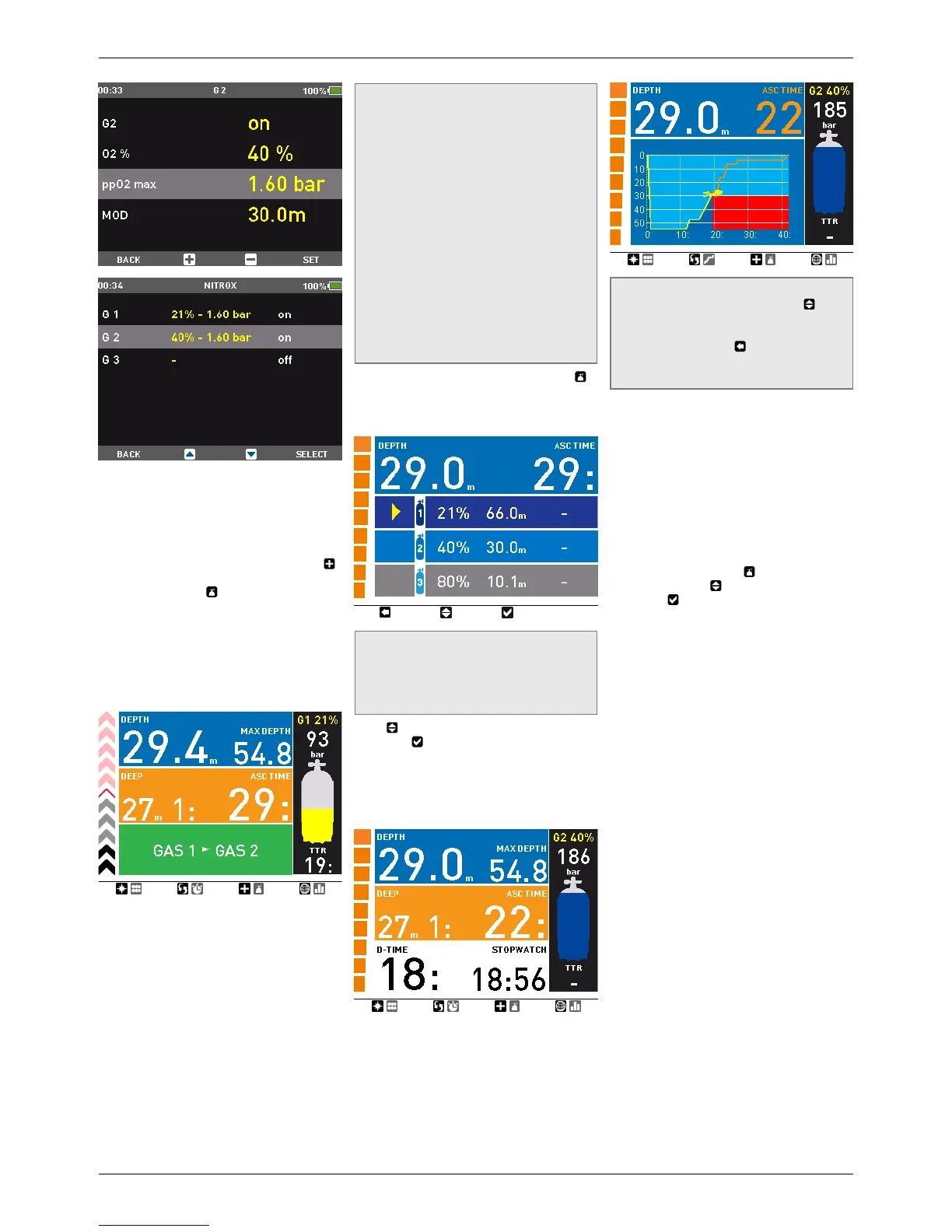
Icon HD always begins the dive with G1,
which has the lowest percentage of oxygen.
When during the ascent you reach the depth
corresponding to the MOD of G2, Icon HD
sounds an audible signal and displays the
message GAS 1 -> GAS 2 at the bottom of the
screen.
NOTE
- IconHD will allow the change only if
the depth is shallower than the MOD
corresponding to the set ppO
2
max.
- IconHD will not allow the gas switch if
you are deeper.
- The message at the bottom of the screen
remains only for 20 seconds. You can
however call up the gas switch screen at
any time, and switch to another gas as
long as your depth allows the gas to be
activated.
- The same process is repeated when
you approach the MOD for G3 with the
message GAS 2 -> GAS 3.
- If you have set G1, G2 and G3 and have
not switched from G1 to G2, once you
reach the MOD for G3 the display will
prompt the message GAS 1 -> GAS 3
At this point, by holding down for 1 second ,
the gas switch screen will appear: this shows
the set gases, with the currently active one
indicated by a yellow arrow.
NOTE
You can reach this screen at any time
during the dive, for instance to check on
the tank pressure and the planned switch
point of G2 and G3.
Press to scroll through the available gases,
then press to activate it. The decompression
calculation will reflect the switch in breathing
gas. In addition, the display will now show
the symbol of the new gas and its oxygen
concentration. In profile view, the area below
the MOD of the deco gas is depicted in red.
NOTE
- You can select another gas using , if
permitted at that depth.
- You can exit this mode without changing
the gas by pressing .
- If there is only one gas set, the computer
will not enter this menu.
3.5.3. SPECIAL SITUATIONS
3.5.3.1. SWITCHING BACK TO A GAS MIXTURE
WITH LOWER OXYGEN CONCENTRATION
There may be situations in which you have
to switch back to a gas with lower oxygen
concentration than what you are currently
breathing. This can happen for instance if you
want to descend deeper than the MOD for the
current gas, or if for instance you have run out
of gas in G3 during the decompression. To do
so, simply press and hold
to call up the gas
switch screen. Use to choose another gas,
then press
to activate it.
3.5.3.2. SUBMERGING BELOW THE MOD
AFTER A GAS SWITCH
If after having switched to a gas mixture with a
higher oxygen concentration you inadvertently
drop again below the MOD for that mixture,
the MOD alarm will immediately go off. Either
switch back to a gas mixture suited for that
depth, or ascend above the MOD for the gas
mixture you are breathing from.
3.5.4. TTR WHEN DIVING WITH MORE THAN
ONE GAS MIXTURE
Icon HD determines the TTR based on your
breathing pattern, the tank pressure for the
gas you are currently breathing, and the
decompression time calculated for that gas only.
It does not account for tanks other than what you
are currently breathing from, hence your actual
autonomy may be higher. For this reason when
diving with more than one gas mixture the LOW
TANK PRESSURE warning does not exist.
3.5.5. LOGBOOK FOR DIVES WITH MORE
THAN ONE GAS MIXTURE
For dives carried out with more than one gas
mixture, Icon HD adds information on oxygen
concentration, initial, final and differential
pressure for all gases used. On the dive profile,
switch points are shown on the time line.


 To Next Page
 Loading...