37
DIVE COMPUTER NEMO WIDE
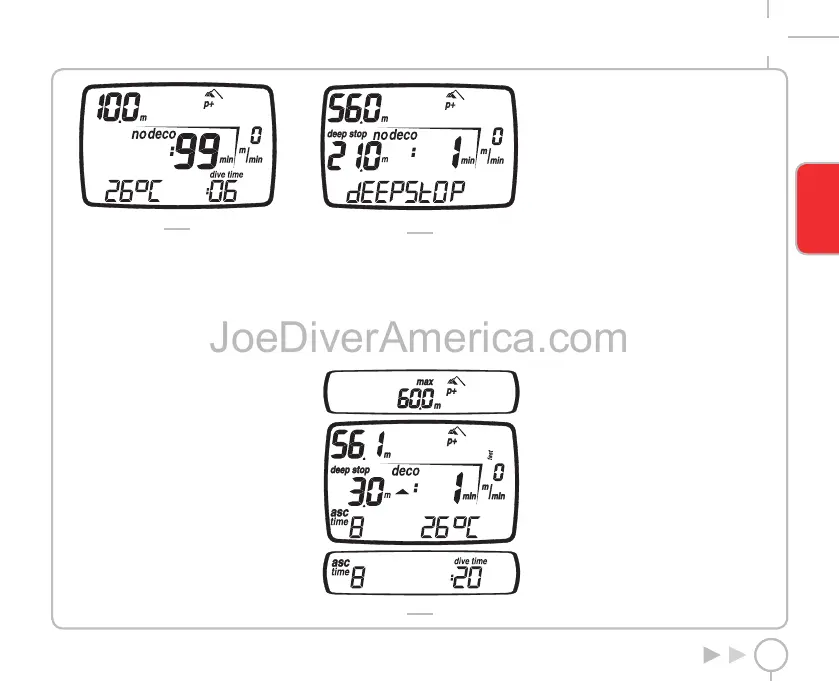
FIG. 12
The display bar shows you:
• the temperature (in °C or in °F);
• the duration of the dive so far (dive time) in
digits.
In this mode, the keys operate as follows:
<+> button:
• Press this button to display the maximum depth
reached. Press it again to remove the maximum
depth.
• Hold down the button for 2 seconds to activate
the display backlight.
<-> button:
• inactive in this mode.
<ENTER> button:
• temporarily displays (for 10 seconds) the dive
parameter settings, just as they appear in
Predive Mode.
<ESC> button:
• When the <ESC> button is pressed during
the dive, Nemo Wide will temporarily display
the estimated deep stop required. The data
displayed during the ascent may vary as a result
of the diver’s behavior. Divers should check
this data during their ascent for more precise
information on the estimated stop (Fig. 13).
FIG. 13
DIVE AIR: “DECOMPRESSION
STOP” DIVE
If the diver does not ascend when the residual time
has expired, Nemo Wide switches to “decompression
stop” mode, indicated by the appearance of the
“deco” message and by an audible alarm.
The following data are displayed in this mode
(Fig. 14):
FIG. 14
• “deco” icon”;
• current depth (in “m” or “ft”);
• depth of deepest decompression stop
(in “m” or “ft”);
• duration of the deepest decompression stop;
• icons for the altitude program and personal
correction factor (if enabled).
In this mode, the keys operate as follows:
<+> button:
• Press this button to display the maximum depth
reached. Press it again to remove the maximum
depth.
• Hold down the button for 2 seconds to activate
the display backlight.
<-> button:
by pressing this button you can choose to view on
the display bar:
• the ascent time;
• the temperature (in °C or in °F).
or
• the ascent time;
• the duration of the dive so far (dive time) in
digits
<ENTER> button:
• temporarily displays (for 10 seconds) the dive
parameter settings, just as they appear in
Predive Mode.
<ESC> button:
• When the <ESC> button is pressed during
the dive, Nemo Wide will temporarily display
the estimated deep stop required. The data
displayed during the ascent may vary as a result
of the diver’s behavior. Divers should check
this data during the ascent for more precise
information on the estimated stop.
ENGLISH
2334-Nemo Wide-ing-rev.indd 372334-Nemo Wide-ing-rev.indd 37 19/09/2006 11.09.4919/09/2006 11.09.49



 To Next Page