41
DIVE COMPUTER NEMO WIDE
!
WARNING
It is essential to correctly set the oxygen
percentage in the mix to ensure correct
readouts of:
• no decompression time remaining;
• decompression stop times;
• alarm on exceeding the maximum
permitted PPO
2
.
!
WARNING
Before the dive, make sure you have correctly
set up all the EAN dive parameters: percentage
of oxygen in the mix and limit for the partial
pressure of oxygen, which together determine
the maximum depth of the dive.
!
WARNING
The use of oxygen rich mixes exposes
the diver to different hazards from those
associated with compressed air. The
diver should be aware of these risks and
understand how to avoid them.
!
WARNING
Nemo Wide should only be used for diving
with oxygen rich mixes (EAN) by divers
who have the necessary certification. Lack
of appropriate diver training may result in
possibly serious injury.
!
WARNING
The user is advised to carefully read the
section on compressed air diving before
reading the section on EAN dives.
MONITORING OF THE GENERAL
DIVE PARAMETERS
OXYGEN PARTIAL PRESSURE
When the diver reaches a depth at which the
PPO
2
exceeds the maximum limit entered in the
corresponding parameter, (from 1.2 to 1.6 ATM),
Nemo Wide triggers an alarm condition signaled by:
• blinking depth indicator;
• audible alarm.
The alarm persists until the diver ascends enough for
the PPO
2
to return within the programmed limit.
!
WARNING
When the max PPO
2
alarm goes off, ascend
immediately until the alarm turns off.
EFFECTS ON CENTRAL NERVOUS SYSTEM
Oxygen toxicity exposure is monitored by means of a
CNS (Central System Calculation), based on currently
accepted recommendations for exposure limits.
This toxicity is expressed as a percentage value
which ranges from 0% to 100%. The percentage
CNS value is shown on the display. An alarm is
triggered when it exceeds 75%, signaled by blinking
of the value.
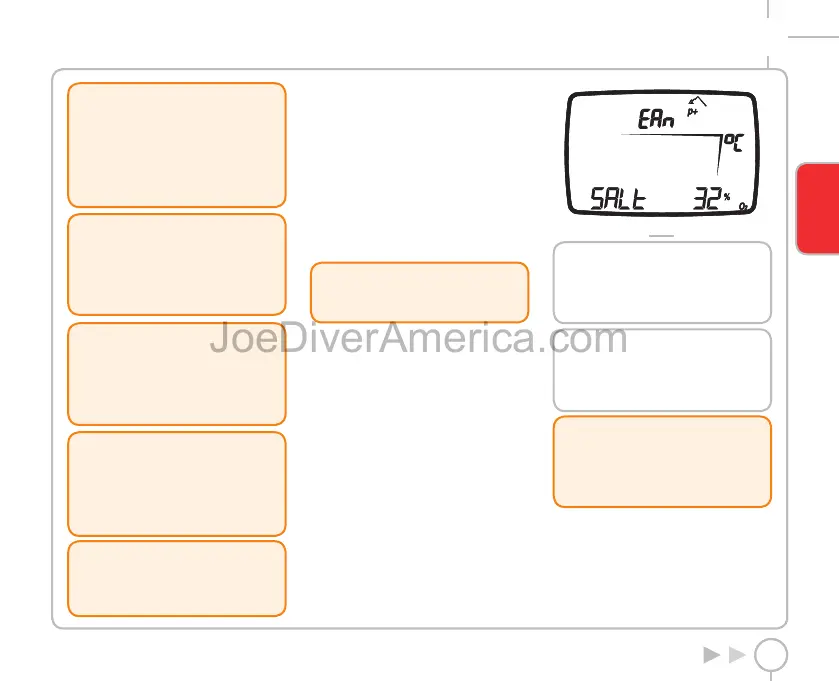
PREDIVE EAN
This operating mode remains active until the diver
goes below 1.2 meters (4 ft).
The following details are displayed (Fig. 22):
• type of dive (EAN);
• units of measurement (m-°C or ft-°F);
• type of water (Salt, Fresh);
• altitude program (if enabled) and level;
• personal correction factor (if enabled) and level;
• icon for %O
2
.
FIG. 22
NOTE
If Predive Mode persists for more than
10 minutes without any button being
pressed, Nemo Wide will revert to Time
mode.
NOTE
Before every dive, it is advisable
to enter Set Dive mode and check all
the parameter settings and the EAN
parameters in particular.
!
WARNING
We advise that when diving you always put
Nemo Wide into Predive mode.
Always check that the dive computer is
switched on early in your dive.
ENGLISH
2334-Nemo Wide-ing-rev.indd 412334-Nemo Wide-ing-rev.indd 41 19/09/2006 11.09.5119/09/2006 11.09.51



 To Next Page