47
DIVE COMPUTER NEMO WIDE
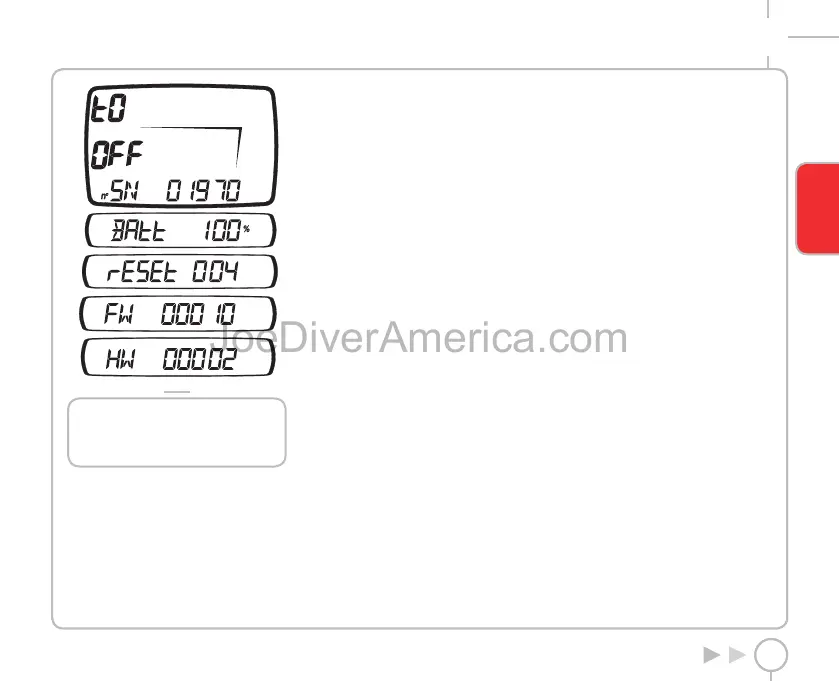
FIG. 33
NOTE
When the battery charge status is
displayed, pressing the ENTER button will
run an instant battery check.
FAQ
Q: What happens if I replace the battery after a dive,
before the desaturation time has run out?
A: The residual nitrogen memory will be cleared, and
the RGBM calculations for any previous dives will be
aborted. The diver who used the computer in the
previous dive must not dive for at least 24 hours.
Q: What happens if I start a dive while Nemo Wide is
still in OFF mode?
A: If left in OFF mode when you begin the dive,
Nemo Wide will still activate DIVE mode within 20
seconds of descending past 1.5 m (5 ft).
Q: When I replace the battery, will my Log Book dive
data be lost?
A: No.
Q: What happens if there is an uncontrolled ascent
or omitted decompression stop during an “AIR” or
“EAN” dive?
A: Nemo Wide automatically switches to “Stop”
mode at the end of the dive. The only Scuba mode
that remains active in this case is “Bottom time”.
Q: What indicates that “Bottom Time” mode was
chosen by the user, rather than forced as a result of
underwater behavior errors during the preceding
dive?
A: In the latter case, during the dive and in surface
mode, the pertinent error icons are displayed along
with the standard “Bottom Time” indications.
Q: If I select “AIR” or “EAN” mode after completing a
dive in “Bottom Time” mode, how will the new dive
be managed?
A: Nemo Wide does not allow you to do an “AIR” or
“EAN” dive in the 24 hours immediately following a
“Bottom Time” dive.
Q: Why is the PLANNING mode disabled sometimes?
A: This happens if you end a dive with an omitted
stop or an uncontrolled ascent. If this happens,
Nemo Wide switches to BOTTOM TIME and prevents
use of the Dive - AIR and Dive - EAN for 24 hours.
Q: What is the purpose of “OFF” mode?
A: By placing Nemo Wide in “OFF” you can display
the specifications of your dive computer.
Q: Where can I find the product serial number?
A: In OFF mode.
Q: If I already own the Iris interface, can I use it with
Nemo Wide?
A: No.
Q: Sometimes the temperature indication is too
high in time mode.
A: The thermometer was calibrated for use
underwater; out of the water Nemo Wide is affected
by your body temperature. Therefore if you want
a more accurate temperature reading, we suggest
that you take the Nemo Wide off your wrist and
leave it for a few minutes on a surface that is not
influenced by other temperatures.
Q: Are the 3 minutes of the safety stop included in
the ASC time?
A: The 3 minutes of the safety stop are not included
in the ASC time.
Q: What is a DEEP STOP?
A: To minimize the likelihood of critical bubble seed
formation, in case of decompression dives or dives
close to the no-deco limit, Nemo Wide prompts
for a series of one-minute Deep Stops at different
depths depending on the dive profile. This is one of
the special characteristics of the RGBM Mares-Wienke
Algorithm. For more information visit: www.rgbm.
mares.com
Q: If I ascend above the depth for the DEEP STOP can
I go back down to do the stop?
A: If you surpass the stop by more than a meter (3 ft),
the stop is canceled.
Q: Why doesn’t the DEEP STOP icon appear during
the dive?
A: The DEEP STOP only appears for decompression
dives or dives close to the deco limit.
ENGLISH
2334-Nemo Wide-ing-rev.indd 472334-Nemo Wide-ing-rev.indd 47 19/09/2006 11.09.5419/09/2006 11.09.54



 To Next Page
 Loading...
