9
Set time
Set Time is used for setting all the information which
appears on the instrument in Time Mode.
Set Time comprises:
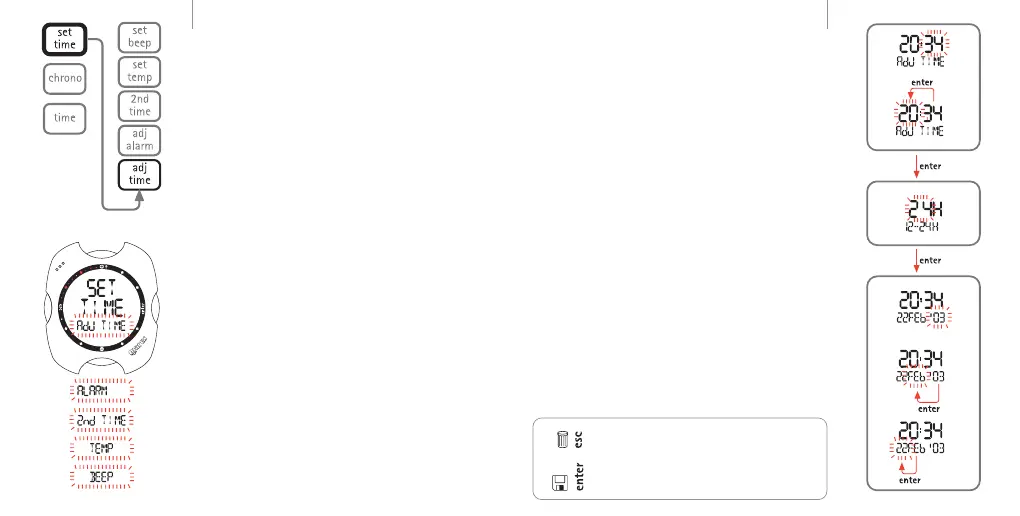
Adj Time: set the time, its format (12 or 24 hour),
and date.
Alarm: set and turn on/off the alarm.
2nd Time: enable and set a second time zone.
Temp: select the units of measurement.
Beep: enable time signal.
As described in the chapter "Shortcut to Set Time
Functions", to provide quicker access to the settings the
Set Time function can be invoked directly from Time
Mode.
time menu
EN
EN
Adj time
As already described briefly in the quick guide, the Adj
Time menu is used for setting the date and time of the
first time zone. It is also possible to choose the format
for the primary time display(12h - 24h).
In Set Time, press the <+> or <-> buttons until "Adj
Time" appears on the display bar and press the <enter>
button to accept the item.
Use the <+> or <-> buttons to adjust the values. Press
and release the button to change the value by one unit
at a time, or hold down the button for rapid increment
or decrement. Press the <enter> button to save the
changes made.
As illustrated in the figures, you must first set the time,
followed by the format, and finally the date.
The chosen time format will be used in all the Nemo
operating modes: alarm, second time zone, log book,
dive, stopwatch.
Note:
pressing <esc> during the settings cancels any changes
made and reverts to the preceding value;
pressing <enter> during the settings accepts the
changes made and advances to the next parameter, or
returns to the higher menu level.
Setting the TimeTime formatSetting the Date
10



 To Next Page