EN
2nd Time
Nemo allows you to set a second time. This can be
particularly useful when traveling between different
time zones.
Note: the format for the second time (12h-24h) will be the same as that
chosen for the first one.
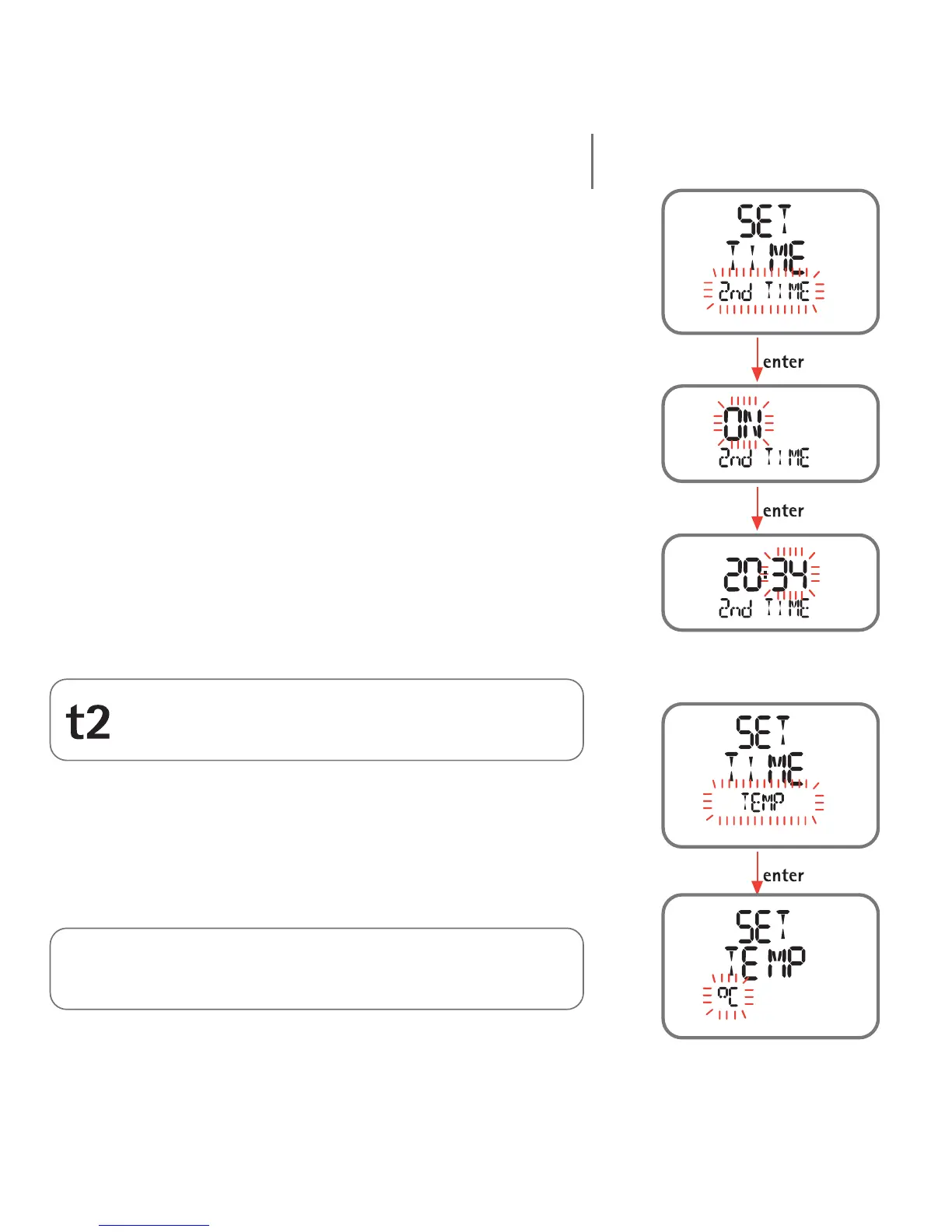
To enable the second time zone, scroll to the "Set Time -
2nd Time" item and then press the <enter> button (the
"ON" message appears on the display bar). Press the
<enter> button again to begin setting the second time,
proceeding in the same way as for the first time.
When it is enabled, the second time will appear on the
primary time display.
Set Temp
The Set Temp item in the Set Time menu selects the
units of measurement for temperature (degrees Celsius
or Fahrenheit), by setting either metric or imperial units.
Note:
The units chosen in the Time Menu will also be used in the Dive
Menu, and vice versa.
Note:
This icon appears in Time Mode to indicate that the second
time is active.
12



 To Next Page