11
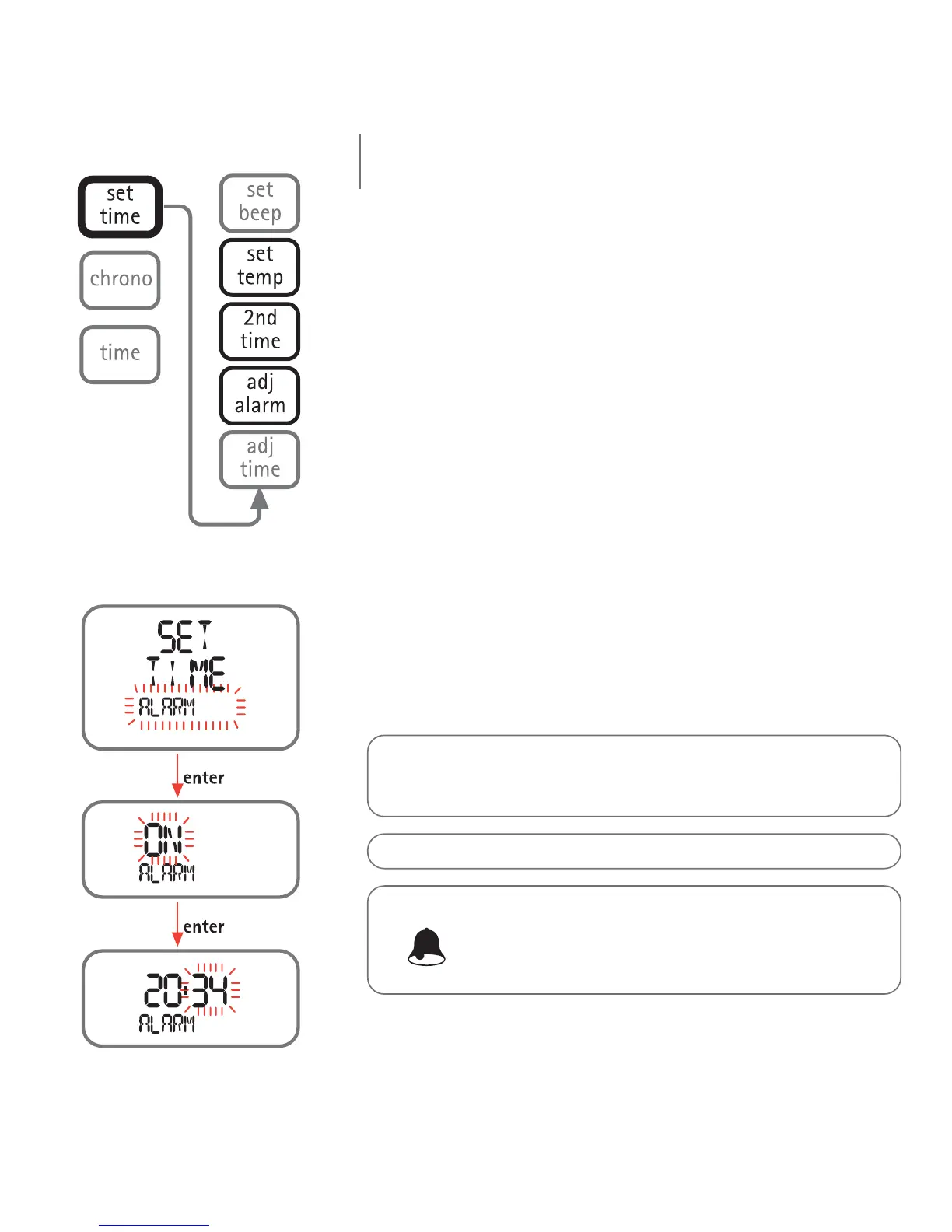
Adj Alarm
The alarm is refers to whichever time is on the primary
display, which can be either the first or second time
zone. The following paragraph explains how to enable
and set a second time zone.
Note: the alarm time format (12h - 24h) depends on the selection made
for the primary time display.
To set the alarm, access Set Time - Alarm and press the
<enter> button to enable the alarm (the "ON" message
will appear on the display bar). Press the <enter>
button again to access the function for setting the
alarm time.
If the alarm is turned on, Nemo will sound for one
minute at the programmed time. To silence the alarm,
press any one of the buttons.
Note:
In Time Mode this icon indicates that the alarm is on.
In Dive - Free Dive mode, instead, it indicates that the
audible alarms are enabled.
Note: the alarm function is disabled when Nemo is in DIVE mode.
Note: Nemo will automatically re-activate the alarm for the
following day; to avoid this, go back to SET TIME ALARM and turn the
alarm "off".
EN
time menu



 To Next Page