EN
Dive - "Deco Stop" Nitrox
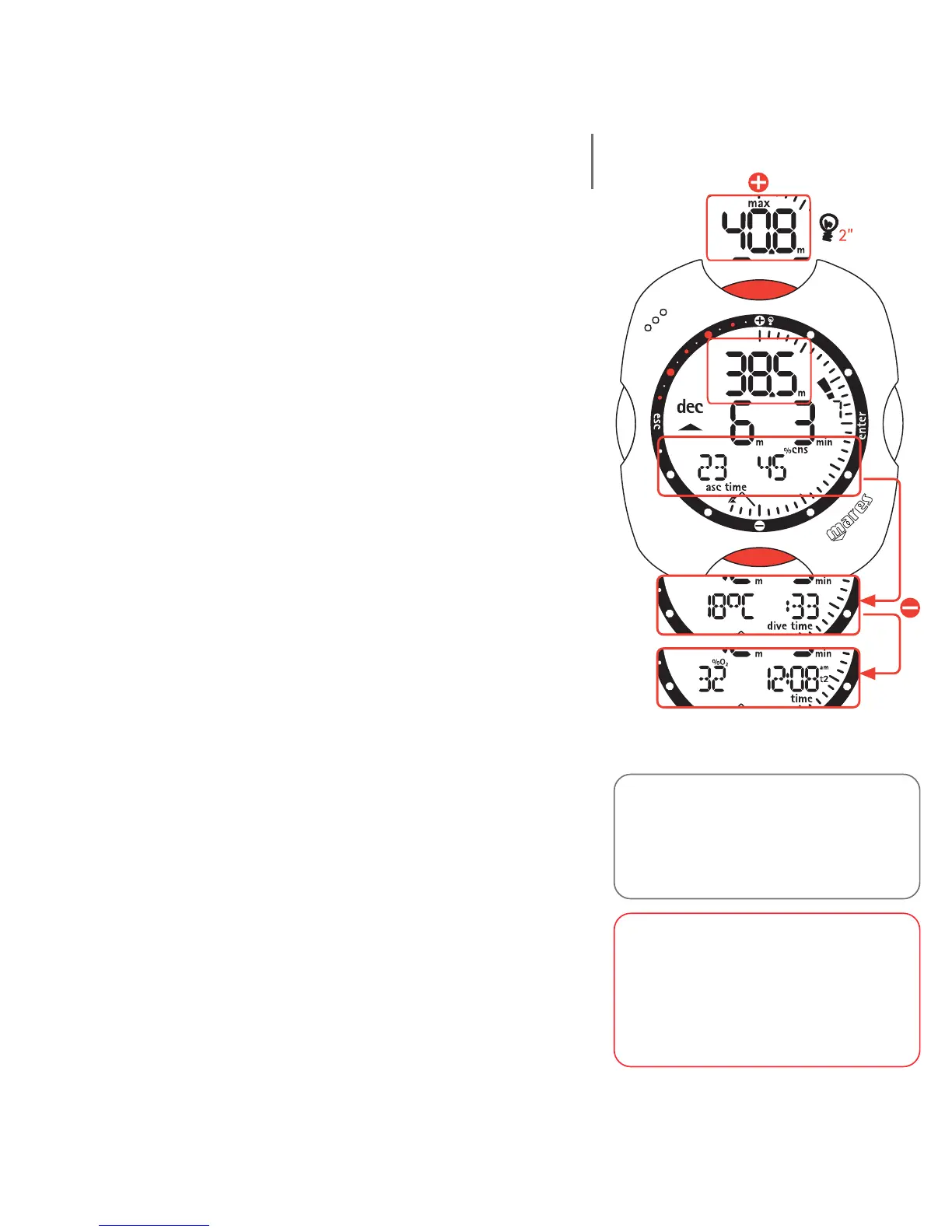
The details displayed in the case of decompression-stop
Nitrox dives are the following:
• "deco" icon;
• current depth (in "m" or "ft");
• depth of deepest decompression stop (in "m" or "ft");
• duration of the deepest decompression stop;
• duration of the dive so far, in minutes, shown in
analog form around the perimeter of the dial;
• icons for the altitude program and personal
correction factor (if enabled).
On the display bar it is possible to view one of the
following:
• the ascent time, i.e. the total time necessary for
surfacing;
• the %CNS.
Or
• the temperature (in °C or in °F);
• the duration of the dive so far (dive time) in digits.
Or
• the %O
2,
• the primary time.
WARNING
To fully understand how to perform
decompression with Nitrox, the user
should also carefully read the
corresponding section for compressed-
air deco stop dives.
Note:
The procedure for scrolling the items
on the display is identical to that
described in the section on diving with
compressed air.
40



 To Next Page