29
PUCK DIVE COMPUTER
ENGLISH
HOW THE PUCK DIVE
COMPUTER WORKS
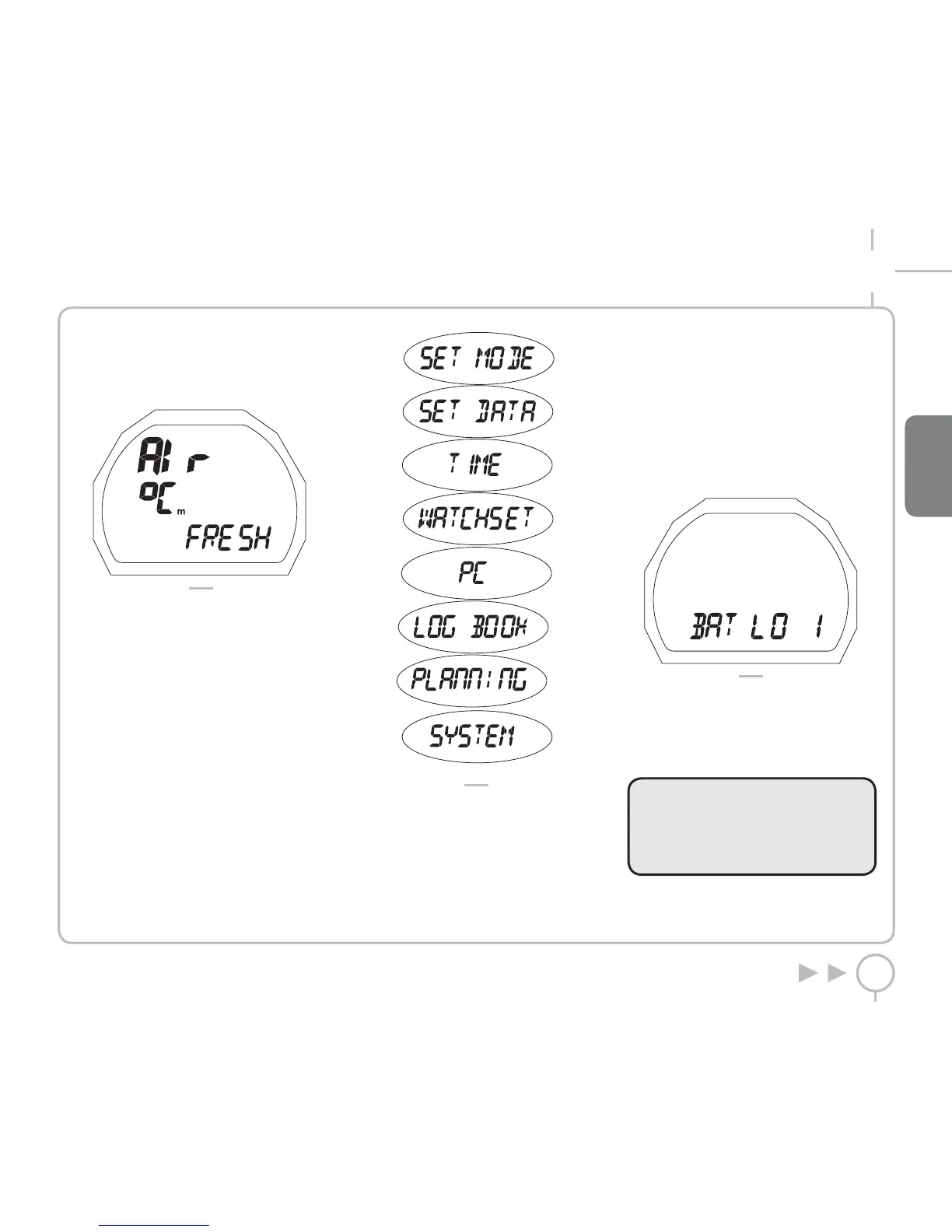
Press the button to switch on PUCK, which starts
in PREDIVE - AIR mode (Figure 1).
FIG. 1
Press the button to scroll through the main menu,
which offers 9 operating modes (Figure 2).
• PREDIVE
• SET MODE
• SET DATA
• TIME
• WATCHSET
• PC
• LOGBOOK
• PLANNING
• SYSTEM
FIG. 2
The buttons follow the same logic in all operating
modes:
• Press and release to scroll through the menu
items.
• Holding down the button for approximately
2 seconds will enter a specific menu or
confirm the selections you have made.
CHECK THE BATTERY POWER LEVEL
PUCK will periodically check the battery power
level; you can view an indicator in SYSTEM mode.
There are three power levels:
• BATT OK
• BATT LO 1
• BATT LO 2
If a low charge level is detected (BATT LO 1 ), the
battery icon turns on and the display backlight
function is disabled (Figure 3).
FIG. 3
When the icon first appears, replace the battery
as soon as possible.
If the level reaches the minimum level (BATT LO 2),
all the PUCK functions will be disabled, and only
SYSTEM mode can be accessed.
WARNING
When the computer has not been used
for a long time, we recommend that you
check the battery power, and replace it
if necessary.



 To Next Page