In order for Quad Air to display tank pressure
and gas consumption information, you must first
establish a channel of communication between
the tank module and Quad Air. This is called
pairing. This operation needs to be performed
only once and ensures a permanent and
interference-free link between the two devices.
NOTE
To perform the pairing operation, the tank
module must be pressurized to at least
15bar/220psi. Hence it must be mounted
on a first stage regulator, which is itself
mounted on a full scuba tank and the valve
opened.
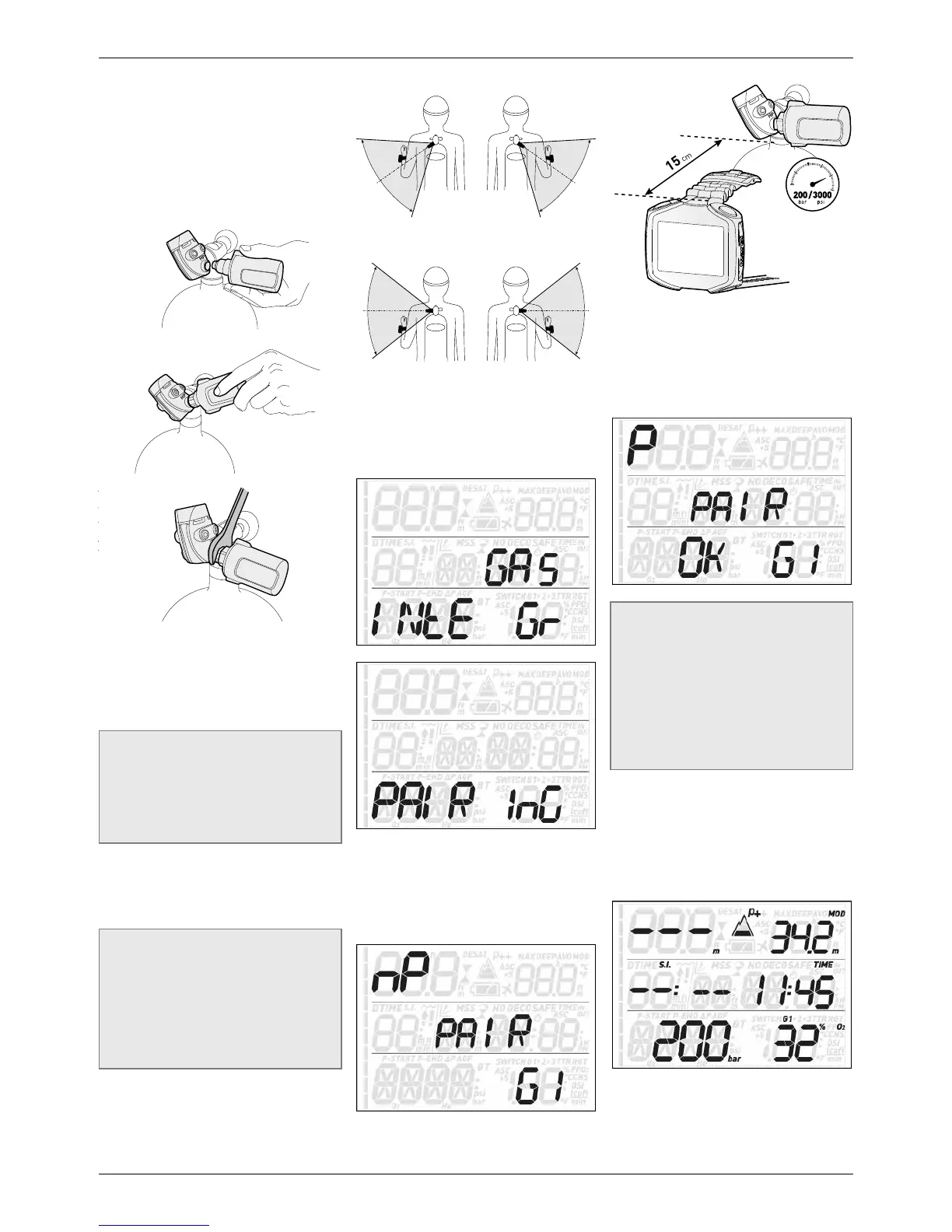
To mount the tank module on the first stage
regulator, first remove the high pressure port
plug, then screw in the tank module gently by
hand until you feel a minimum of resistance,
then use a 19mm wrench to tighten it.
NOTE
- Do not force the tank module while
holding it by the plastic cap.
- Do not overtorque while using the
wrench: the o-ring seal is assured as
soon as you feel the first resistance. The
only reason for using a wrench to tighten
a bit more is to prevent the tank module
from unscrewing itself over time.
The Mares tank module communicates via radio
frequency with Quad Air. For best transmission,
we recommend positioning the tank module as
described in the next figures.
To pair the tank module with the Quad Air,
proceed as follows:
- Open the tank valve to pressurize the tank
module. You now have two minutes to
perform all steps listed below;
- Go into SET/SET DIVE/GAS INTEGR/
PAIRING.
- The display will show G1 in the lower right
corner and the word PAIR in the middle. The
top left corner shows the letters nP (Not
Paired) or P (Paired) to indicate the current
status of that channel. Use the UP and
DOWN buttons in case you are trying to pair
channel G2 or G3.
- Place Quad Air at about 15 cm / 6 inches
from the tank module as shown in figure 9.
- Press ENTER and wait until either OK or
NOT OK appear on the display.
In the first case you have successfully
established a connection, in the second you
need to repeat the operation, but you must
turn off the valve and depressurize the
first stage completely, then wait 5 minutes
before attempting again.
NOTE
- When diving with more than one gas
mixture, tanks G1, G2 and G3 must be
set to increasing oxygen levels. Refer
to section 3.5 for more information on
multigas diving.
- A tank module can only be paired to one
channel on one Quad Air. If you pair the
same tank module to a second channel
on the same Quad Air or to a second
Quad Air, the first one will be erased.
After a successful pairing of G1 to Quad Air, the
pre-dive display will show the tank pressure
in either bar or psi upon pressing and holding
the lower left button. If tank G1 has not been
paired, Quad Air will show nP instead of a
pressure value. If G1 has been paired but Quad
Air is not receiving any signal, it will show - - -
instead of a pressure value.


 To Next Page
 Loading...