13
NOTE
The MOD for G2 is the switch depth for
the corresponding gas. This is what
Smart uses for its calculation, alarms and
suggested switch points.
3.5.1. SETTING MORE THAN ONE GAS
The characteristics of the gases must be
entered in the computer before the dive. It will
then be your responsibility to tell Smart which
gas is currently being used during the various
phases of the dive.
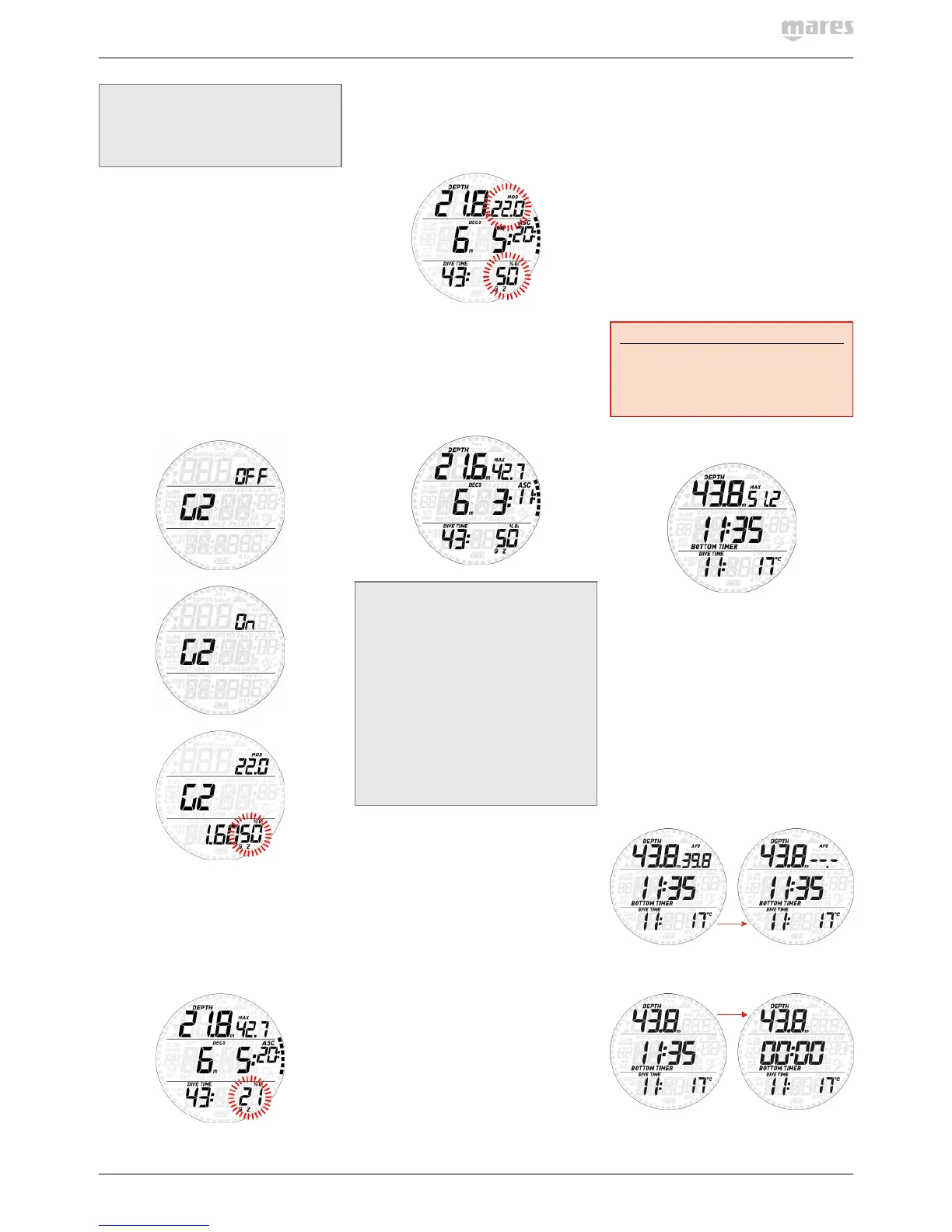
To use multiple gases, you will need to enable
the gases and set the oxygen percentage and
the ppO
2
max for each one. Keep in mind that
the MOD for G2 is the depth at which Smart
will prompt you to perform the gas switch (see
section 3.5.2 below).To enable G2, press the
upper button when G2 OFF is displayed and
it will change to G2 ON. Now press and hold
to confirm it. This will lead you to a display in
which you can set the O
2
% and ppO
2
/MOD for
G2 in a manner completely similar to G1.
3.5.2. SWITCHING GAS
Smart always begins the dive with G1, which
has the lowest percentage of oxygen. When
during the ascent you reach the depth
corresponding to the MOD of G2, Smart sounds
an audible signal and the oxygen concentration
of G1 starts to blink in the lower right corner.
Press the upper button while this indication is
blinking to initiate the gas switch: the oxygen
percentage of G2 starts to blink in lieu of that
of G1, and in the top right corner the letters
MOD and the value of the MOD for G2 appear,
blinking.
Press and hold the upper button to confirm
the switch to G2, or press the lower button to
cancel the gas switch and stay with G1. In both
cases the set oxygen concentration will be
displayed steadily in the lower right corner of
the screen, and within 20 seconds the ascent
time is updated to reflect the higher oxygen
concentration in the breathing gas.
NOTE
- Smart will allow the change only if
the depth is shallower than the MOD
corresponding to the set ppO
2
max.
- Smart will not allow the gas switch if you
are deeper.
- The automatic blinking of the oxygen
concentration of G1 lasts only for 20
seconds. You can however initiate the
gas switch at any time by pressing and
holding the upper button when the
oxygen concentration is displayed in the
lower right corner, then switch to G2 as
long as your depth allows the gas to be
activated.
3.5.3. SPECIAL SITUATIONS
3.5.3.1. SWITCHING BACK TO A GAS MIXTURE
WITH LOWER OXYGEN CONCENTRATION
There may be situations in which you have
to switch back to a gas with lower oxygen
concentration than what you are currently
breathing. This can happen for instance if you
want to descend deeper than the MOD for the
current gas, or if for instance you have run
out of gas in G2 during the decompression. To
do so, simply press the lower button until the
oxygen concentration is displayed in the lower
right corner, then press and hold the upper
button to initiate the gas switch. From here on
the procedure is the same as described in 3.5.2.
3.5.3.2. SUBMERGING BELOW THE MOD
AFTER A GAS SWITCH
If after having switched to a gas mixture with a
higher oxygen concentration you inadvertently
drop again below the MOD for that mixture,
the MOD alarm will immediately go off. Either
switch back to a gas mixture suited for that
depth, or ascend above the MOD for the gas
mixture you are breathing from.
3.6. BOTTOM TIMER MODE
When Smart is set to bottom timer mode, it
will only monitor depth, time and temperature,
and will not carry out any decompression
calculation. Maximum displayed dive time
in gauge mode is 999 minutes. You can only
switch to bottom timer mode if the computer is
completely desaturated. All audible and visual
alarms, other than the low battery alarm, are
turned off.
WARNING
Dives in bottom timer mode are performed
at your own risk. After a dive in bottom timer
mode you must wait at least 24hours before
diving using a decompression computer.
During a dive in bottom timer mode, the
following information is displayed:
- current depth
- max depth
- stopwatch
- dive time
- temperature
- in case of an ascent: ascent speed
(in m/min or ft/min).
Press the upper button to toggle between max
depth, average depth and an empty field. Press
the lower button to bring up the time of day in
lieu of the dive time (the display reverts back
to dive time after 4 seconds).
While the average depth is displayed, pressing
and holding the upper button resets the average
depth.
From any other display, press and hold the
upper button to restart the stopwatch.


 To Next Page
 Loading...