14
3.6.1. DIVE VIOLATION INDUCED BOTTOM
TIMER MODE
The following violations can occur during an
Air or Nitrox dive:
- Uncontrolled ascent.
- Missed deco stop.
In case of a violation, Smart will restrict the
use of Air and Nitrox mode for 24hours, and
will only allow operation in bottom timer mode.
3.7. FREE DIVE MODE
Smart features a free diving mode with
dedicated features specifically for breath hold
divers. In free diving, we differentiate between
immersion and dive session. An immersion
is the individual trip below the water surface.
The dive session is a group of immersions
performed in sequence without exiting the free
dive mode.
WARNING
The practice of free diving exposes divers
to different hazards from those associated
with scuba diving. The diver should be
aware of these hazards and understand
how to avoid them.
WARNING
Do not practice free diving within 24 hours
of having performed a scuba dive.
3.7.1. SETTINGS
Go into the MODE menu and from here select
FREE then press and hold the upper button to
confirm your choice. This will automatically
lead you into the settings menu for free diving.
Press and hold the lower button to exit if you
don’t need to change any of the settings. Else
scroll through the available settings pressing
either button. To edit a setting, press and hold
the upper button, then press either button to
modify the setting, then press and hold the
upper button again to confirm the change. The
available settings are:
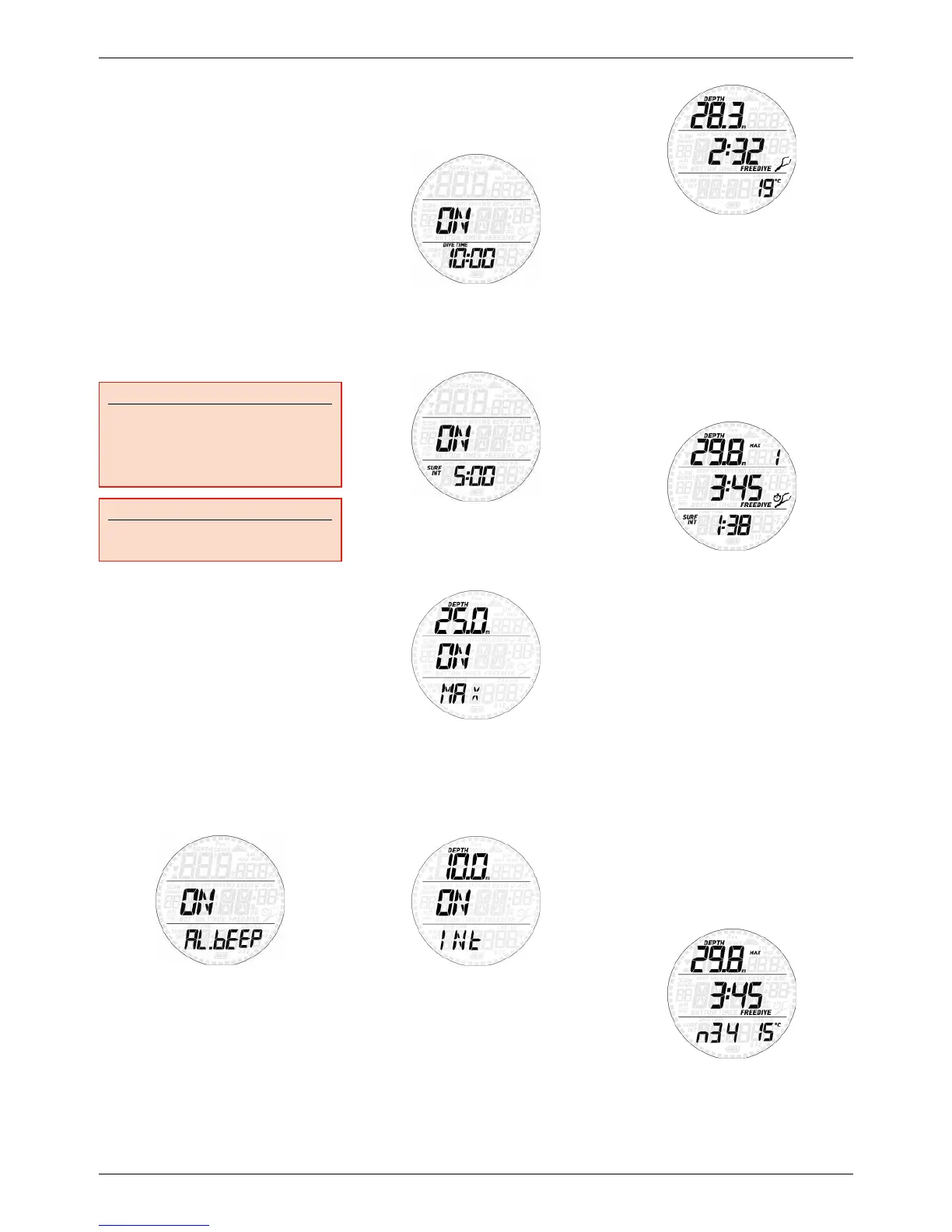
AL.beep
This allows you activate or deactivate all
warnings at once.
Dive time
If active, when the dive time reaches the set
limit an audible alarm will go off and the dive
time will blink on the display.
Surf int
If active, when the surface interval reaches the
set limit an audible alarm will go off and the
surface interval will blink on the display.
Max
If active, upon reaching the depth defined in
the setting an audible alarm will go off and the
depth will blink on the display.
Int
This allows you to set a depth interval at which
a short audible sequence is activated. For
instance, if you set a depth interval of 5m/15ft,
the audible sequence will go off at 5m/15ft,
10m/30ft, 15m/45ft etc.
3.7.2. USING SMART ON A FREE DIVE
Put Smart into PRE DIVE so that as soon
as you submerge past 1.2m/4ft it will start
monitoring your dive. Smart will show the
current depth in the top row, the dive time in
minutes and seconds in the middle row and
the water temperature in the bottom row.
Press the lower button and the time of day
will appear for a few seconds to the left of the
temperature. Press and hold the lower button
to activate the backlight.
3.7.2.1. SURFACING BETWEEN IMMERSIONS
When returning to a depth of less than
0.8m/3ft, Smart switches to surface mode.
The display will show the maximum depth
of the dive that just ended in the top row, its
duration in the middle row, and the surface
time in minutes and seconds in the bottom
row together with the minimum temperature
recorded during the immersion. The number
to the right of the max depth is the sequential
counter of the immersions in the dive
sequence.
By pressing the upper button the display
switches to maximum depth of the dive
session in the top row, maximum dive time of
the session in the middle row and minimum
temperature during the session in the bottom
row.
Press and hold the upper button to exit free
dive mode. Do this only at the end of your
dive session so that your immersions are
all logged together (see section 3.7.3 for
information about the logbook in free dive
mode). Note that Smart will exit the free dive
mode automatically after 10 minutes without
immersion.
3.7.3. LOGBOOK IN FREE DIVE MODE
Smart separates scuba dive logs from free dive
logs, hence there is a dedicated summary page
for each. As you enter the logbook function, the
two alternate every 4 seconds. The free dive
summary shows max depth in the top row,
longest dive time in the middle row, number
of sessions and minimum temperature in the
bottom row.
Upon pressing the upper button, individual
logs will be shown in chronological sequence.
Scuba dives are described in section 2.5. Free
dives are grouped in sessions, and for each
session there are two summary pages: the


 To Next Page
 Loading...