26
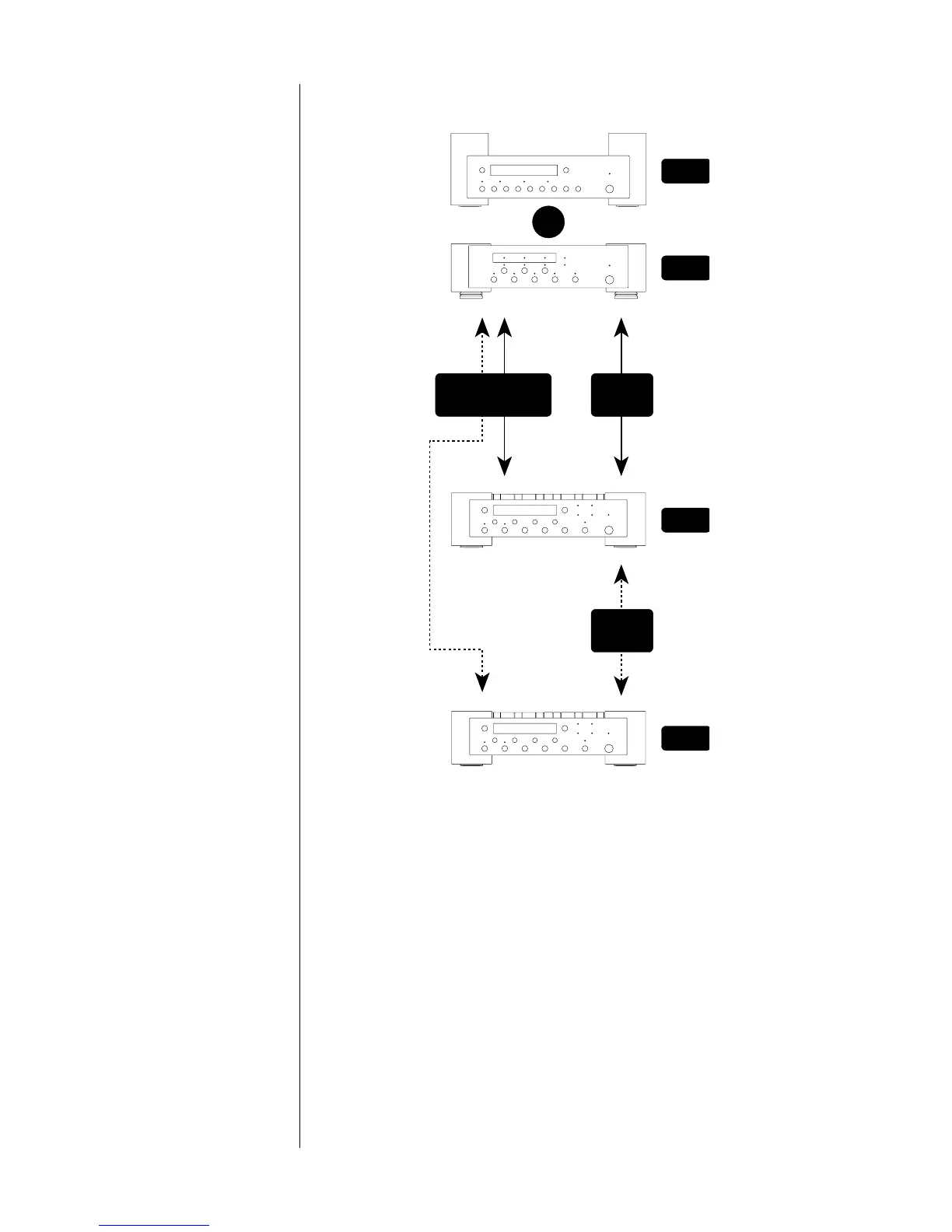
In summary, then, this diagram shows the connections you need
to make to link your Nº31 to a Mark Levinson digital processor.
Nº31
OR
digital output
digital input
slave in
master
slave out
Link
cable
digital output slave in
Nº31
Nº30
Nº35
Link
cable
Audio
connections
11. The Nº31 is set internally for 100V, 120V, 200V, 220V, or 240V AC
mains operation @ 50 or 60Hz. Make sure that the label on the
rear panel of your Nº31 indicates the correct AC operating
voltage for your location. (See "Rear panel.")
If the voltage indicated is incorrect, or if you wish to change the
AC operating voltage of the Nº31, see your Mark Levinson dealer.
The Nº31 can be powered by a normal 15-ampere AC mains line.
If other devices are also powered from the same AC line, their
additional power consumption must be taken into account.
Voltage setting
Quick-reference:
Connecting the Nº31 to a
Mark Levinson
digital processor


 To Next Page