3
repeat disc repeat track program clear program review program save index mode
on track
on disc
MADRIGAL AUDIO LABORATORIES
repeat A
>
B preview program + program –
display
mode
1086
7 9
5
elapsed time
time remaining
standby
REFERENCE
CD TRANSPORT
Nº 31
111 12 15
13 14
display
intensity
2 43
track index time
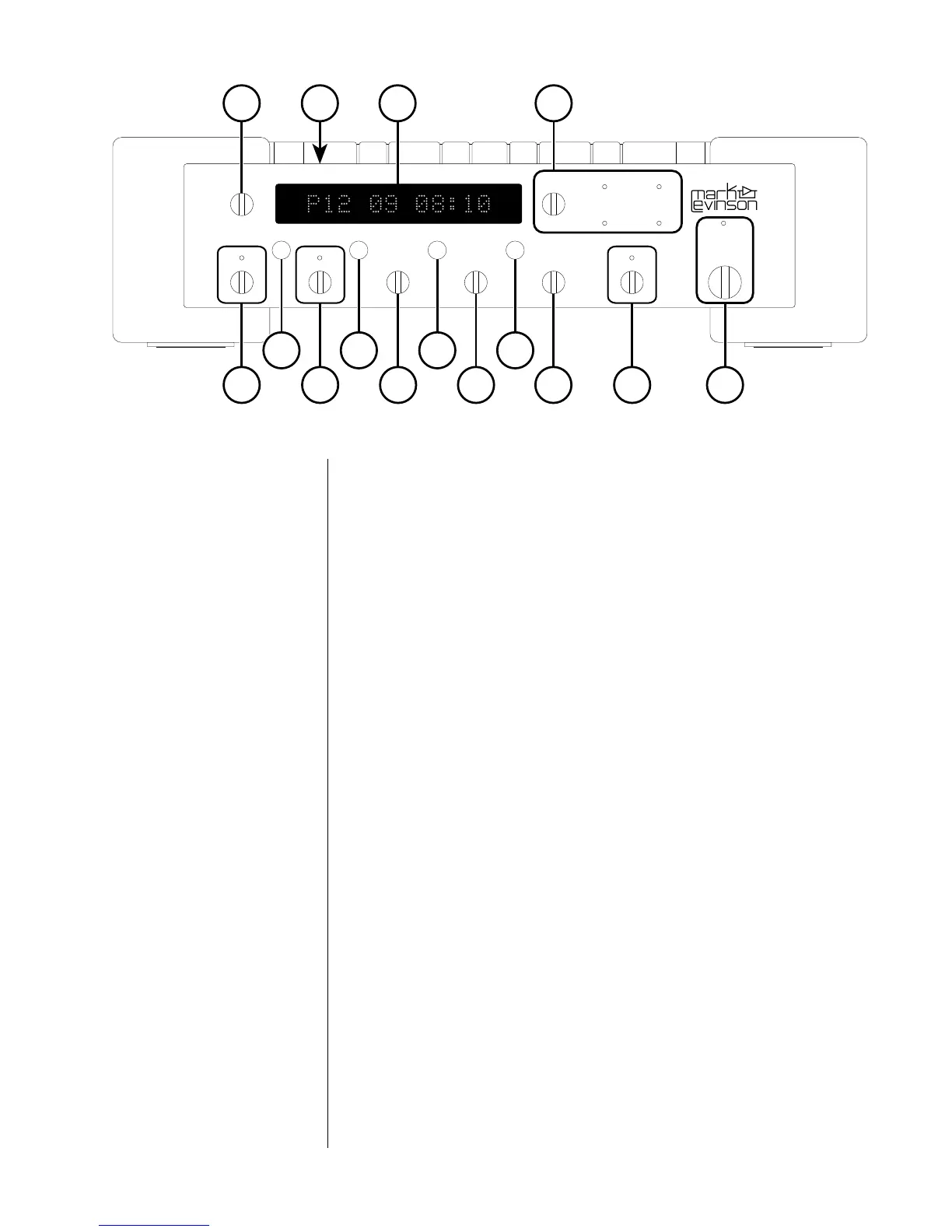
Front panel
1 standby
When the Nº31 is connected to AC power and the main power
switch on the rear panel is in the "|" position (see "Rear panel"),
pressing this button takes the Nº31 out of "standby" mode and
enables the front-panel controls.
When the Nº31's main power switch is first turned on (or when
power is restored after an interruption), the Nº31 will be ready to
operate (that is, it won't be in standby mode).
Pressing standby again places the Nº31 into standby mode and
disables the front-panel controls.
While the Nº31 is in standby mode, the Display is dark and the
standby LED flashes slowly. When the Nº31 is ready to operate (not
in standby mode), the standby LED remains lighted.
Note: When going into standby, the Nº31 deactivates its
digital outputs. With some digital processors, this may result in
a low-level "pop" on the audio outputs (
linked
Mark Levinson
digital processors aren't subject to this effect).
To prevent this low-level "pop" from coming through your
system's speakers or headphones, adjust the volume to its
lowest level before placing the Nº31 into standby.


 To Next Page