19
FX20 INSTALL GUIDE
VERSION 1.6 | APRIL 26, 2024
SET THE ENCODER GAPS
Before beginning the initial print run, it is critical to calibrate alignment and spacing of the encoder strips
and sensors. After leveling, the sensors may collide with the encoder strips, in which case the strips must
be adjusted in order to prevent damage. If an encoder is out of range of a strip, sensor readings will be
inaccurate and the indicator LED will turn red. To ensure correct operation, set the encoder gaps as follows:
YAXIS ENCODER
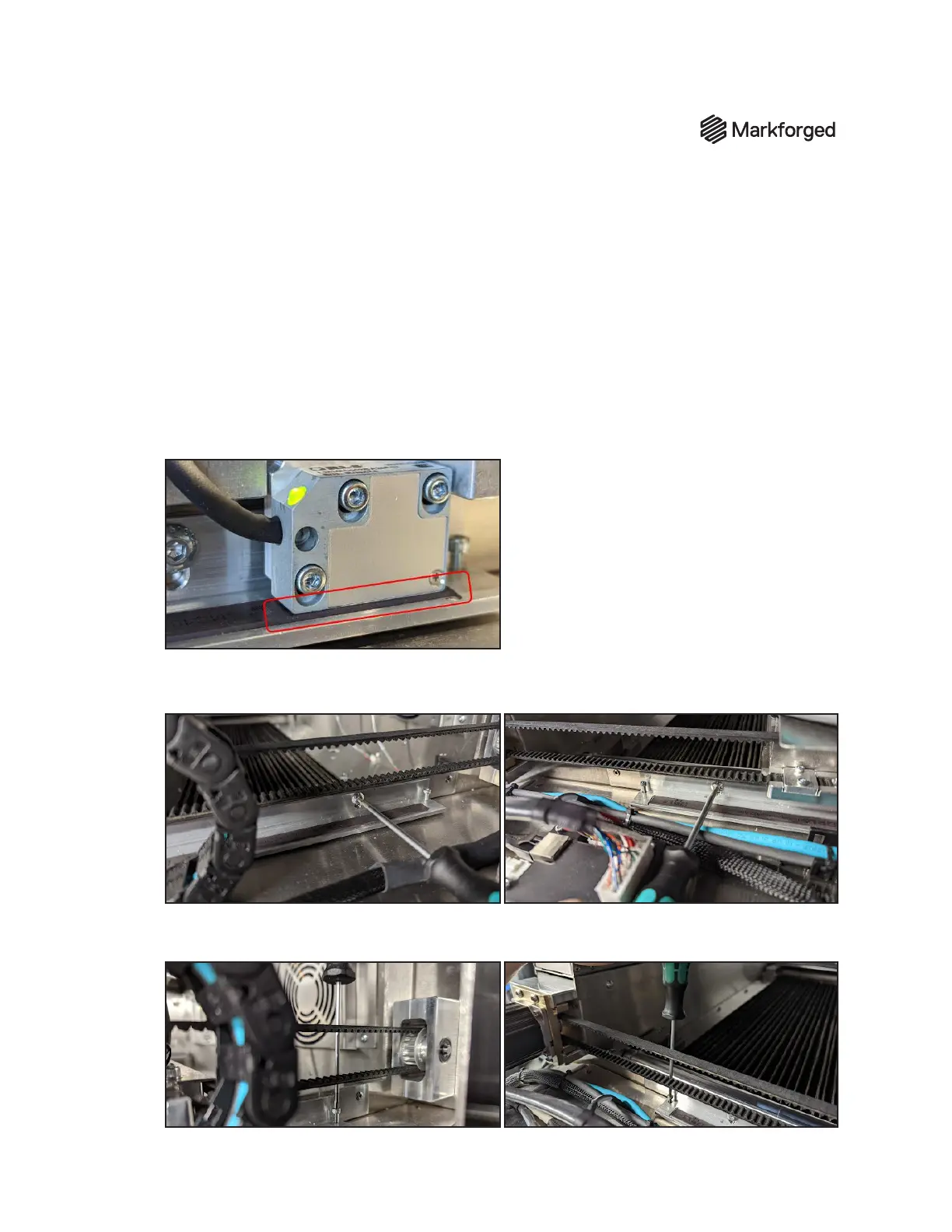
1. Conrm that all three y-axis encoder mounting screws are fully tightened. (See photo in step 2.)
2. Slowly and carefully move the gantry rail through the entire Y-travel of the machine by hand while
observing the spacing between the encoder sensor and the strip. Look for collisions throughout
the travel on both Y rails.
If the sensor and strip collide, immediately stop moving the gantry. Proceed to step 3.
3. Use a 3mm hex driver to slightly loosen (but do NOT remove) the two screws that mount the rail.
4. Use the 2.5mm hex driver to rotate the ne adjustment screws (located at the end of the encoder
strip) counterclockwise until they do not protrude from the bottom of the rail.



 To Next Page