16
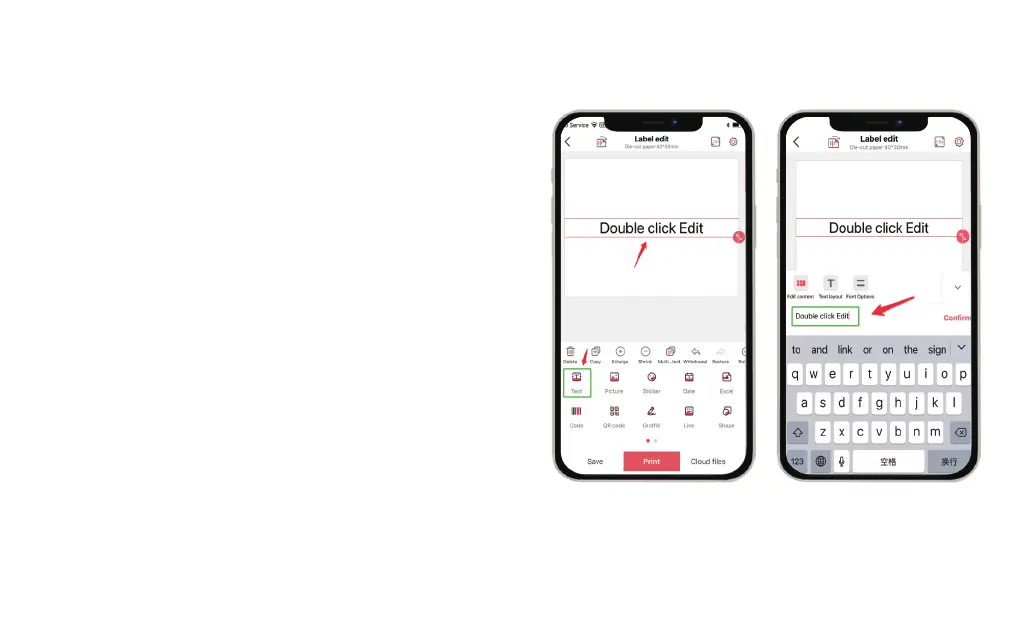
Double click "Double click Edit" to edit your text you can drag the text
box to adjust the text location. Choose the text size, font, and left and
right alignment, or directly drag the text box to complete the
adjustment of the text position. You can also add some stickers,
Graffiti, Dates, Lines, Shapes, and Numbers.P50 label machine also
supports printing pictures, Excel, Code, QR code, and OCR.
After finishing the text font settings, click Print to enter the print
preview page. On the print preview page, you can add the number of
copies to be printed at one time and the direction of printing, we
recommend the default print direction.
17


 To Next Page