22
Category
Print
Fail
Stop
Printing
Item NO. Question Answer (Possible causes and solutions)
Why is the printed
label blank
Why the printing
is blurry and
incomplete
Why is the
printed content
not centered?
Why did the
printer suddenly
stop printing
a.The printing paper is placed upside down.
Replace the paper in the correct orientation
b.Paper issue: Replace another label paper, do
label calibration and print
a. Low Power. the red light is flashing: Charge
the printer.
b. Didn' t do label calibration before printing Do
label calibration and print again.
c.Poor quality printing paper, replace a new roll
of labels. Print head issue: Check whether there
is any done on the print head. If it is, wipe and
clean the print head with an alcohol swab In the
shutdown state.
a.Not calibrate the label before printing: calibrate
it before starting to print.
b.The model setting of the printer in the APP
does not match the printer used, reselect the
model.
c. If the label size set in the APP does not match
the actual label, reset the size, and try printing
again.
d.Confirm whether the font is too large beyond
the printing range, adjust the font size, and try
again.
In order to ensure the reliability of the printer, the
printer is designed with various self-protection,
including“out of paper”, "paper bin open”, "low
power”, etc. Please deal with the the situation
according to the related solution.
6
7
8
9
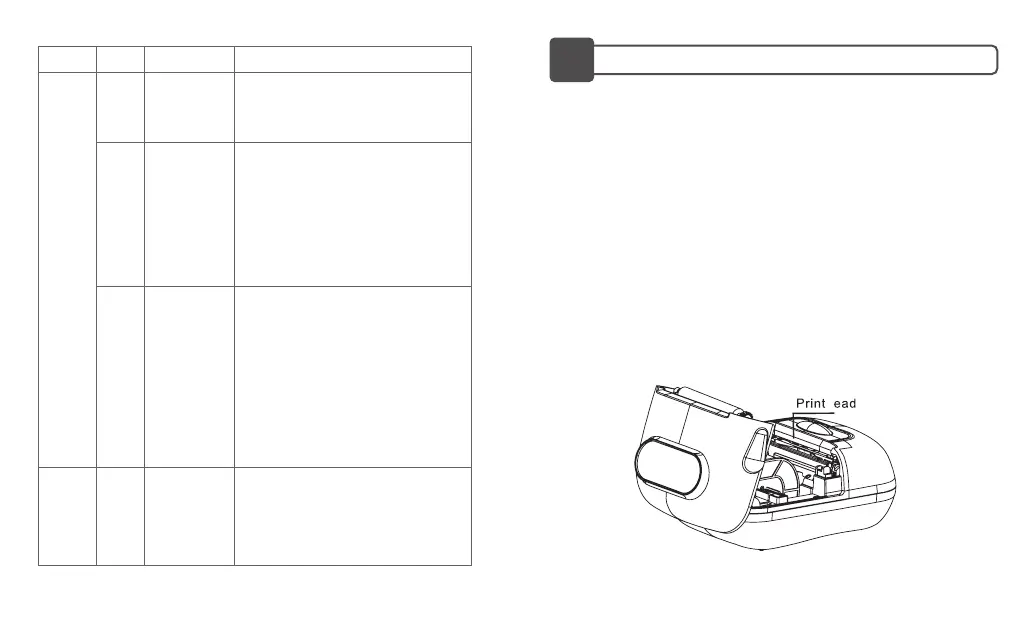
PRINT HEAD/RUBBER-COVERED ROLL CLEANING
23
If any issue below happens, please clean the print head/Rubber
-covered roll :
Blurry printing
Loud noise when feeding the paper
There is glue residue or dust sticking to the printhead.
Cleaning procedures:
1. Turn off the printer,
2. Wait for the roll to cool off completely after printing. Open the
cover and find the printhead;
3. Clean the dust or smudge with an alcoholic cotton ball (drained)
or exclusive printer cleaning pen (needs to be purchased).
4. Wait 5-10 minutes to make sure the alcohol has been volatilized
before turning on the printer.


 To Next Page