11
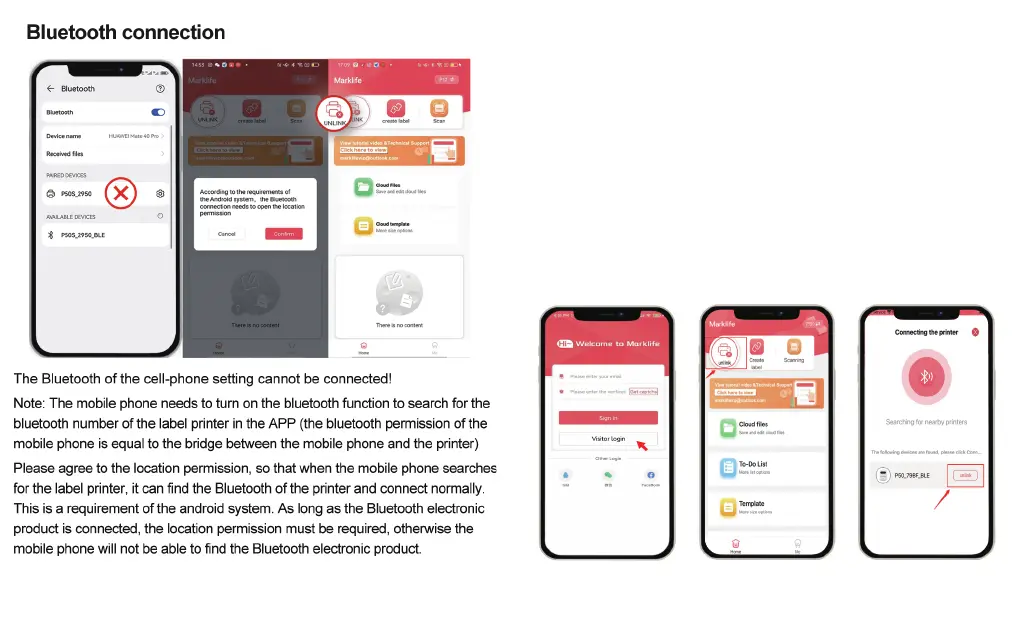
Connect P50 to APP
Turn on your label maker: Press and hold the On/Off button until the
button green light appears.
Turn on Bluetooth on your phone.
Open the Marklife APP.
Click Visitor Mode, our APP supports visitor mode, which means
you can use the app without registering. You can also register or
log in through a third-party account.
Click the "Unconnected" button, find your P50 label maker name,
and click to Connect it.
NOTE: Please make sure to connect the device from the app side. It
will be failed if you connect from the phone Bluetooth section.
10


 To Next Page