M4 - Mx computer System | V2 | Introduction and Presentation
Equipment List
Here are the hardware and software you need to install a system with a Mx computer.
Computer
• 1 Mac Pro computer (quad-core)
• 1 wireless trackball mouse
• 1 Mac Pro power cord
• 2 Thunderbolt to HDMI/VGA/DVI adapters
• 1 Ethernet cable for connection with Mx computer
• 1 Scala/Scala2 software dongle
Receiver
• 1 M4 receiver
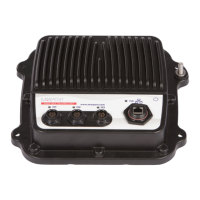
Mx computer
Aaon compact fanless box PC. Reference: PO boxer-6639M
Power supply: MEAN WELL HEP-150-24 A
Optional Equipment (not included)
• 1 to 6 monitors
• 1 Uninterruptible Power Supply (UPS) to prevent problems if the mains power fails
(recommended). Size: 500VA.
• Additional hydrophone junction boxes
• 1 test hydrophone that you can keep on board and connect to the receiver to do functional tests.
• 1 NMEA converter junction box (ref. NC-2-TEMP) to receive temperature data from
hydrophones
• 1 NMEA multiplexer to receive NMEA data and display them in Scala/Scala2: ShipModul
MiniPlex-3E-N2K if using NMEA2000 and NMEA0183 or Miniplex-3E if using only NMEA0183.
• If using Mosa2 on a tablet computer: refer to Marport sales offices to know the recommended
model.
Software
Software Application Name Definition
Marport validated MacOS Operating system on computer
Scala/Scala2
Marport software application collecting, processing, storing
and displaying data received from sensors, sounders and other
connected devices.
Scala Replay/ScalaReplay2 Marport software application replaying data recorded in
Scala/Scala2.
Mosa2 Marport software application used to configure sensors. Can be
used on desktop or tablet computers.
| 9


 To Next Page