EasyManua.ls Logo

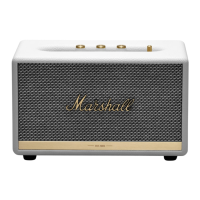
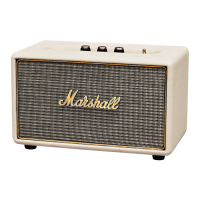
Marshall Amplification Acton Bluetooth - User Manual

Marshall Amplification Acton Bluetooth
24 pages
Print Icon
To Next Page IconTo Next Page
Loading...
USER MANUAL
ACTON BLUETOOTH - STEREO LOUDSPEAKER

Questions and Answers

  • L
    Lisa RojasJul 27, 2025
    Why won't my Marshall Amplification Speakers turn on?
    • M
      Megan EverettJul 27, 2025
      If your Marshall Amplification Speakers aren't turning on, first ensure the speaker is properly connected to a working AC wall socket. Also, verify that you've selected the correct audio source input. Check that your sound source is connected to the speaker via Bluetooth or cable. Increase the volume on both your sound source and the speaker. Make sure the audio cable is securely connected. If the amplifier is clipping, reduce the volume on your sound source and lower the volume or bass on the speaker.
  • H
    heather56Aug 2, 2025
    What to do if the sound is distorted on my Marshall Amplification Speakers?
    • D
      Dr. Leonard LeonAug 2, 2025
      If the sound from your Marshall Amplification Speakers is distorted, try these steps: First, turn down the playback volume on your sound source. If you're using a sound file (like an MP3), it might be of poor quality, so try a different file or music player. Also, lower the volume, bass, or treble directly on the speaker itself.
  • E
    Elizabeth CollinsAug 9, 2025
    Why does the Bluetooth connection keep dropping out on my Marshall Amplification Acton Bluetooth Speakers?
    • S
      Shawn ChandlerAug 9, 2025
      If your Marshall Amplification Speakers Bluetooth connection drops out, it might be due to distance or obstacles. Try moving the Bluetooth device closer to the speaker, ensuring they are within 10 metres and free from obstructions like walls. Also, be aware that strong electric fields from devices like microwave ovens or fluorescent lights can cause interference.
  • W
    William YatesAug 14, 2025
    What to do if my device asks for a pin code when connecting to Marshall Amplification Acton Bluetooth Speakers?
    • C
      Carolyn BrownAug 14, 2025
      If your device asks for a PIN code when connecting to Marshall Amplification Speakers via Bluetooth, you usually don't need to enter one. However, if prompted, use '0000' as the PIN code. Note that the speaker cannot connect using Bluetooth HF (hands-free) area function. Try connecting with the included coil cord instead.
  • T
    Thomas AvilaAug 20, 2025
    Why are my Marshall Amplification Speakers having erratic performance?
    • N
      Nancy SmithAug 20, 2025
      If your Marshall Amplification Speakers are experiencing erratic performance, it might be due to interference from another electronic device. Try moving the speaker to a different location or turning off/moving the interfering device.

Summary

Important Safety Instructions

Installation and Connection

Cleaning and Maintenance

General Description

Plugging In the Acton Bluetooth

Turning the Power On;Off

Using the Acton Bluetooth with Your Devices

Connecting via Bluetooth (Pairing)

Connecting Sound Source via Cable

Input - 3.5 mm Stereo Plug

Choosing Your Source

Adjusting the Volume, Bass, and Treble Sound

Troubleshooting

Acton Bluetooth Does Not Turn On

Guidance for when the speaker fails to power on.

No Sound

Troubleshooting steps for when no audio output is heard.

Low Sound Volume

Solutions for insufficient audio output levels.

Crackling Sound

Steps to resolve audio distortion or crackling.

Marshall Amplification Acton Bluetooth Specifications

General IconGeneral
TypeBluetooth Speaker
Power Output30 W
Frequency Response50 Hz - 20 kHz
Bluetooth Version5.0
Mains Frequency50 / 60 Hz
Bluetooth Range10 m
Battery LifeNot Applicable (Plug-in)
Input Voltage100-240V
Tweeter0.75 inch

Related product manuals