EasyManua.ls Logo

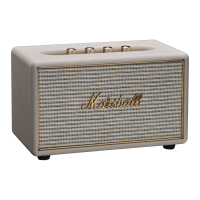
Marshall Amplification Acton Multi-Room - User Manual

Marshall Amplification Acton Multi-Room
33 pages
Print Icon
To Next Page IconTo Next Page
Loading...
USER MANUAL
ACTON MULTI-ROOM

Questions and Answers

  • H
    hernandezmeganAug 13, 2025
    What to do if my Acton Multi-Room Marshall Amplification speaker does not turn on?
    • J
      james70Aug 13, 2025
      If your Marshall Amplification speaker isn't turning on or can't be found in the app, ensure the power cord is properly connected to both the speaker and a working AC wall socket. Also, verify that the speaker and your mobile device are connected to the same Wi-Fi network. You may need to push the SOURCE knob. If the speaker is in standby mode, turn the SOURCE knob to Wi-Fi and hold it for 3 seconds to make the speaker discoverable.
  • L
    Lance BryantAug 17, 2025
    What to do if there is no sound from my Marshall Amplification Acton Multi-Room?
    • J
      jameslaneAug 17, 2025
      If your Marshall Amplification speaker isn't producing sound, first, make sure the correct sound source is selected by turning and pushing the SOURCE knob. Then, check the volume levels on both your sound source and the speaker, increasing them slightly if needed. Also, if you are using Wi-Fi or Bluetooth connection, ensure that Wi-Fi or Bluetooth is enabled on both your device and your speaker. For enabling Wi-Fi or Bluetooth on your speaker, turn the SOURCE knob to Wi-Fi or Bluetooth and push and hold for 3 seconds to make the speaker discoverable by the device. If your device asks for a pin code, try using '0000'.
  • J
    John ParkerAug 21, 2025
    Why does the Bluetooth connection drop out on my Marshall Amplification speaker?
    • J
      John WongAug 21, 2025
      If your Bluetooth connection drops out on your Marshall Amplification speaker, try moving the devices closer to each other, within 10 metres, ensuring there are no obstructions like walls or doors. Also, be aware that items like microwave ovens, wireless network adapters, fluorescent lights and gas cookers operate on the same frequency as Bluetooth devices, potentially causing electrical disturbances.
  • D
    Danny HallAug 25, 2025
    What to do if my Marshall Amplification speaker is not responding?
    • T
      Timothy PerryAug 25, 2025
      If your Marshall Amplification speaker is not responding, unplug the speaker’s power plug from the wall socket, wait 15 seconds, and then plug it back in. You can also try resetting the speaker to its factory state.
  • W
    William ShortAug 28, 2025
    Why is the sound distorted on my Marshall Amplification speaker?
    • B
      bkingAug 28, 2025
      If the sound from your Marshall Amplification speaker is distorted, first, turn down the playback volume on the sound source. If that doesn't work, the audio stream or sound file might be of poor quality, so try another sound file or music player. You can also try lowering the volume or bass/treble directly on the speaker.
  • G
    George MendozaSep 1, 2025
    Why is there a crackling sound from my Marshall Amplification speaker?
    • L
      Linda GardnerSep 1, 2025
      If you hear a crackling sound from your Acton Multi-Room Marshall Amplification speaker, it might be because the amplifier is clipping due to running out of output power. Try decreasing the volume on your sound source. Additionally, consider lowering the volume or bass on the Acton Multi-Room speaker itself.
  • L
    Luis RodriguezSep 5, 2025
    Why doesn't Multi Mode work on my Marshall Amplification speaker?
    • G
      georgewhiteSep 5, 2025
      If Multi Mode isn't working on your Marshall Amplification speaker, ensure that Multi Mode is activated by pushing the SINGLE/MULTI MODE button on all speakers you want to include in the Multi Mode group. Also, if the speaker that started streaming audio (the server) drops out, restart the music on that speaker or reconfigure the group in the Marshall Multi-Room app.
  • S
    Samantha MooreSep 8, 2025
    What to do if the audio is cutting out in Multi Mode on my Marshall Amplification speaker?
    • M
      Mrs. Tiffany Wood MDSep 8, 2025
      If the audio is cutting out in Multi Mode on your Marshall Amplification speaker, the Wi-Fi bandwidth might be too low for Multi Mode to play at normal quality. To fix this, adjust the streaming quality by setting the 'Multi Streaming Quality' to 'Low' in the Marshall Multi-Room app.

Summary

Setting Up Your Marshall Speaker

Google Home App Setup

Configure your speaker for Wi-Fi using the Google Home app and follow in-app instructions.

Marshall Multi-Room App Customization

Download and use the Marshall Multi-Room app for advanced customization of your speaker.

Bluetooth Connectivity and Pairing

Bluetooth Pairing Steps

Turn the Source knob, push for 3 seconds, and select 'Acton Multi-Room' on your device to pair.

Bluetooth Device Memory

The speaker stores up to eight Bluetooth devices, prioritizing the last connected one.

Selecting Audio Sources and Presets

Source Selection with Source Knob

Turn the Source knob to select the audio input or Wi-Fi streaming preset.

Wi-Fi Preset Management

Push the Source knob to select Wi-Fi presets (1-7), AUX, or Bluetooth devices.

Marshall Multi-Room Modes

Single Mode Speaker Operation

Stream audio individually to each speaker by toggling the Single/Multi Mode button.

Multi Mode Speaker Operation

Stream identical audio to all speakers in a group; indicated by a lit mode indicator.

Resetting the Speaker to Factory State

Performing a Factory Reset

Push and hold the Single/Multi Mode button and Source knob for 7 seconds until indicators light up.

Factory Reset Consequences

The speaker resets to factory settings, ready for reconfiguration, deleting all user configurations.

Technical Specifications Overview

Sound System Specifications

Details amplifier, driver types, frequency response, and connectivity standards like Wi-Fi and Bluetooth.

Electrical and Physical Details

Information on input voltage, mains frequency, power consumption, weight, and unit dimensions.

Marshall Amplification Acton Multi-Room Specifications

General IconGeneral
BrandMarshall Amplification
ModelActon Multi-Room
CategorySpeakers
LanguageEnglish

Related product manuals