10
3. Connection Diagrams &
Instructions
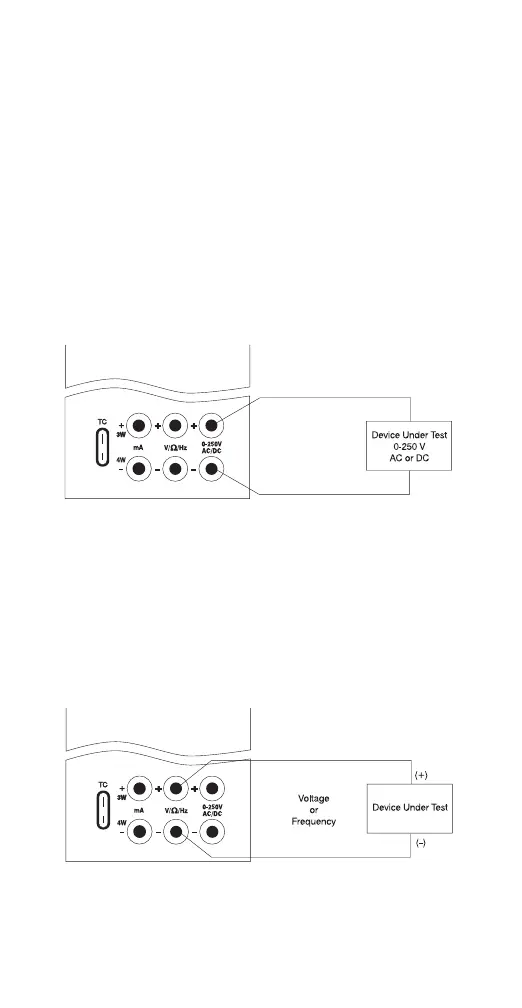
A. Measuring High Voltage AC or DC
1. Select the Voltage Input Mode. Use the
“Range” key to select either AC or DC input.
2. Connect the device to be measured as
shown in Figure 1.
! WARNING ! When measuring high voltage be
sure to use proper connections as shown in
Figure 1. Failure to do so will cause serious
damage to the calibrator.
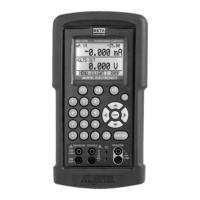
B. Measuring Low Voltage and Frequency
1. Select the desired mode Voltage or
Frequency. Use the “Range” key to select the
proper range for the mode chosen.
2. Connect the device under test as shown in
Figure 2.
Figure 1.
Figure 2.
! WARNING ! Do not exceed 20 VDC at the
V/Ω/Hz input.


 To Next Page