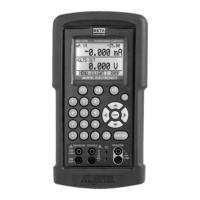
and acts as a second function
key to all keys that have an
associated second function.
Features such as setpoints,
°F/°C, backlight and external
pressure module activation all
use the Shift key.
B. Setpoints
1. Storing Setpoints
The setpoint mode allows up to 9 set-
points to be stored in non-volitile memo-
ry for each range. The procedure is as
follows:
a. Set the output to the desired value.
b. Press shift followed by the “SET” key.
c. Choose the desired setpoint storage
location by pressing a key (1-9).
d. Enter a new value and repeat steps 1
thru 3 as needed, up to 9 setpoints for
each range can be stored.
2. Recalling Setpoints
a. To recall a setpoint, press shift fol-
lowed by the”SPT” key.
b. You will be prompted to enter the
number of the desired setpoint loca-
tion stored previously.
c. Press the desired location number and
the unit will go to that output.
3. Automated Stepping
The MC1000 can auto-step through
some or all of the stored setpoints for a
given range. The procedure is as follows:
a. Press “Shift” followed by auto.
b. “Auto SPT ?” will appear. Enter the
7


 To Next Page