12
E. Simulating Current
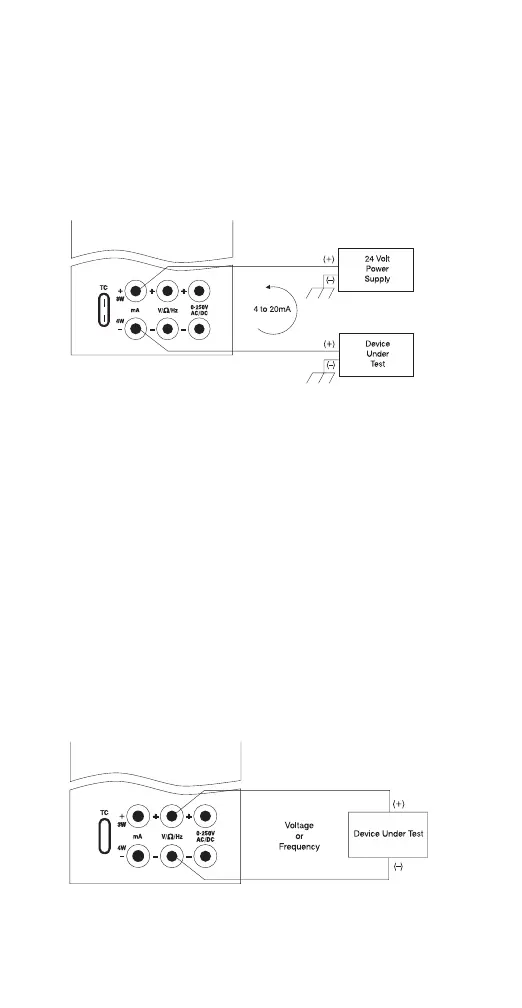
The MC1000 can act as a two-wire transmitter
and control a 4-20mA loop from the external
power supply for that loop.
1. Select the mA “2W” output mode.
2. Connect the device as shown in figure 5.
3. Enter the desired output.
F. Sourcing
Voltage/Resistance/Frequency
1. Select the proper operation mode: volts,
ohms, frequency.
2. Connect device under test as shown.
3. In the resistance or frequency modes use the
“Range” key to choose the desired range for
the mode you’re operating in.
4. The MC1000 is capable of driving up to ±1
mA on the Voltage and Frequency ranges
and is able to handle up to a 3 mA excitation
on the Resistance Simulation Range.
Exceeding these limits will result in a warning
on the display.
Figure 6.
Note: The frequency output is a 12 Volt square
wave with –.1 volt offset
Figure 5.


 To Next Page