www.massfidelity.com
5
PRODUCT REFERENCE: REMOTE
The IR (infrared) remote, can control any Core. Because the IR
TJHOBMJTEJSFDUJPOBMJUTIPVMECFQPJOUFEUPXBSEUIFGSPOUPGUIF
Core and have clear line-of-sight to the Core. If multiple Cores are
in close proximity, one remote may trigger more than one Core.
Generally, the keys on the remote perform the same function as
the matching keys on the Core unit. Please note, however, that
setup functions that require pressing two keys at the same time
NVTUCFQFSGPSNFEPOUIF$PSF
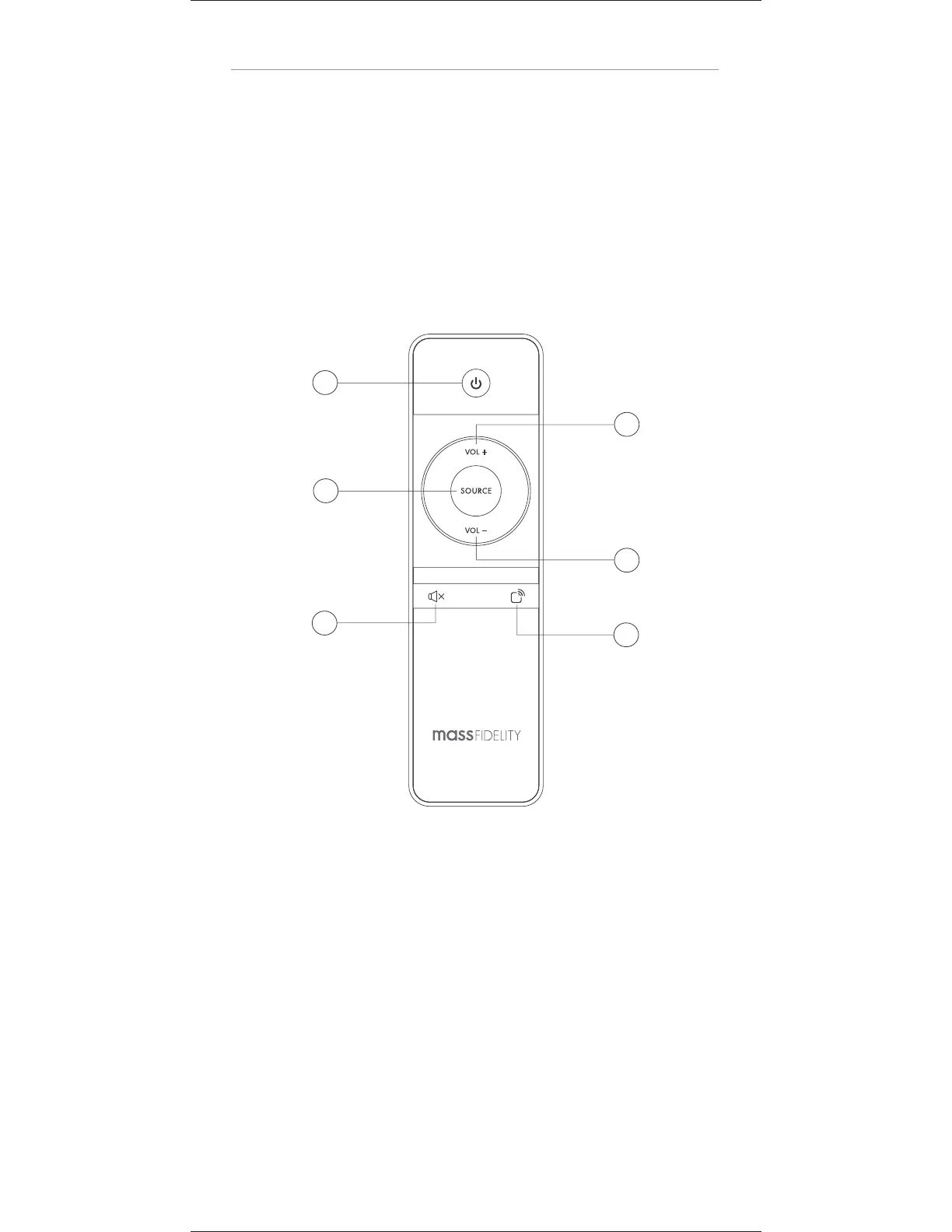
1. POWER keyTXJUDIUIF$PSFPOPGGPSUPTUBOECZNPEF
Please note that the Core must already be on in order to be
operated by the remote control; it cannot be used if the Core
is completely powered off.
2. VOL + key: increase sound volume
3. SOURCE key4FMFDUUIFJOQVUTPVSDFFOBCMF
speakerphone, disconnect Bluetooth
4. VOL – key: decrease sound volume
5. MUTE key: mute the sound from the Core
6. MULTI-ROOM key: transmit audio to additional Core
speakers for multi-room audio
1
2
3
4
5
6


 To Next Page