NEVER LEAVE HEATER UNATTENDED WHILE BURNING OR
WHILE CONNECTED TO A POWER SOURCE
© 2014, Pinnacle Products International, Inc. Kerosene Forced Air Heater User’s Manual
Operation
Starting the Heater: (Ignition)
1. Fill the tank with kerosene or other approved
fuel until needle on fuel gauge points to “F”.
2. Replace fuel cap and tighten firmly.
3. Connect the heater to a three prong
(grounded) power source. You must use a
three prong (grounded) extension cord that
is at least 6 feet long and is a minimum of 14
AWG rating.
4. Turn thermostat control knob to desired
temperature setting. The thermostat set range
is from 40 ºF to 110 ºF.
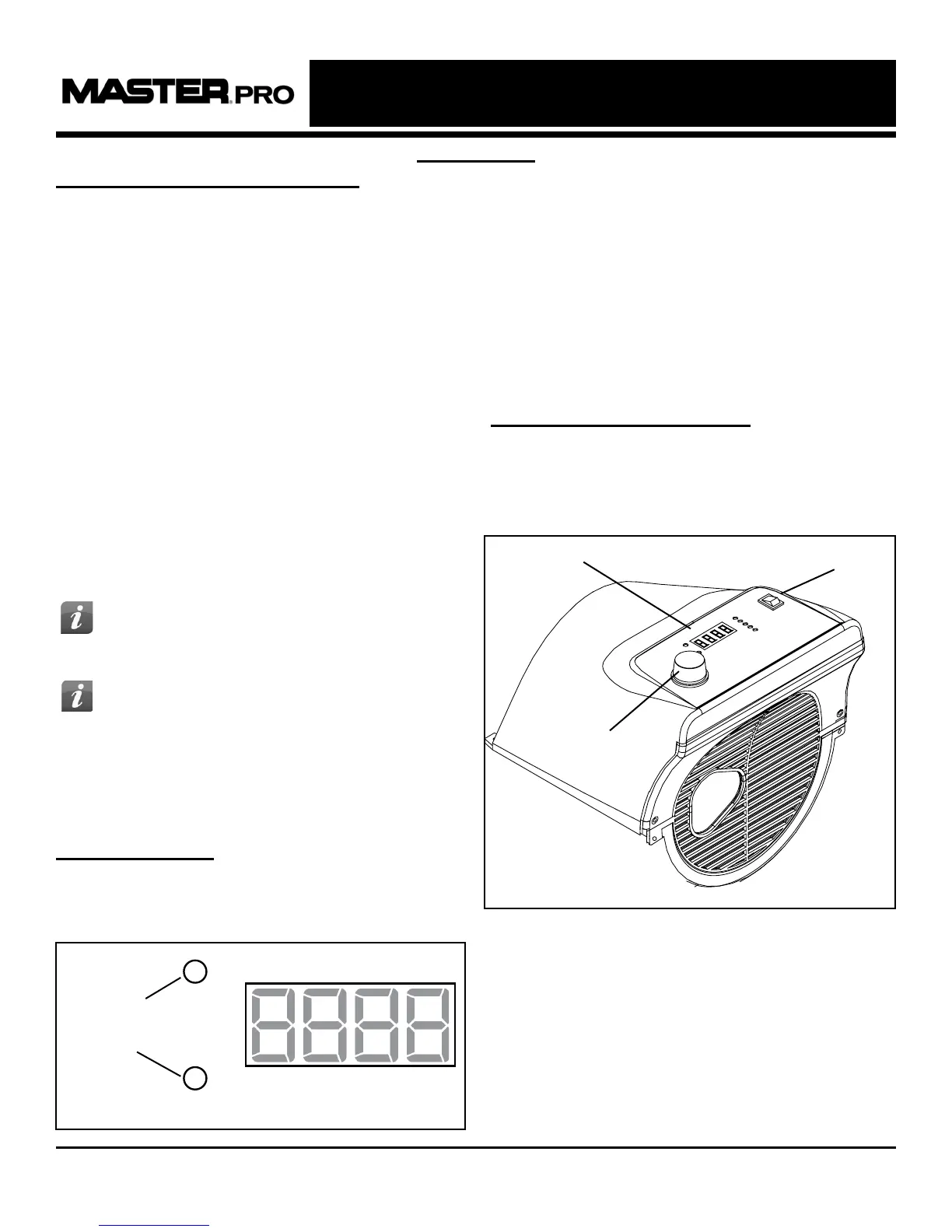
5. Move power switch to “On” position. The
power indicator light and room temperature
display will illuminate and heater will ignite.
(See Figure 4)
Digital Display:
- The digital display will show the room
temperature and running time of the heater.
(See gure 5)
NOTE: If if the heater still does not ignite, refer to
“Troubleshooting Guide” on page 11.
The room temperature display will indicate the
following:
- When the temperature is less than 0 ºF the
display says “LO”.
- When the temperature is more that 99 ºF the
display says “HI”.
- Between 0 °F and 99 °F the display shows
actual temperature.
Stopping / Restarting Heater:
- To stop the heater, move the power switch to the
“Off” position and unplug the power cord.
- To restart the heater; wait 10 seconds and follow
ignition steps.
Power Switch
Thermostat Knob
Digital Display
Figure 4
7
TIP: If the heater does not ignite; move
switch to “Off” position, check steps 1-3
above and then move switch to “On” position.
TIP: If the heater does not ignite, the
thermostat may be set too low. Turn
the control knob to a higher setting until the
heater ignites. If the heater does not ignite;
move switch to “Off” position, check steps 1-3
above and then move switch to “On” position.
Figure 5
Run Time
Temperature


 To Next Page