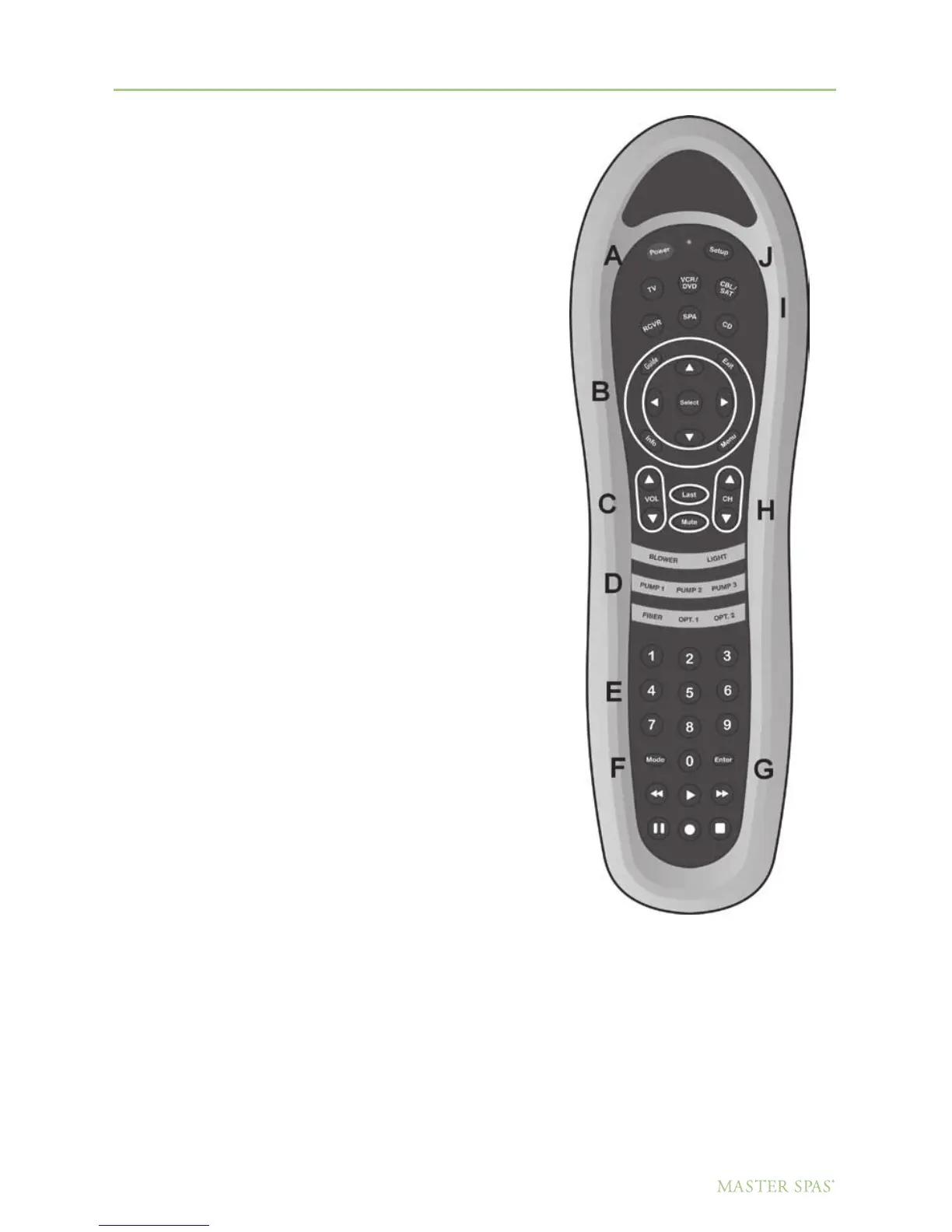
DOLPHIN REMOTE
System Operation – To Watch TV
Turn on TV
1. Select Device (TV). (I)
2. Press Power. (A)
3. Select Tuner input using the Mode button. (F)
Note: You may need to step through several
unused video inputs.
4. Select desired channel. (E OR H)
5. Turn on DVD/CD/Stereo unit and select the A/V input mode.
NOTE: The following procedure is for initial set up
and programming of TV channels.
(If using either a satellite receiver or cable box make
sure unit is on before starting this procedure.)
1. Select TV device. (I)
2. Press the Arrow up button (B) to bring up
the TV menu.
3. Use the channel down button (H) to highlight
setup.
4. Press the volume up button (B) to select either
CATV or TV.
5. Use the channel down button (H) to highlight
auto program.
6. Press the volume up button (B) to start programming.
7. Your TV will now program all available stations
into memory.
Note: Menu will disappear after 10 seconds.
66
DO NOT DIVE.
Master Spa Parts - 1068 American Drive, Neenah, WI, 54956, USA



 To Next Page