52DO NOT DIVE.
SWIM SPA CONTROLS - ICON SPA TOUCH
THE SET TEMPERATURE AND LIGHTS
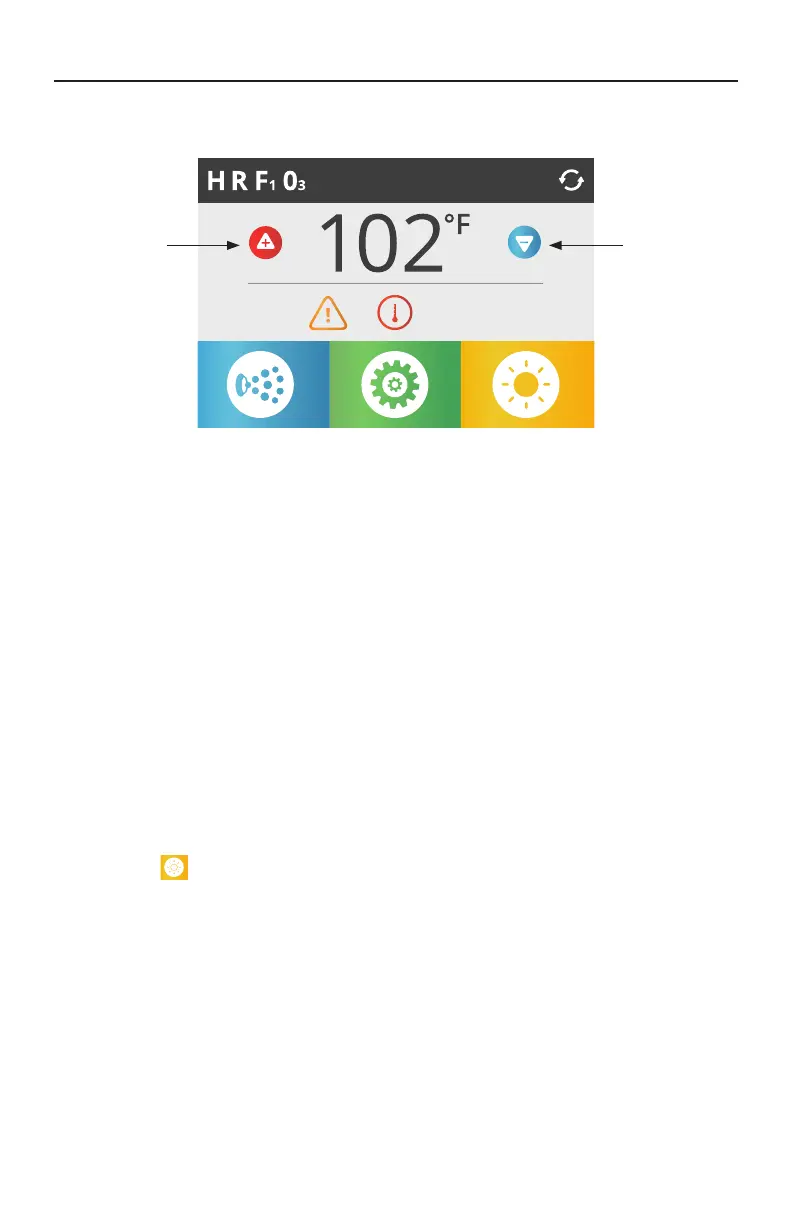
SET TEMPERATURE
Press Up or Down once to display the Set Temperature (indicated by a flashing ºF or ºC). Press Up or
Down again to modify the Set Temperature. The Set Temperature changes immediately.
If you need to switch between High Temperature Range and Low Temperature Range you need to
go to the Settings Screen.
PRESS-AND-HOLD
If Up or Down is pressed and held, the temperature will continue to change until you stop pressing,
or until the Temperature Range limits are reached.
5:29 pm
Adjusts Set
Temperature
Up
Adjusts Set
Temperature
Down
LIGHTS
The Lights Icon
turns the lights (if equipped) inside your swim spa on or off. If your swim spa is
equipped with LED Light System, turn the lights on and off repeatedly within a couple of seconds to
rotate through available color schemes.




 To Next Page