
EasyManua.ls Logo

MasterCraft 1323.2 - User Manual

MasterCraft 1323.2
28 pages
Print Icon
To Next Page IconTo Next Page
Loading...
IMPORTANT:
Read and understand this instruction manual
thoroughly before using the product.
INSTRUCTION
MANUAL
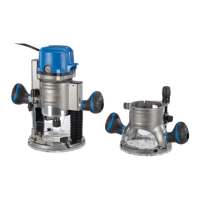
PLUNGE/FIXED-BASE ROUTER
054-6821-2

Questions and Answers

  • T
    tonybellAug 3, 2025
    Why is my MasterCraft 1323.2 not working?
    • F
      fjohnsonAug 3, 2025
      If your MasterCraft Wood Router isn't working, first ensure it's properly plugged into a power source. Next, check that the switch is in the “ON” position. If it still doesn't work, the carbon brushes may be worn and need replacing. Remove the brush caps and replace the old brushes with new ones.
  • C
    Crystal JonesAug 8, 2025
    What to do if the motor cannot be clamped tightly on MasterCraft Wood Router?
    • D
      Donna KempAug 8, 2025
      If the motor of your MasterCraft Wood Router cannot be clamped tightly, rotate the locking nut clockwise to adjust the tightness. Also, the motor may not clamp tightly because wood dust has entered the base or the motor clamp. Use compressed air or a brush to clean the dust.
  • J
    john85Aug 14, 2025
    How to get smooth cuts with MasterCraft 1323.2?
    • E
      Eric CrawfordAug 14, 2025
      If the results of your MasterCraft Wood Router cuts are not smooth, it is likely that the bit is dull. Change to a sharp bit.
  • A
    Andrew WhiteAug 19, 2025
    What to do if the motor cannot be installed smoothly into the base of MasterCraft 1323.2?
    • D
      Darius SmithAug 19, 2025
      If the motor of your MasterCraft Wood Router cannot be installed into the base smoothly, it is likely due to wood dust accumulated on the base or the motor housing. Use compressed air or a brush to clean the dust.
  • A
    annesandovalAug 23, 2025
    What to do if the bit cannot be removed from MasterCraft Wood Router?
    • K
      Kathryn ReyesAug 25, 2025
      If the bit cannot be removed from your MasterCraft Wood Router, it may be stuck to the collet. Remove the collet and bit together, and then knock the bit out from the collet.
  • S
    Sarah PerezAug 28, 2025
    Why can't I install a bit in my MasterCraft 1323.2?
    • L
      Luis CollinsAug 28, 2025
      If a bit cannot be installed in your MasterCraft Wood Router, it may be the wrong size for the collet. Use only 1/4” (6.4 mm) diameter bits with the 1/4” (6.4 mm) collet; use only 1/2” (12.7 mm) diameter bits with the 1/2” (12.7 mm) collet.

Summary

Safety Guidelines

Know Your Tool

Read manual and labels before operation for safe use.

Work Area Safety

Keep workspace clean, well-lit, and free from hazards.

Electrical Safety

Ensure proper grounding, avoid wet conditions, and protect cords.

Personal Safety

Stay alert, use PPE, prevent unintentional start, dress properly.

Operating Instructions

Cutter Bit and Collet Sleeve

Instructions for installing and removing cutter bits and collet sleeves.

Motor and Base Assembly

Procedures for attaching the motor to the fixed and plunge bases.

Depth Adjustment

Methods for setting and adjusting cutting depth on fixed and plunge bases.

Router Operation and Feeding

Using controls, understanding feed rates, and safe feeding techniques.

Maintenance

Replacement of Carbon Brushes

Steps for replacing worn carbon brushes in the router motor.

Troubleshooting

Router Not Working

Diagnosing and solving issues when the router does not operate.

Cut Quality Issues

Addressing problems with the results of router cuts not being smooth.

Bit Installation and Removal

Resolving issues with installing or removing the cutter bit.

Motor Clamping Issues

Troubleshooting problems with clamping the motor into the base.

Parts List

Exploded View

Diagram showing all components of the router assembly.

Warranty

Warranty Coverage

Details on product warranty period and coverage for components.

Warranty Conditions and Limitations

Terms, conditions, and limitations that apply to the product warranty.

Additional Limitations and Consumer Rights

Further warranty limitations and consumer rights regarding the product.

MasterCraft 1323.2 Specifications

General IconGeneral
BrandMasterCraft
Model1323.2
CategoryWood Router
LanguageEnglish

Related product manuals
