headline bars
continuation tabs
notes
warnings
headline bars
continuation tabs
notes
warnings
headline bars
continuation tabs
notes
warnings
16
model no. 054-7527-8 | contact us 1-800-689-9928
NOTICE:
• Do not change the torque setting when the tool is running.
• When adjusting the torque ring, make sure that the speed switch is either completely in the low or the high position.
OPERATING INSTRUCTIONS
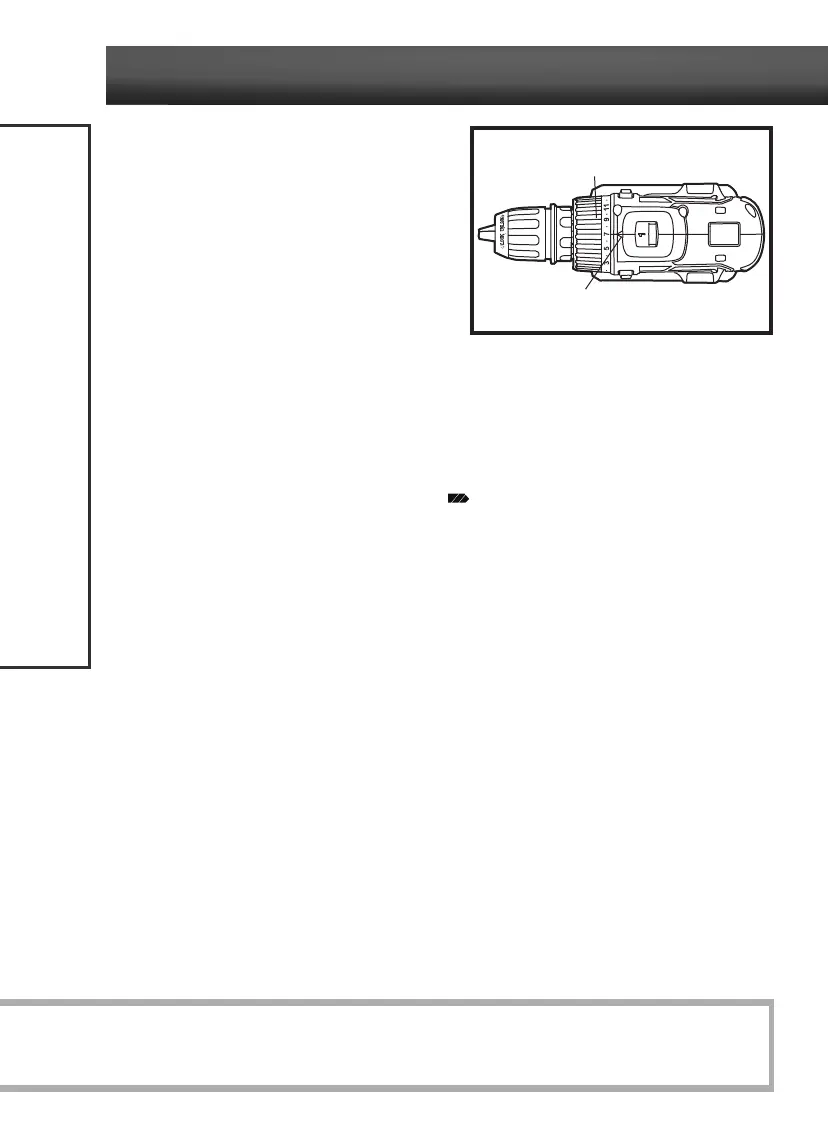
ADJUSTABLE TORQUE CLUTCH
(fig 9)
The torque clutch can be adjusted to any of 24
different settings (23 driving and 1 drilling). The
higher the torque setting, the more force the
cordless drill/driver produces to turn an object in
either low or high rotation speed.
When using the cordless drill/driver for driving
applications, it is necessary to increase or decrease
the torque to help prevent damage to screw heads,
threads, and the workpiece. Adjust the torque by
rotating the torque-adjustment ring. The proper
setting depends on the job and the type of bit, fastener, and material you will be using.
In general, use greater torque for larger screws; but if the torque is too high, the screws may be
damaged or broken. For delicate operations, such as removing a partially stripped screw, use a low
torque setting.
When using the cordless drill/driver for drilling applications, rotate the torque-adjustment ring in the
torque-increased direction until the drilling symbol (
) aligns with the arrow on the housing.
fig 9
Torque-adjustment ring
Arrow



 To Next Page