EasyManua.ls Logo

MasterForce 260-9518 - User Manual

MasterForce 260-9518
16 pages
Print Icon
To Next Page IconTo Next Page
Loading...
To Reduce The Risk Of Injury, User Must Read And
Understand Operator’s Manual. Save These Instructions For Future Reference.
260-9518
0099002192-01
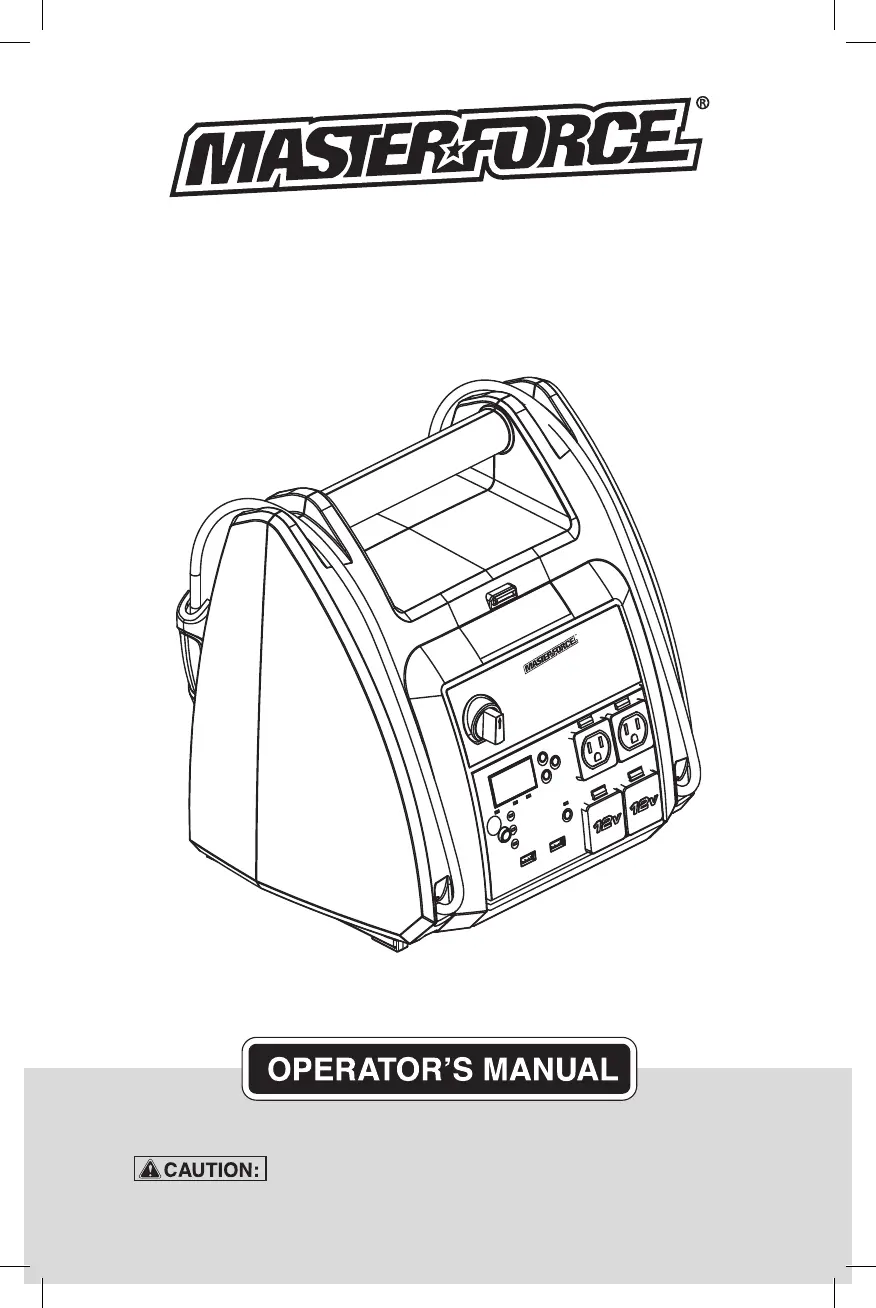
1150 Peak Amp Jump Starter,
AC/DC/USB Power Source
and Compressor

Questions and Answers

  • J
    Justin Garcia IIAug 3, 2025
    Why won't my MasterForce 260-9518 Remote Starter jump start my car?
    • P
      Patricia LucasAug 3, 2025
      If your MasterForce remote starter won't jump start your car, there are several potential reasons. First, ensure that the Jump Start switch is turned ON. Next, check the clamps for a solid connection to both the battery and the frame, ensuring the connection points are clean. Also, verify the battery charge status by pressing the Select button on the front of the unit, referring to the Digital Display section. Finally, the vehicle's battery might be defective and require a professional check.
  • S
    shannonbutlerAug 8, 2025
    What to do if my MasterForce 260-9518 Remote Starter won't power my 12V device?
    • M
      Mrs. Catherine Huerta DVMAug 8, 2025
      If your MasterForce remote starter unit isn't powering your 12V device, start by ensuring the 12V device is switched on. Then, check the battery charge status of the portable power unit by pressing the button on the front. See the Digital Display section for details. If the device still doesn't power on, it's possible the 12V device draws more than 15A or has a short circuit, in which case you should contact a qualified service technician to replace the fuse.
  • M
    Melanie AlexanderAug 12, 2025
    Why does my MasterForce 260-9518 display 'err' when the inverter is on?
    • C
      Christopher SkinnerAug 13, 2025
      If the inverter on your MasterForce Remote Starter is on but the display shows 'err', it could be due to a couple of reasons. First, the jump starter battery may not be fully charged, so try recharging the unit. Alternatively, the device you're using might be drawing more than 400W or has a short circuit. Ensure you only use devices that draw less than 3.3 amps of AC current.
  • B
    Brandon FrazierAug 18, 2025
    What does it mean if the alarm is on on my MasterForce Remote Starter?
    • J
      Jorge McdonaldAug 18, 2025
      If the alarm on your MasterForce Remote Starter is activated, it's likely due to reversed connections. Disconnect the jump starter and reverse the clamps to correct the polarity.
  • A
    Amanda NicholsAug 23, 2025
    Why does the compressor on my MasterForce 260-9518 Remote Starter shut off before reaching pressure?
    • W
      wilsoncalebAug 23, 2025
      If the compressor on your MasterForce Remote Starter shuts off before reaching the set pressure, it's likely because the compressor has a thermal cutoff to prevent overheating. Wait a few minutes, and the compressor should start up again and finish the process once it cools down.
  • L
    Lisa LopezAug 27, 2025
    Why won't the internal battery of my MasterForce 260-9518 hold a charge?
    • K
      Kevin CaldwellAug 28, 2025
      If the internal battery of your MasterForce Remote Starter won't hold a charge, the battery might be bad and unable to accept a charge. Have the battery checked by a professional.

Summary

Safety Symbols

Safety Information

Symbol Meaning

Explains meanings of DANGER, WARNING, and CAUTION safety alert symbols.

Battery Disposal

Information on proper disposal of sealed, non-spillable lead-acid batteries.

Important Safety Instructions

Risk of Explosive Gases

Warnings about explosive gases generated by lead-acid batteries during operation.

Risk of Electric Shock or Fire

Safety precautions related to electric shock and fire hazards when using the unit.

Personal Safety Precautions

Restrictions on Use

Limitations on using the inverter with life support devices or systems.

Eye and Skin Protection

Recommends wearing eye protection and protective clothing when working near batteries.

Battery Acid Neutralization

Instructions on neutralizing battery acid spills with baking soda.

Remove Metal Items

Warning to remove metal jewelry to prevent short circuits and burns.

No Smoking;Flames

Prohibits smoking or open flames in the vicinity of batteries or engines.

Charging the Internal Battery

Checking Battery Charge Level

Explains how to check the internal battery's charge status via the digital display.

Charging via Extension Cord

Instructions for charging the unit using an extension cord and wall outlet.

Charging While Driving

Guidance on charging the internal battery while driving using a specific cable.

Important Charging Warning

Critical warning about not overcharging or leaving the battery unattended while driving.

Operating Instructions

Digital Display

Explanation of the digital display's functions and readings for battery status.

Jump Starting a Vehicle

Step-by-step guide on how to safely jump start a vehicle using the jump starter.

Work;Emergency Light

Instructions on operating the built-in work or emergency light.

Powering a 12 V DC Device

Guide on using the unit to power 12V DC accessories via the accessory outlets.

Powering 12 V DC Devices

Using the USB Port

Guide on how to charge devices using the unit's USB ports.

Using the Air Compressor

Compressor Operation

Steps for operating the air compressor, including setting PSI and inflation.

Overheating Protection

Information on the compressor's built-in thermal protection and auto-shutoff.

Using the Inverter

Inverter Wattage Considerations

Discusses wattage requirements and compatibility with modified sine wave inverters.

Powering an 110 V AC Device

Instructions for powering 110V AC devices using the unit's AC power outlet.

Risk of Electric Shock

Safety warning regarding electric shock hazards from the 110V AC output.

Maintenance Instructions

Moving and Storage Instructions

Storage Recommendations

Recommendations for storing the jump starter in a cool, dry place.

Moving Precautions

Precautions to take when moving or transporting the jump starter to prevent damage.

Storage Hazard Warning

Warning about potential acid leaks and damage if stored improperly.

Troubleshooting

Specifications

Replacement Parts

Accessories

Warranty Information

90-Day Money Back Guarantee

Explanation of the 90-day money back guarantee for customer satisfaction.

3-Year Limited Warranty

Terms and conditions of the 3-year limited warranty for defects.

MasterForce 260-9518 Specifications

General IconGeneral
BrandMasterForce
Model260-9518
CategoryRemote Starter
LanguageEnglish

Related product manuals