MASTERBUS
4 September 2008 / MasterBus - USB interface / EN
2.2 HOW TO SET UP A MASTERBUS
NETWORK
Each device that is suitable for the MasterBus
network is equipped with two data ports. When two
or more devices are connected to each other
through these ports, they form a local data network,
called the MasterBus.
Keep the following rules in mind:
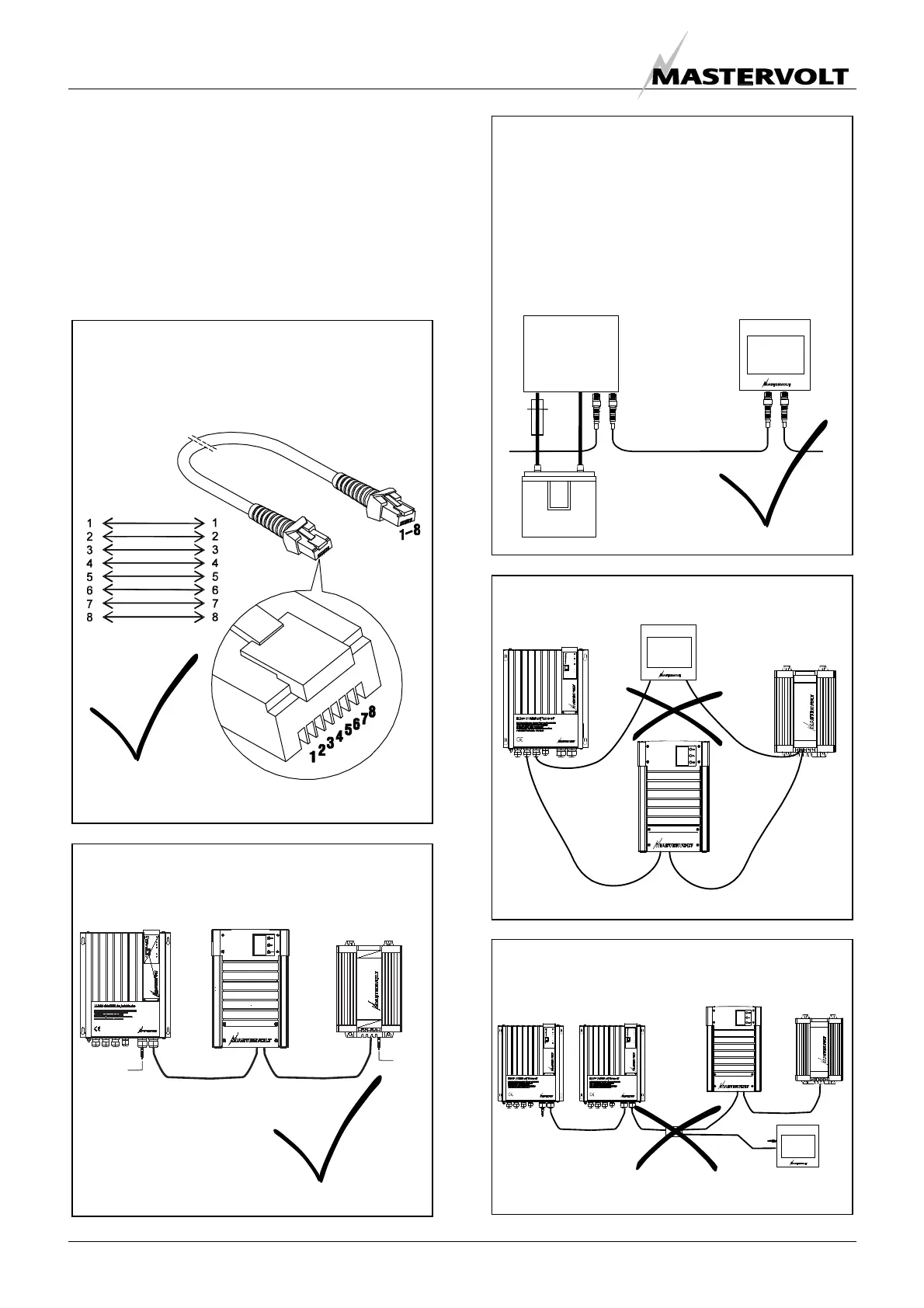
Connections between the devices are made by
standard straight UTP patch cables. Mastervolt
can supply these cables. These cables are also
commonly available at computer supply stores.
OK
Figure 1
Do not make T-connections in the network
Figure 5
Do not make ring networks
Figure 4
The electric power for the network comes from
the connected devices.
At least one device in the network should have
powering capabilities (see specifications).
One powering device can power up to three non-
powering devices.
As all powering devices are galvanically isolated,
multiple powering devices are allowed
OK
Figure 3
As with all high speed data networks, MasterBus
needs a terminating device on both ends of the
network
Terminating
device
Terminating
device
OK
Figure 2


 To Next Page